If your Wayne Dalton garage door opener isn’t responding or remote controls aren’t working, you may need to reset it. Knowing how to reset a Wayne Dalton garage door opener can save you time, prevent damage, and restore smooth operation. This guide breaks down the process into simple steps, so even beginners can follow along safely and effectively.
Tools and Materials Needed
Before you start, gather the following:
- Ladder for reaching the opener unit
- Screwdriver (if panel removal is needed)
- Original remote or wall console
- Safety gloves and glasses
Read too: Door and Garage Door Companies: Choosing the Right Partner for Your Needs
Pro Tip: Always disconnect power before working on your opener to prevent accidental activation.
Step-By-Step Reset Process
1. Power Down the Opener
- Unplug the opener from the electrical outlet
- Wait 10–15 seconds to ensure internal capacitors discharge
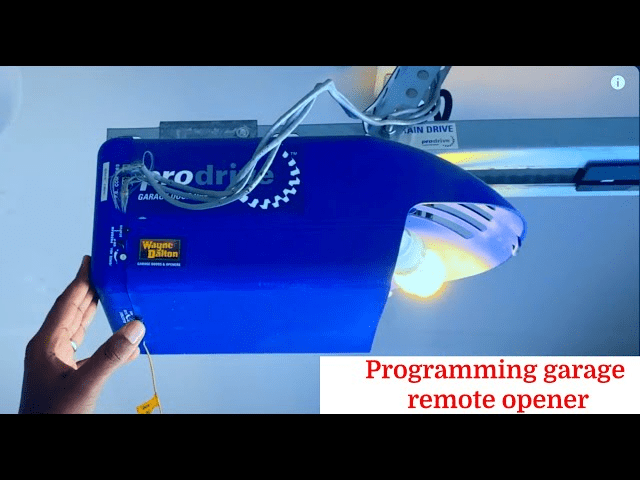
2. Locate the “Learn” Button
- Open the garage door opener cover
- Find the “Learn” button on the motor head
- Common colors: red, yellow, purple, or orange
3. Press and Hold the Learn Button
- Press and hold for 6–10 seconds until the indicator light turns off
- This erases previous remote and keypad codes
4. Reprogram Remotes (Optional)
- Press the Learn button once briefly
- Within 30 seconds, press the button on the remote you wish to program
- Confirm that the garage door responds to the remote
5. Test the Wall Console
- Ensure wall console and safety sensors function properly
- Run the door up and down several times to verify smooth operation
Troubleshooting Tips
- Opener does not respond: Check power source and circuit breaker
- Remote not working after reset: Ensure correct programming sequence
- Door reverses or stops: Inspect safety sensors and alignment
Comparison Table: Manual Reset vs Full Reset
| Feature | Manual Reset | Full Reset |
|---|---|---|
| Erases all codes | No | Yes |
| Requires Learn button | Yes | Yes |
| Time to complete | 1–2 min | 5–10 min |
| Use case | Single remote issues | Multiple remote/keypad problems |
Safety Considerations
- Keep fingers and tools away from moving parts
- Avoid adjusting tension springs without a professional
- Wear safety glasses when working near the opener mechanism
- Confirm proper function before leaving the door unattended
FAQ
Q1: How often should I reset my Wayne Dalton opener?
A1: Only reset when remotes are lost, unresponsive, or the opener malfunctions.
Q2: Can I reset the opener without unplugging it?
A2: It’s safer to unplug to avoid accidental movement and ensure safety.
Q3: Will a reset affect all remotes?
A3: Yes, a full reset erases all previously programmed remotes and keypads.
Q4: How do I know the opener is successfully reset?
A4: The indicator light on the motor head turns off, and previous remotes stop working until reprogrammed.
Q5: Can I do this reset myself or need a professional?
A5: Most homeowners can safely reset the opener by following these instructions, but call a professional if you’re uncomfortable with electrical components.
Conclusion
Knowing how to reset a Wayne Dalton garage door opener ensures your garage door operates smoothly and securely. By following this guide, you can quickly troubleshoot issues, reprogram remotes, and restore functionality without calling a technician.
Share this guide with friends or family who may encounter garage opener issues—it can save them time and frustration!



Leave a Reply