If your Genie garage door opener is acting up or you need to reprogram a remote, knowing how to reset code for Genie garage door opener is essential. Resetting the code ensures your garage door remains secure and all remotes work correctly. In this guide, we’ll walk you through the process step-by-step, so even beginners can handle it confidently and safely.
Tools and Materials Needed
- Ladder to safely reach the garage door opener
- Screwdriver (for cover removal if required)
- Genie remote or keypad
- Safety gloves and protective glasses
Tip: Always unplug the opener before beginning any work to prevent accidental movement.
Read too: Door and Garage Door Companies: Choosing the Right Partner for Your Needs
Step-by-Step Guide to Reset Genie Garage Door Code
1. Power Down the Opener
- Unplug the opener from the electrical outlet
- Wait 10–15 seconds for the internal electronics to reset
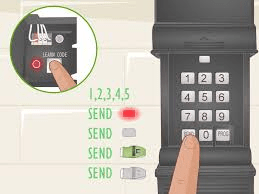
2. Locate the “Learn” Button
- Remove the cover if necessary
- The Learn button is typically near the antenna wire on the motor head
- Button color may vary (red, yellow, or purple) depending on model
3. Erase Existing Codes
- Press and hold the Learn button for about 6 seconds until the LED turns off
- This deletes all previously programmed remotes and keypads
4. Reprogram Your Devices
- Press the Learn button briefly
- Within 30 seconds, press the button on the remote or keypad you want to program
- LED light will blink or turn solid to confirm successful programming
5. Test the System
- Check that the garage door responds to all programmed remotes and keypads
- Verify wall console and safety sensors are functioning
- Repeat programming for additional remotes if needed
Troubleshooting Tips
- Remote not working after reset: Make sure it’s within 30 seconds of pressing the Learn button
- Door reverses or stops: Check sensor alignment and track condition
- Opener not responding: Confirm power supply and circuit breaker status
Quick Comparison Table: Single Remote vs Full Reset
| Feature | Single Remote Reset | Full Code Reset |
|---|---|---|
| Deletes other remotes | No | Yes |
| Time to complete | 1–2 min | 5–10 min |
| When to use | One remote malfunction | Lost remote or security concern |
| LED indicator | Blinks once | Turns off then on |
Safety Precautions
- Always unplug the opener before adjusting anything
- Keep hands clear of moving parts during testing
- Wear gloves and safety glasses for protection
- Avoid attempting torsion spring adjustments yourself—call a professional
FAQ
Q1: Can I reset my Genie opener without a remote?
A1: Yes, the Learn button on the motor head allows resetting and reprogramming remotes or keypads directly.
Q2: Will a full reset delete all existing remotes?
A2: Yes, a full code reset erases all previously programmed devices, requiring you to reprogram each one.
Q3: How do I confirm the reset worked?
A3: LED indicators will blink or turn off, and previous remotes will no longer operate the door until reprogrammed.
Q4: Is it safe to reset the opener myself?
A4: Yes, if you follow safety steps like unplugging the opener and wearing gloves, the process is safe for beginners.
Q5: How long does a full reset take?
A5: Typically 5–10 minutes depending on how many remotes or keypads you need to program.
Conclusion
Knowing how to reset code for Genie garage door opener keeps your garage secure, restores remote functionality, and resolves most common issues quickly. By following this step-by-step guide, you can handle the reset safely and confidently.
Share this guide with friends or family who may struggle with their garage opener—it can save time and prevent frustration.



Leave a Reply