If you’re frustrated because My Chamberlain Garage Door Opener Won’t Connect To Wifi, you’re not alone. A disconnected opener means no remote access, no real-time alerts, and reduced smart functionality.
The good news? Most WiFi connection issues are easy to fix with a few simple troubleshooting steps. This guide walks you through everything—from signal strength problems to router compatibility—so you can get your myQ® system back online quickly.
Why My Chamberlain Garage Door Opener Won’t Connect To WiFi
Chamberlain WiFi-enabled openers use built-in myQ® technology to connect to your home network. These openers are manufactured by Chamberlain Group, one of the leading smart garage brands in North America.
Read too: The Complete Guide to Tighten Chain On Garage Door Opener for Smooth Operation
When your device won’t connect, it’s typically caused by:
- Weak WiFi signal
- Incorrect network band (5GHz vs 2.4GHz)
- Router firewall settings
- Firmware issues
- Incorrect setup process
Let’s break down each possibility.
Does Chamberlain Work With 5GHz WiFi?
One of the most common questions:
Does my Chamberlain opener support 5GHz WiFi?
No.
Most Chamberlain myQ-enabled openers only support 2.4 GHz WiFi networks.
WiFi frequency basics are explained under Wikipedia. The 2.4 GHz band provides longer range, which is ideal for garages located farther from routers.
If your router combines 2.4 GHz and 5 GHz under the same network name (SSID), your opener may struggle to connect.
Step-by-Step Fix: Reconnect Chamberlain to WiFi
Follow this method carefully.
Step 1: Confirm WiFi Signal Strength
Stand in your garage and check WiFi bars on your smartphone.
You need at least 2–3 bars of signal strength.
If signal is weak:
- Move router closer
- Install WiFi extender
- Use mesh WiFi system
Step 2: Verify You’re Using 2.4 GHz Network
Log into your router settings.
Ensure:
- 2.4 GHz is enabled
- Separate SSID if possible (e.g., HomeWiFi_2.4)
Connect your phone to 2.4 GHz before starting setup.
Step 3: Reset WiFi on Chamberlain Opener
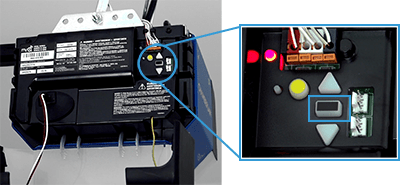
- Locate the “Learn” button on motor unit.
- Press and hold for 6 seconds until LED turns off.
- Release button to clear WiFi settings.
This does not erase remote programming.
Step 4: Reconnect Through myQ App
- Open myQ app.
- Tap “Add Device.”
- Select Garage Door Opener.
- Follow on-screen instructions.
- Choose your 2.4 GHz network.
Enter WiFi password carefully.
Why Does My myQ App Say “Offline”?
If your opener was previously connected but now shows offline:
Possible causes:
- Router reboot
- Internet outage
- Firmware update interruption
- IP address change
Try:
- Power cycling router.
- Unplugging opener for 30 seconds.
- Restarting myQ app.
Router Settings That May Block Connection
Certain router configurations prevent connection.
Check:
- Firewall level (set to medium)
- MAC address filtering (disable temporarily)
- Guest network restrictions
- WPA3-only security (switch to WPA2/WPA3 mixed mode)
Overly strict security settings can block IoT devices.
How Far Can Chamberlain Opener Be From Router?
Ideal distance:
- Within 50–100 feet indoors
- Fewer than 2–3 walls between router and garage
Concrete walls significantly weaken signal.
Should You Use a WiFi Extender?
If garage is detached or far from house:
- Install WiFi extender halfway between router and garage.
- Or install mesh node inside garage.
Extenders often resolve 80% of connectivity issues.
Firmware Update Issues
If setup fails repeatedly:
- Update myQ app
- Check for opener firmware update in app
- Restart smartphone
Outdated firmware can cause pairing failure.
When to Factory Reset Chamberlain Opener
If nothing works:
- Press and hold Learn button for 6–10 seconds.
- Release when LED turns off.
- Wait 60 seconds.
- Start setup from scratch.
Be prepared to reprogram remotes if full reset is triggered.
Pros and Cons of WiFi Garage Control
Advantages
- Remote access anywhere
- Real-time alerts
- Activity history
- Integration with smart home platforms
Disadvantages
- Dependent on internet stability
- Requires router compatibility
- Occasional firmware issues
Estimated Cost of Fixes
| Solution | Cost |
|---|---|
| Router reset | Free |
| WiFi extender | $30–$80 |
| Mesh system | $150–$300 |
| Professional service | $100–$200 |
Most issues are solved without professional help.
When Should You Contact Support?
Contact Chamberlain support if:
- Opener LED does not respond
- WiFi module appears defective
- myQ app fails repeatedly despite correct settings
- Unit is under warranty
Hardware failures are rare but possible.
FAQ: My Chamberlain Garage Door Opener Won’t Connect To WiFi
1. Why does my opener only work sometimes?
Likely weak signal or router interference.
2. Does Chamberlain support 5GHz WiFi?
No. Only 2.4 GHz networks are supported.
3. Will resetting WiFi erase remote controls?
No. Only network settings are cleared.
4. Why does my app say “Unable to Connect”?
Incorrect password, wrong frequency band, or firewall restrictions are common causes.
5. Can I connect multiple openers to one app?
Yes. myQ supports multiple devices under one account.
6. Do I need internet for opener to function?
No. It operates normally without WiFi, but smart features won’t work.
Preventing Future WiFi Issues
- Keep router firmware updated
- Install mesh system for larger homes
- Avoid placing router inside metal cabinets
- Restart router monthly
Stable internet equals reliable smart garage access.
Final Thoughts
If My Chamberlain Garage Door Opener Won’t Connect To Wifi, the issue is almost always related to signal strength, network band settings, or router configuration. By ensuring you’re using 2.4 GHz, resetting WiFi settings properly, and strengthening signal coverage, you can restore connectivity quickly.
Smart garage access adds convenience and security—but only when properly configured.
If this guide helped you reconnect your opener, consider sharing it on social media to help other homeowners solve their WiFi connection problems quickly and confidently.



Leave a Reply