If you’re searching for How To Program A Universal Clicker Garage Door Opener, you probably just bought a new remote—or your old one stopped working. Programming a universal clicker can seem confusing at first, especially with different brands like LiftMaster, Chamberlain, Genie, or Craftsman.
The good news? Most universal remotes can be programmed in under 10 minutes. In this complete step-by-step guide, you’ll learn exactly how to pair your clicker correctly, troubleshoot issues, and avoid common mistakes.
Read too: The Complete Guide to Tighten Chain On Garage Door Opener for Smooth Operation
What Is a Universal Clicker Garage Door Opener?
A universal clicker is a remote control designed to work with multiple garage door opener brands and frequencies. Instead of buying a brand-specific remote, universal clickers are compatible with most major manufacturers.
Garage door openers use radio frequency (RF) signals to communicate between the remote and motor unit. For technical background on how garage door systems work, see:
https://en.wikipedia.org/wiki/Garage_door_opener
Most modern openers use rolling code technology for security.
How To Program A Universal Clicker Garage Door Opener (Basic Method)
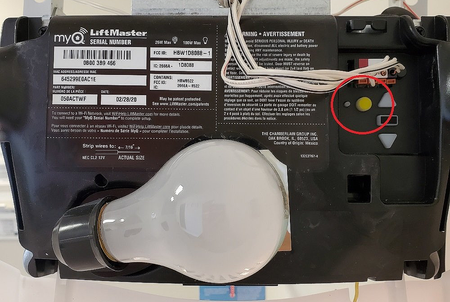
Step 1: Locate the “Learn” Button


4
The Learn button is typically:
- On the back or side of the motor unit
- Near the antenna wire
- Behind a light cover
Button colors may vary: yellow, purple, red, green, or orange.
Step 2: Press the Learn Button
- Press and release the Learn button.
- An LED indicator will light up or blink.
- You now have about 30 seconds to pair the remote.
Step 3: Press the Clicker Button
- Press the button on your universal clicker.
- Hold for 2–3 seconds.
- Release and press again.
If programmed successfully, the opener light will blink or the motor will click.
Step 4: Test the Door
Stand 5–10 feet away and press the programmed button.
If the door moves, programming is complete.
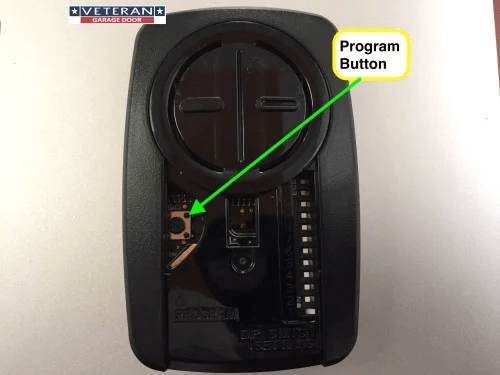
How To Program Without a Learn Button (Older Dip Switch Models)
Older garage door openers use dip switches instead of rolling codes.
How to Program:
- Open the remote battery compartment.
- Locate dip switches inside.
- Match the switch positions to those inside the opener unit.
- Close remote and test.
Both units must match exactly.
How Long Does Programming Take?
Average time:
- 3–5 minutes (rolling code models)
- 10 minutes (dip switch models)
If you experience delays, recheck compatibility.
What Brands Are Compatible With Universal Clickers?
Most universal remotes work with:
- LiftMaster
- Chamberlain
- Genie
- Craftsman
- Linear
Check packaging for compatibility chart before purchasing.
Common Problems and Solutions
Remote Not Programming
Possible causes:
- Incorrect frequency
- Wrong button pressed
- Memory full
- Weak battery
Solution:
- Replace battery
- Clear opener memory
- Reattempt pairing
Memory Full Issue
Some openers store only 7–20 remotes.
To clear memory:
- Hold Learn button for 10 seconds.
- LED turns off.
- Reprogram remotes individually.
Remote Works Only Sometimes
Likely causes:
- Signal interference
- Low battery
- Antenna obstruction
Keep antenna hanging straight down for best reception.
Step-by-Step Troubleshooting Checklist
If programming fails, follow this order:
- Replace remote battery.
- Confirm brand compatibility.
- Stand within 3–5 feet during programming.
- Clear opener memory.
- Reprogram slowly and carefully.
- Check for nearby RF interference.
Systematic troubleshooting saves time.
Does Universal Clicker Programming Erase Other Remotes?
No—unless you clear memory manually.
Pressing the Learn button briefly only adds new remotes.
Holding it for 10+ seconds erases all stored codes.
Can You Program Multiple Doors?
Yes.
Most universal clickers have 2–3 programmable buttons.
Repeat pairing process for each garage door.
Safety Tips During Programming
- Keep door clear of people and pets.
- Do not stand directly under the door.
- Ensure sensors are aligned before testing.
Safety systems prevent accidents during operation.
Advanced Tip: Programming via Wall Console
Some newer systems allow remote programming directly from the wall panel.
Refer to your opener’s manual for advanced pairing options.
FAQ – How To Program A Universal Clicker Garage Door Opener
Why won’t my universal clicker pair?
Check battery, compatibility, and ensure you pressed the Learn button correctly.
How far should I stand when programming?
Within 3–5 feet of the motor unit.
Do universal remotes work with old garage doors?
Yes, if compatible with dip switch systems.
Can I reprogram without ladder access?
Not usually—you must access the Learn button on the motor unit.
How many remotes can be programmed?
Most openers store between 7 and 20 remotes.
Does programming reset travel limits?
No. Travel limits remain unchanged.
Conclusion
Learning How To Program A Universal Clicker Garage Door Opener is easier than it seems. By locating the Learn button, pairing within the 30-second window, and following proper troubleshooting steps, most homeowners can complete the process in minutes.
If programming issues persist, check compatibility or consult your opener’s manual.
If this guide helped you successfully pair your remote, consider sharing it with friends or neighbors—garage door programming doesn’t have to be complicated when you follow the right steps.



Leave a Reply