Introduction
There is nothing quite as frustrating as pulling into your driveway after a long day, only to realize you cannot get your truck’s built-in transmitter to communicate with your garage. If you are searching for how to set garage door opener in Ford F150, you are likely dealing with a syncing issue or programming a new remote for the first time. We understand that vehicle technology can feel overwhelming, but rest assured that configuring your HomeLink system is a straightforward process that anyone can master with the right guidance. This comprehensive tutorial will walk you through every step to ensure seamless access to your home.
Understanding Your Ford F150 HomeLink System
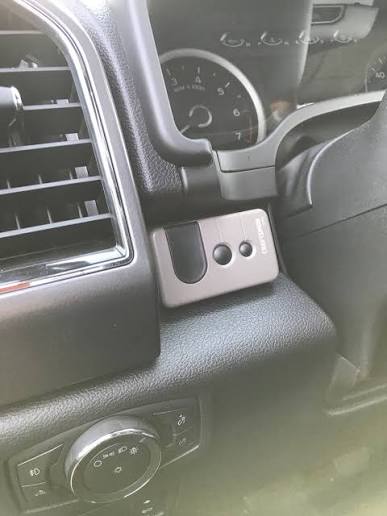
Before diving into the buttons, it is vital to understand what you are actually programming. Most modern Ford F150 trucks come equipped with the HomeLink Universal Transceiver. Unlike a standard handheld remote, this system is integrated directly into your vehicle’s overhead console, rearview mirror, or center stack, depending on your trim level and model year.
According to technical documentation referenced on Wikipedia, HomeLink uses radio frequency (RF) signals to communicate with garage doors, gates, lighting systems, and even security cameras. It supports both fixed-code and rolling-code technologies, making it compatible with the vast majority of openers manufactured after 1993. Knowing whether your garage door uses rolling code (security+ 2.0) sor fixed code technology is essential, as the programming steps differ slightly between the two.
Fixed Code vs. Rolling Code: What Is the Difference?
| Feature | Fixed Code Openers | Rolling Code Openers |
|---|---|---|
| Manufacture Date | Typically pre-1996 | Post-1996 / Modern |
| Security Level | Lower (static signal) | High (signal changes each use) |
| Programming Steps | 2 Steps (Vehicle only) | 3 Steps (Vehicle + Motor Unit) |
| Indicator Light | Solid light when programmed | Rapid flash then solid |
| Common Brands | Older Genie/Chamberlain | LiftMaster, Craftsman, Genie Intellicode |
Understanding this distinction prevents the most common error: stopping at step two when your door actually requires the third “learn button” synchronization at the motor unit.
Step-by-Step: How To Set Garage Door Opener In Ford F150
Follow these precise instructions to program your system. Ensure your truck is parked outside the garage with the ignition in the “ON” or “ACC” position. Never program while inside the garage to avoid accidental activation or carbon monoxide buildup.
Step 1: Clear Previous Codes (Recommended)
If you bought the truck used or are reprogramming a button, start fresh. Press and hold the two outer HomeLink buttons simultaneously for approximately 10–20 seconds. Watch the indicator LED; when it begins to flash rapidly, release the buttons. Your system is now cleared and ready for new programming.
Step 2: Put HomeLink Into Training Mode
- Hold your original handheld garage remote 1–3 inches away from the HomeLink buttons on your F150.
- Simultaneously press and hold the desired HomeLink button AND your handheld remote’s button.
- Keep holding both until the HomeLink indicator light flashes slowly, then rapidly. This rapid flashing confirms the frequency has been captured.
- Release both buttons.
Note for Canadian F150 Owners: Due to federal regulations, some Canadian models require you to press and release the HomeLink button repeatedly during training rather than holding it continuously. If the light does not change, try the press-release method.
Step 3: Test the Connection
Press the newly programmed HomeLink button once. Observe the indicator light and your garage door:
- Solid Light + Door Moves: You have a fixed-code opener. Programming is complete!
- Rapid Flashing Light + No Movement: You have a rolling-code opener. Proceed immediately to Step 4.
- No Light: Repeat Step 2, ensuring proper distance and battery strength in your handheld remote.
Step 4: Sync Rolling Code Openers (Crucial Final Step)
This is where most users get stuck when learning how to set garage door opener in Ford F150. You must bridge the vehicle and the garage motor.
- Locate the “Learn” or “Smart” button on your garage door motor unit (usually near the antenna wire or under the light cover). Colors vary: yellow, purple, orange, red, or green.
- Press and release the Learn button. You typically have 30 seconds before the mode times out.
- Return to your F150 and press the programmed HomeLink button firmly. Hold for 2 seconds, release, and repeat up to 3 times within the 30-second window.
- The garage door should activate, confirming successful synchronization.
Expert Tip: If your F150 is a 2021 or newer model with the updated HomeLink 5 system, some units support direct cloud-based pairing via the FordPass app, eliminating the need for the physical learn button entirely. Check your owner’s manual for “HomeLink Cloud Connect” compatibility.
Troubleshooting Common Programming Failures
Even with perfect execution, issues arise. Here are data-backed solutions for the top three problems:
- Weak Handheld Remote Battery: Over 40% of failed programming attempts stem from dying batteries in the original remote. Replace with a fresh CR2032 or equivalent before starting.
- LED Headlight Interference: Modern LED headlights emit RF noise that can block HomeLink signals. Turn off your headlights during programming if you experience repeated failures.
- Frequency Mismatch: Some older European or Asian-market openers operate on frequencies incompatible with North American HomeLink. Verify your opener’s frequency (typically 315 MHz or 390 MHz) matches your F150’s specifications found in the owner’s manual.
Frequently Asked Questions (FAQ)
Can I program my Ford F150 HomeLink without an original remote?
Generally, no. The HomeLink system requires cloning an existing signal. However, if your garage opener has a “Learn” button and your F150 supports direct-to-motor programming (newer models), you may bypass the handheld remote. Consult your specific F150 year’s manual for “direct programming” procedures.
Why does my HomeLink work intermittently after successful programming?
Intermittent operation usually indicates signal interference or a failing garage door opener logic board. First, test with headlights off. If the problem persists, check the opener’s antenna for damage or consider installing a HomeLink repeater kit, which amplifies the signal between vehicle and motor.
How many devices can my Ford F150 HomeLink store?
Standard HomeLink systems store up to 3 distinct devices. Newer HomeLink 5 systems in 2021+ F150s can store up to 7 devices. Each button can control one device, though some buttons support multi-function sequencing.
Does programming HomeLink erase my keyless entry codes?
No. HomeLink programming is completely independent of your truck’s key fob memory or keypad entry system. Clearing HomeLink buttons only affects the universal transceiver, not your vehicle’s security or access systems.
Is there a subscription fee for using HomeLink in my F150?
Traditional RF-based HomeLink is completely free with no subscription. However, newer cloud-connected features (remote status checks, voice control via Alexa) may require a Ford Connected Services subscription after an initial trial period. Basic open/close functionality never requires payment.
My F150 has no visible HomeLink buttons. Where are they?
In certain 2022–2026 F150 trims, HomeLink is integrated into the rearview mirror assembly or embedded within the center touchscreen as a digital interface. Check your mirror housing for small embossed icons or navigate to Settings > Vehicle > HomeLink in your SYNC screen.
Conclusion
Mastering how to set garage door opener in Ford F150 transforms your daily routine from fumbling with remotes to effortless, integrated home access. By understanding the difference between fixed and rolling codes, following the precise three-step synchronization process, and troubleshooting common pitfalls, you can achieve reliable performance in under 15 minutes. Remember, patience during the training phase and fresh batteries in your handheld remote solve the vast majority of issues.
Now that your F150 is perfectly synced, why keep this knowledge to yourself? Share this guide on Facebook, X (Twitter), or Reddit to help fellow Ford owners conquer their garage door frustrations. Have a unique tip or model-year-specific trick? Drop it in the comments below — our community thrives on shared expertise! Safe driving and smooth entries ahead.



Leave a Reply