Many homeowners wonder What Is The Transmitter Button On Garage Door Opener and why it plays such an important role in everyday convenience. If your garage door suddenly stops responding to the remote, the transmitter button is often the first component worth checking.
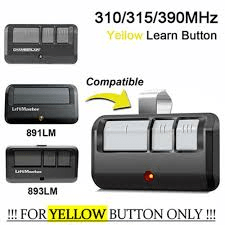
Understanding how this small button works can help you troubleshoot remote issues, program new remotes, and maintain your garage door system. In this guide, we’ll explain what the transmitter button is, how it functions, and how to program or fix it if problems occur.
Read too: Door and Garage Door Companies: Choosing the Right Partner for Your Needs
What Is The Transmitter Button On Garage Door Opener?
The transmitter button on a garage door opener is the button located on a remote control device that sends a wireless signal to the garage door opener motor. When you press this button, it transmits a radio frequency signal that tells the garage door to open or close.
In simple terms, the transmitter button acts as a wireless command switch.
Instead of manually lifting the garage door or using a wall switch, the transmitter allows you to control the door remotely from:
- your car
- your driveway
- inside your home
This technology relies on radio frequency communication, which enables the remote control to communicate with the opener unit installed on the garage ceiling.
For a general explanation of garage door systems, see:
https://en.wikipedia.org/wiki/Garage_door
How Does a Garage Door Transmitter Button Work?
Understanding how the transmitter button works can help you troubleshoot issues quickly.
When the button is pressed, three steps occur:
1. Signal Transmission
The remote control sends a coded radio signal to the garage door opener.
Typical frequencies include:
- 315 MHz
- 390 MHz
These frequencies ensure reliable communication between the remote and the opener.
2. Signal Verification
Modern garage door systems use rolling code technology.
This means the signal changes every time you press the transmitter button, improving security.
Rolling codes help prevent hackers from copying remote signals.
3. Door Activation
Once the opener receives the correct signal, it activates the motor.
The motor then:
- opens the garage door
- closes the garage door
- stops the door if pressed again
This entire process takes less than one second.
Where Is the Transmitter Button Located?
The transmitter button can be found in several places depending on the type of remote system you use.
1. Handheld Remote Control
This is the most common type.
It usually has 1–4 transmitter buttons.
Each button can control a different garage door or gate.
2. Built-In Car Transmitter (HomeLink)
Many modern vehicles include a built-in transmitter system.
This allows you to control the garage door without a separate remote.
3. Keychain Remote
These compact remotes are designed for portability.
They attach easily to your car keys.
4. Wall-Mounted Wireless Keypad
Some garage systems include a keypad outside the garage.
You enter a code that activates the transmitter signal.
Types of Garage Door Transmitter Buttons
Not all transmitter buttons are the same.
Here are the most common types used in modern garage door systems.
Single-Button Transmitters
These remotes control only one garage door.
Advantages
- simple operation
- minimal setup
- reliable signal
Best For
- single garage homes
Multi-Button Transmitters
These remotes include multiple transmitter buttons.
Each button can control a different device.
Example uses:
- garage door 1
- garage door 2
- gate opener
- lighting system
Smart Transmitter Systems
New smart garage door systems connect to mobile apps.
Instead of a physical transmitter button, you use your smartphone.
Advantages include:
- remote access anywhere
- activity monitoring
- voice control integration
Garage Door Transmitter Comparison
| Transmitter Type | Convenience | Cost | Features |
|---|---|---|---|
| Single Button Remote | High | Low | Basic control |
| Multi-Button Remote | Very High | Medium | Multiple devices |
| Keychain Remote | High | Low | Portable |
| Smartphone App | Very High | Medium | Smart features |
How to Program a Garage Door Transmitter Button
Programming the transmitter button is a simple process.
Follow these steps carefully.
Step 1: Locate the “Learn” Button on the Opener
The learn button is located on the garage door opener motor unit.
Common colors include:
- yellow
- purple
- red
- green
Press the button once.
A small LED light will activate.
Step 2: Press the Transmitter Button
Within 30 seconds, press the transmitter button on your remote.
Hold it for about 2 seconds.
Step 3: Wait for Confirmation
The opener light will usually blink or click to confirm programming.
Your transmitter button should now control the garage door.
Common Problems With Garage Door Transmitter Buttons
Even reliable systems can experience problems.
Here are the most common issues homeowners encounter.
Dead Remote Battery
The most common cause of transmitter failure is a dead battery.
Most remotes use small coin batteries such as:
- CR2032
- CR2016
Replacing the battery often resolves the issue immediately.
Signal Interference
Nearby electronics can sometimes disrupt radio signals.
Possible interference sources include:
- LED lighting
- Wi-Fi routers
- wireless cameras
Remote Needs Reprogramming
Power outages or system resets may erase remote memory.
In this case, reprogram the transmitter button using the steps above.
Worn Transmitter Button
Over time, the button itself may wear out.
Signs include:
- needing to press harder
- inconsistent response
- remote works only occasionally
If this happens, replacing the remote may be necessary.
Tips to Extend the Life of Your Garage Door Transmitter
A few simple habits can keep your transmitter working reliably.
Replace Batteries Every 1–2 Years
Even if the remote still works, replacing the battery prevents unexpected failure.
Protect the Remote From Moisture
Water exposure can damage the electronic circuit.
Keep the remote dry whenever possible.
Avoid Dropping the Remote
Frequent impacts may loosen internal components.
Store Spare Remotes Safely
Extra remotes should be stored inside the home rather than left in parked vehicles.
FAQ: What Is The Transmitter Button On Garage Door Opener
What does the transmitter button do on a garage door opener?
The transmitter button sends a wireless signal from the remote control to the garage door opener motor, instructing the door to open or close.
Can a garage door opener have multiple transmitter buttons?
Yes. Many remotes have multiple buttons that can control several garage doors or other automated systems.
Why is my garage transmitter button not working?
The most common causes include a dead battery, signal interference, or the need to reprogram the remote.
How far can a garage door transmitter work?
Most garage door remotes work from 50 to 150 feet, depending on the model and signal strength.
Can I add another transmitter button to my garage opener?
Yes. Most garage door openers allow multiple remotes to be programmed using the learn button.
Are garage door transmitters secure?
Modern systems use rolling code technology, which changes the signal each time the button is pressed, improving security.
Conclusion
Understanding What Is The Transmitter Button On Garage Door Opener helps homeowners troubleshoot remote issues and use their garage door systems more effectively. The transmitter button is responsible for sending the wireless signal that opens or closes your garage door, making it one of the most essential components of the system.
By learning how transmitter buttons work, how to program them, and how to maintain them properly, you can keep your garage door operating smoothly and securely for years.
If you found this guide helpful, consider sharing it on social media with other homeowners who may be troubleshooting their garage door remotes.



Leave a Reply