Introduction
There are few things more frustrating than pressing your garage door remote only to be met with silence, especially when you are rushing to leave for work or returning home in bad weather. If your system has stopped responding, learning how to reset a Genie Intellicode garage door opener is often the quickest solution to restore functionality and security. This comprehensive guide will walk you through every reset scenario with empathy and precision, ensuring you get back to your daily routine without unnecessary stress or expensive service calls.
Why Would You Need to Reset Your Genie Intellicode System?
Before diving into the technical steps, it is vital to understand why a reset is necessary. Genie’s Intellicode technology uses rolling-code security, which changes the access code every time the remote is used. While this prevents signal theft, it can occasionally cause synchronization errors between the transmitter (remote) and receiver (opener).
Common triggers for a reset include:
- Power Surges: Lightning or grid fluctuations can scramble the opener’s logic board memory.
- Battery Replacement: Changing batteries in a remote sometimes clears its programming.
- New Ownership: Moving into a new home requires clearing old codes for security.
- Interference: New electronic devices nearby can disrupt the radio frequency.
- Malfunctioning Keypad: Wireless keypads frequently lose sync after battery changes.
According to industry data from the Door and Access Systems Manufacturers Association (DASMA), nearly 30% of garage door opener service calls are resolved simply by reprogramming or resetting the system, highlighting that most issues are software-related rather than mechanical failures.
How To Reset A Genie Intellicode Garage Door Opener (Main Unit)
This is the core procedure. Performing a factory reset on the motor unit clears all previously programmed remotes and keypads. Warning: Only do this if you have all your transmitters present, as they will all need to be reprogrammed afterward.
Step-by-Step Factory Reset Instructions
- Locate the Learn Button: Find the square “Learn” button on the motor head. It is typically located under the light lens cover or near the antenna wire. On Intellicode models, this button is usually black or red.
- Initiate Reset Mode: Press and hold the Learn button for approximately 10 seconds. Watch the LED indicator light next to the button.
- Confirm the Reset: The LED will turn on, then blink, and finally turn off completely. Once the light goes out, release the button. All codes are now erased.
- Test the System: Press any previously programmed remote. The door should not respond. If it does, repeat step 2 for an additional 5 seconds.
- Reprogram Immediately: Proceed to the remote programming section below to restore access.
Safety Note: Always ensure the garage door area is clear of people, pets, and objects before testing. According to Wikipedia, modern safety standards require photo-eye sensors to prevent entrapment; verify these are functioning after any reset.
How to Program a Genie Intellicode Remote After Reset
Once the main unit is reset, you must reintroduce your transmitters. The Intellicode system distinguishes between older fixed-code remotes and newer rolling-code remotes. Ensure your remote is compatible before proceeding.
Programming Standard Intellicode Remotes
- Press the Learn Button: Briefly press and release the Learn button on the motor head. The LED will illuminate solid red (or blue, depending on model year).
- Activate the Remote: Within 30 seconds, press the button on your remote you wish to program. Hold it until the motor unit LED blinks.
- Confirm Sync: Release the remote button. Press the same remote button again. The LED should turn off, indicating successful programming.
- Final Test: Press the remote button one more time to operate the door.
Troubleshooting Failed Programming
| Symptom | Probable Cause | Solution |
|---|---|---|
| LED never lights up | Faulty learn button or board | Check wiring; consult manual |
| LED blinks rapidly | Incompatible remote | Verify FCC ID matches Intellicode |
| Door moves partially | Travel limits need adjustment | Adjust limit switches on rail |
| Works once then stops | Weak remote battery | Replace with fresh CR2032 or AA |
| No response at all | Antenna damage | Inspect hanging antenna wire |
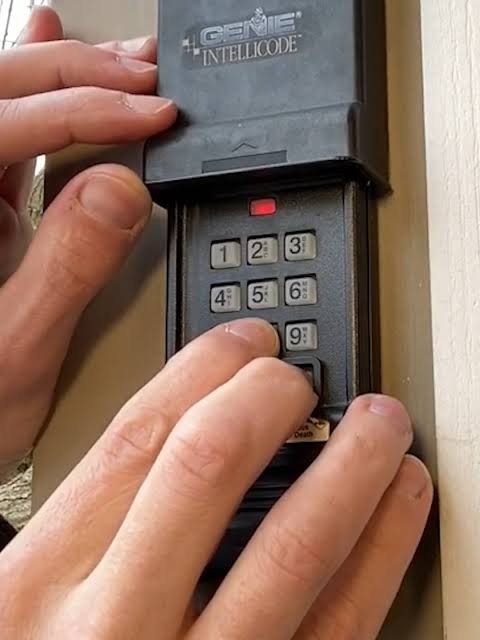
How to Reset a Genie Intellicode Wireless Keypad
Wireless keypads are convenient but prone to desynchronization. Resetting them does not require resetting the main motor unit unless the keypad itself is being replaced.
Keypad Reset Procedure
- Open the Battery Compartment: Slide down the cover on the bottom of the keypad.
- Locate the Program Button: Inside, you will find a small recessed button labeled “Program” or “Set.”
- Clear Old Codes: Press and hold the Program button for 5 seconds until the LED blinks. This clears the keypad’s internal memory.
- Enter New PIN: Type your desired 3–4 digit PIN, then press the Program button inside the compartment.
- Sync to Opener: Go to the motor unit and press the Learn button. Return to the keypad within 30 seconds, enter your new PIN, and press the send/open button. Repeat until the door responds.
Expert Tip: Use a PIN that is easy for family members to remember but difficult for others to guess. Avoid sequential numbers like 1234 or birth years.
Understanding Intellicode vs. Fixed Code Security
Many homeowners confuse Intellicode with older fixed-code systems. Understanding this distinction is critical when purchasing replacement parts or troubleshooting.
- Fixed Code (Legacy): Uses a static binary code set by DIP switches. Vulnerable to code grabbers. Rarely manufactured after 2005.
- Intellicode (Rolling Code): Generates a new code from billions of possible combinations each use. Even if intercepted, the captured code is useless for future entry.
If your Genie opener was manufactured after 1995, it almost certainly uses Intellicode. However, some transitional models from the late 1990s support both. Check your motor unit label for “Intellicode,” “ACSCTG,” or “Series II/III” designation to confirm compatibility before buying remotes.
When Resetting Doesn’t Work: Advanced Diagnostics
If you have followed all steps correctly and the system still fails, the issue may be hardware-related. Consider these diagnostics before calling a professional:
- Check Photo-Eye Alignment: Misaligned safety sensors will prevent operation regardless of programming status. Both LEDs should be solid green/red (depending on brand). Clean lenses with a soft cloth.
- Inspect Logic Board Capacitors: Power surges can damage capacitors on the circuit board. Look for bulging or leaking components. This requires multimeter testing and soldering skills.
- Antenna Integrity: The hanging wire antenna must be fully extended and undamaged. A broken antenna reduces range dramatically.
- Gear and Sprocket Wear: If the motor runs but the door doesn’t move, the plastic drive gear may be stripped. This is a mechanical failure unrelated to resetting.
Statistically, logic board failures account for approximately 15% of Genie opener repairs in units over 10 years old. If your unit falls in this category and resetting fails, replacement may be more cost-effective than repair.
Frequently Asked Questions (FAQ)
Q1: How often should I reset my Genie Intellicode garage door opener?
You should only reset your opener when experiencing malfunctions, after a power surge, or when moving into a new home. There is no maintenance schedule requiring periodic resets. Unnecessary resets increase wear on the learn button and risk losing all programmed devices.
Q2: Can I reset my Genie opener without the original remote?
Yes. The factory reset procedure uses only the motor unit’s learn button and does not require any remote. However, you will need at least one compatible Intellicode remote or keypad to reprogram the system afterward. Without a compatible transmitter, the opener will remain unusable.
Q3: Will resetting erase my wall console settings?
No. Hardwired wall consoles are typically not affected by the wireless learn button reset. They communicate via direct wiring, not radio frequency. However, wireless wall consoles will be erased and must be reprogrammed alongside your remotes.
Q4: My Genie opener has two learn buttons. Which one do I use?
Dual-button models typically separate Series II and Series III/Intellicode programming. Consult your specific model’s manual, but generally, the button labeled “Intellicode” or marked with a rolling code icon is correct for modern remotes. Using the wrong button will result in failed programming.
Q5: Is there a difference between “reset” and “reprogram”?
Yes. Resetting clears all stored codes from the opener’s memory, returning it to factory state. Reprogramming adds a specific remote or keypad to the existing memory without deleting other devices. Most troubleshooting requires reprogramming; full resets are reserved for security breaches or persistent sync failures.
Q6: Can smart home integrations survive a factory reset?
No. Aladdin Connect or other Wi-Fi modules linked to your Genie opener will lose their pairing during a factory reset. You must reconnect the smart module through its respective app after completing the reset and reprogramming your physical remotes. Allow 2–3 minutes for the module to reboot before attempting reconnection.
Conclusion
Mastering how to reset a Genie Intellicode garage door opener empowers you to handle common access issues confidently, saving both time and money. Whether you are dealing with a simple remote sync problem or securing a new home, the steps outlined above provide a reliable roadmap to restoration. Remember that patience and attention to LED indicators are your best tools during this process.
If this guide helped you regain access to your garage, please share it on social media to assist other homeowners facing similar challenges. Your share could save someone a costly service call and restore their peace of mind. Safe and secure garage access is a fundamental part of home comfort—don’t let a blinking LED ruin your day!



Leave a Reply