Introduction
Struggling to sync your garage door with your new vehicle? You’re not alone. Many 2023 Honda Pilot owners face confusion when trying to integrate their home garage systems with their car’s built-in HomeLink technology. If you’re wondering how to program 2023 Honda Pilot garage door opener, this comprehensive guide will walk you through every step clearly and safely.
Whether you’re a tech-savvy driver or a first-time user, this article breaks down the process into simple, actionable steps. By the end, you’ll have your garage door responding to your Pilot’s buttons in minutes.
What Is HomeLink in the 2023 Honda Pilot?
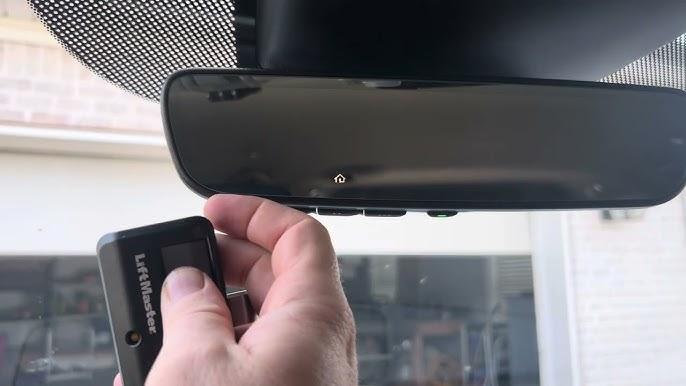
Before diving into the programming steps, it’s essential to understand what HomeLink is. HomeLink is a universal transceiver system integrated into many modern vehicles, including the 2023 Honda Pilot. It allows your car to communicate with garage doors, gate operators, home lighting systems, and even security alarms.
According to Wikipedia, HomeLink was first introduced in 1992 and has since become the most widely used universal transmitter in the automotive industry. In the 2023 Honda Pilot, HomeLink buttons are typically located on the overhead console near the rearview mirror.
Key Features of HomeLink in 2023 Honda Pilot:
- Three programmable buttons for different devices
- Rolling code compatibility for enhanced security
- Easy integration with most major garage door brands
- No additional hardware required in most cases
Step-by-Step Guide: How to Program 2023 Honda Pilot Garage Door Opener
Programming your garage door opener to work with your 2023 Honda Pilot is straightforward if you follow these steps carefully. Make sure you have access to both your vehicle and your garage door remote before starting.
Step 1: Clear Existing HomeLink Memory (If Needed)
If your HomeLink buttons were previously programmed, you should clear them first:
- Turn the ignition to the “ON” position (do not start the engine).
- Press and hold the two outer HomeLink buttons simultaneously.
- Keep holding for about 20 seconds until the indicator light begins to flash rapidly.
- Release the buttons. The memory is now cleared.
Tip: If you’re setting up HomeLink for the first time, you can skip this step.
Step 2: Position Your Vehicle Correctly
Proper positioning ensures a strong signal between your car and the garage door opener:
- Park your 2023 Honda Pilot outside the garage, facing the door.
- Ensure you’re within 1–3 feet of the garage door opener motor unit.
- Keep the garage door closed during programming.
Step 3: Enter Programming Mode
- Turn the ignition to the “ON” position.
- Choose the HomeLink button you want to program (Button 1, 2, or 3).
- Press and hold the chosen HomeLink button and your original garage door remote button simultaneously.
- Hold both buttons until the HomeLink indicator light changes from a slow blink to a rapid flash (this may take 20–30 seconds).
- Release both buttons.
Step 4: Test the Connection
- Press the programmed HomeLink button in your Pilot.
- Observe if the garage door responds.
- If it doesn’t work immediately, repeat Step 3, ensuring you’re holding the buttons long enough.
Step 5: Program Rolling Code Systems (If Applicable)
Many modern garage door openers use rolling code technology for security. If your system uses rolling codes:
- Locate the “Learn” or “Smart” button on your garage door opener motor unit (usually inside the garage).
- Press and release the Learn button. The indicator light on the motor will begin to blink.
- Within 30 seconds, return to your 2023 Honda Pilot and press the programmed HomeLink button three times.
- Test the connection again.
Note: The exact location and color of the Learn button vary by manufacturer. Consult your garage door opener manual if unsure.
Troubleshooting Common Issues
Even with careful following, some users encounter problems. Here are common issues and solutions:
| Problem | Possible Cause | Solution |
|---|---|---|
| HomeLink light doesn’t flash | Weak battery in remote | Replace remote battery |
| Garage door doesn’t respond | Wrong distance from opener | Move closer (1–3 feet) |
| Rapid flash doesn’t occur | Holding time too short | Hold buttons for full 30 seconds |
| Works intermittently | Interference from other devices | Remove nearby electronics |
| Rolling code fails | Missed Learn button step | Repeat Step 5 carefully |
Expert Tip:
If you continue experiencing issues, consult both your 2023 Honda Pilot owner’s manual and your garage door opener manual. Compatibility varies across brands, and some older systems may require additional adapters.
People Also Ask: Common Questions About HomeLink Programming
Q1: Can I program multiple garage doors to one 2023 Honda Pilot?
Yes. The 2023 Honda Pilot HomeLink system has three separate buttons, allowing you to program up to three different devices. This could include multiple garage doors, a gate operator, or even home lighting systems.
Q2: Do I need a professional to program my HomeLink?
No. Programming HomeLink is a DIY-friendly task that takes approximately 10–15 minutes. However, if you’re uncomfortable with the process or encounter persistent issues, contacting a Honda dealership or garage door specialist is recommended.
Q3: Why won’t my HomeLink button stay programmed?
This issue often occurs due to:
- A weak battery in the garage door remote
- Interference from nearby electronic devices
- Incorrect programming sequence
Try reprogramming after replacing the remote battery and ensuring minimal interference.
Q4: Is HomeLink compatible with all garage door openers?
HomeLink is compatible with most major garage door opener brands, including Chamberlain, LiftMaster, Genie, and Craftsman. However, some older or proprietary systems may require additional compatibility modules. Check the HomeLink compatibility database for specific models.
Q5: Can I reset HomeLink without clearing all buttons?
Unfortunately, no. The 2023 Honda Pilot HomeLink system requires clearing all memory before reprogramming. You cannot selectively delete individual button settings.
Q6: Does programming HomeLink affect my vehicle warranty?
No. Programming HomeLink is a standard feature supported by Honda and does not void your warranty. However, improper modifications to electrical systems unrelated to HomeLink could impact coverage.
Benefits of Using HomeLink in Your 2023 Honda Pilot
Integrating your garage door with your vehicle offers several practical advantages:
- Convenience: No need to carry separate remotes
- Security: Rolling code technology prevents code theft
- Versatility: Control multiple devices from one system
- Clean Dashboard: Reduces clutter from extra remotes
- Resale Value: Adds appeal for future buyers
Conclusion
Learning how to program 2023 Honda Pilot garage door opener doesn’t have to be complicated. With the right steps and a bit of patience, you can seamlessly integrate your garage door with your vehicle’s HomeLink system. Remember to position your car correctly, hold the buttons long enough, and complete the rolling code process if applicable.
If you found this guide helpful, share it with fellow Honda Pilot owners on social media! Whether you’re on Facebook, Twitter, or Reddit, spreading the word helps others save time and avoid frustration.
Have questions or success stories? Drop them in the comments below. Happy driving—and happy garage opening!



Leave a Reply