Introduction
Is your new 2023 Honda Odyssey sitting in the driveway while you still fumble for that old, bulky garage remote? You are not alone. Many drivers find the transition to integrated car systems slightly confusing at first, but mastering this feature can save you significant time and hassle every single day. Learning how to program 2023 Honda Odyssey garage door opener is simpler than it looks, and once done, it offers seamless convenience and enhanced security for your home.
In this guide, we will walk you through the exact steps to sync your vehicle with your garage door system. We will also cover troubleshooting tips for rolling code systems and answer common questions to ensure you get it right the first time.
Understanding the HomeLink System in the 2023 Odyssey
Before diving into the buttons, it is helpful to understand what you are working with. The 2023 Honda Odyssey uses a system called HomeLink. This is a universal transceiver built into your rearview mirror or overhead console that mimics the signal of your original garage door remote.
According to HomeLink’s official documentation, the system is compatible with over 95% of garage door openers manufactured since 1982. This high compatibility rate means that whether you have an older chain-drive model or a modern smart opener, the Odyssey can likely control it.
Why Use HomeLink?
- Convenience: No more digging through bags for remotes.
- Security: Reduces the risk of losing standalone remotes.
- Aesthetics: Keeps your car interior clutter-free.
Preparation: What You Need Before Starting
Success in programming often depends on preparation. Rushing this process can lead to errors, especially with modern “rolling code” security systems. Ensure you have the following ready:
- Your Original Garage Door Remote: Keep this handy. You will need it to transmit the signal to the car.
- A Step Ladder (If Needed): If your garage door motor unit is high up, you may need to reach the “Learn” button on the motor itself.
- A Helper (Optional but Recommended): Having someone inside the car to press buttons while you stand by the garage motor can make the process smoother.
- Park Safely: Ensure your Odyssey is parked outside the garage with the engine running or in accessory mode. Keep the garage door closed during initial programming for safety.
Step-by-Step Guide: How to Program 2023 Honda Odyssey Garage Door Opener
The process varies slightly depending on whether your garage door uses a fixed code or a rolling code. Most modern openers (post-1995) use rolling codes for security. We will cover the standard method which works for most users.
Step 1: Clear Existing Memory (If Applicable)
If you are replacing an old remote or reprogramming a button, clear the memory first.
- Press and hold the two outer HomeLink buttons simultaneously.
- Hold them for about 20 seconds until the indicator light begins to flash rapidly.
- Release the buttons. The memory is now cleared.
Step 2: Initiate Training Mode
- Choose one of the three HomeLink buttons in your Odyssey.
- Press and hold the chosen button.
- Do not release it yet. Watch the indicator light. It will start slow, then turn solid, and finally begin to flash rapidly.
- Once the light flashes rapidly, release the button. You have approximately 60 seconds to complete the next steps.
Step 3: Transmit the Signal
- Take your original handheld garage remote.
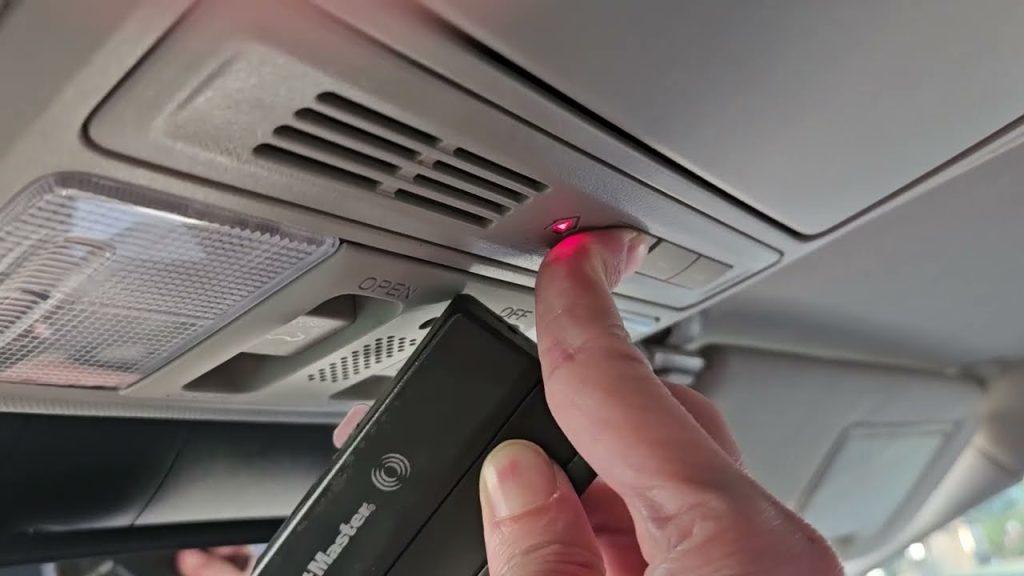
- Point it at the HomeLink buttons in your Odyssey.
- Position the remote 1 to 3 inches away from the HomeLink surface.
- Press and hold the button on your handheld remote that you wish to program.
- Crucial Step: While holding the handheld remote button, continue to hold the HomeLink button in the car.
- Watch the HomeLink indicator light. It will change from a slow flash to a rapid flash.
- Once the light flashes rapidly, release both buttons.
Step 4: Test the Connection
- Press the programmed HomeLink button in your Odyssey firmly.
- Observe your garage door.
- If it moves: You are done! Proceed to the “Rolling Code” section below if your door only moves once and stops, or if you have a newer opener.
- If it does not move: Repeat Steps 2 and 3, ensuring the remote is close enough and batteries are fresh.
Handling Rolling Code Systems
Most garage doors installed after 1995 use rolling code technology. This changes the access code every time you use the remote to prevent hacking. If your door did not operate consistently in Step 4, you likely have a rolling code system.
Additional Steps for Rolling Codes:
- Locate the “Learn” or “Smart” button on your garage door opener motor unit (hanging from the ceiling). It is usually colored yellow, purple, or red.
- Press and release the “Learn” button. You typically have 30 seconds to complete the next action.
- Return to your 2023 Honda Odyssey.
- Press and hold the programmed HomeLink button for 2 seconds, then release.
- Press and hold it again for 2 seconds, then release.
- Repeat this cycle (press-hold-release) up to three times.
- Test the door. It should now operate smoothly.
Note: If you cannot find the Learn button, consult your garage door opener’s manual. Some brands like LiftMaster, Chamberlain, and Genie have specific locations for this button.
Troubleshooting Common Issues
Even with careful following of instructions, issues can arise. Here is a quick comparison of common problems and solutions.
| Issue | Possible Cause | Solution |
|---|---|---|
| Light doesn’t flash | Battery issue or wrong mode | Check car battery; ensure ignition is on. |
| Door moves partially | Rolling code not synced | Perform the “Learn Button” steps above. |
| Remote won’t pair | Distance too far | Move handheld remote closer (1-3 inches). |
| Interference | LED bulbs in opener | Replace LED bulbs in garage opener with incandescent. |
Expert Tip: LED Interference
A lesser-known issue involves LED light bulbs in garage door openers. These can emit radio frequency interference that blocks the HomeLink signal. If programming fails repeatedly, try temporarily unscrewing the LED bulbs in the garage motor unit and retrying the process.
Frequently Asked Questions (FAQ)
1. Can I program multiple garage doors to my 2023 Honda Odyssey?
Yes. The HomeLink system has three separate buttons. You can program each button to a different garage door, gate, or even a home lighting system. Simply repeat the programming steps for each additional device using a different button.
2. What if I don’t have my original garage door remote?
This makes programming difficult. You may need to contact your garage door manufacturer to purchase a replacement remote. Alternatively, some garage door motors have a “wireless keypad” option that can be used to train the HomeLink system, though this is less common.
3. Does programming HomeLink void my garage door warranty?
No. Using a universal transmitter like HomeLink is standard practice and does not void your garage door opener’s warranty. However, always refer to your specific opener’s manual for any brand-specific restrictions.
4. Why does my garage door reverse immediately after closing?
This is usually a safety sensor issue, not a programming error. Check the photo-eye sensors at the bottom of your garage door tracks. Ensure they are aligned and clean. If they are blocked or misaligned, the door will reverse for safety reasons.
5. Can I reset the HomeLink system completely?
Yes. To erase all programmed devices, press and hold the two outer HomeLink buttons for 20 seconds until the light flashes rapidly. This returns the system to factory settings, allowing you to start fresh.
6. Is the 2023 Odyssey HomeLink compatible with MyQ or Smart Garage systems?
HomeLink handles the radio frequency signal. If your smart garage system (like MyQ) relies on Wi-Fi for app control but still uses RF for the physical remote, HomeLink will work. However, HomeLink does not connect to Wi-Fi directly; it only mimics the remote control signal.
Conclusion
Learning how to program 2023 Honda Odyssey garage door opener is a small task with a big payoff. By integrating your garage access into your vehicle, you streamline your daily routine and reduce the clutter of carrying extra remotes. Whether you have a simple fixed-code system or a complex rolling-code setup, the steps outlined above should get you connected quickly.
Remember, patience is key during the rolling code synchronization phase. If you encounter difficulties, double-check your distances and ensure your batteries are fresh.
Did this guide help you get your garage door working with your new Odyssey? Share this article with fellow Honda owners on Facebook or Twitter who might be struggling with their setup. Happy driving!



Leave a Reply