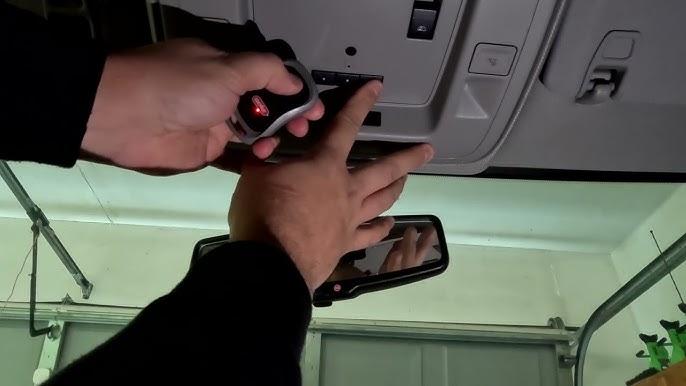
Programming your garage door opener can feel like a daunting task, especially with the advanced technology integrated into modern vehicles like the 2024 Chevy Silverado. Whether you’re moving into a new home or simply replacing an old remote, knowing how to program 2024 Chevy Silverado garage door opener correctly ensures seamless access and enhanced security. This guide simplifies the process, helping you get it right the first time without frustration.
Understanding the 2024 Chevy Silverado’s Garage Door System
Before diving into the programming steps, it’s essential to understand what system your vehicle uses. The 2024 Chevy Silverado typically comes equipped with either a built-in HomeLink® system or a standard remote control interface, depending on the trim level.
What is HomeLink?
HomeLink is a universal transceiver that allows your vehicle to communicate with garage doors, gates, and even home lighting systems. According to Wikipedia, HomeLink has been integrated into millions of vehicles worldwide, offering compatibility with over 95% of garage door openers manufactured since 1993.
Key Features of HomeLink in the 2024 Silverado:
- Supports up to three different devices
- Compatible with rolling code and fixed-code systems
- Includes a learn button for easy synchronization
Identifying Your System Type
Check your owner’s manual or look at the overhead console in your Silverado. If you see three buttons labeled “1,” “2,” and “3,” you likely have the HomeLink system. If not, you may be using a separate remote fob that needs individual programming.
Step-by-Step Guide: How to Program 2024 Chevy Silverado Garage Door Opener
Follow these detailed instructions to successfully pair your garage door opener with your 2024 Chevy Silverado.
Step 1: Prepare Your Garage Door Opener
Ensure your garage door opener is functional and accessible. Locate the “Learn” or “Smart” button on your garage door motor unit. This button is usually found on the back or side of the unit and may be colored yellow, purple, or red.
Tip: Clear any previously programmed remotes if you’re experiencing interference. Hold the Learn button for 10 seconds until the indicator light blinks off.
Step 2: Access the HomeLink System in Your Silverado
- Turn your ignition to the “On” position (do not start the engine).
- Locate the HomeLink buttons on your overhead console or rearview mirror.
- Press and hold the desired button (1, 2, or 3) for approximately 20 seconds until the indicator light begins to flash slowly.
Step 3: Sync with the Garage Door Opener
- Within 30 seconds of the HomeLink light flashing, press and release the Learn button on your garage door motor unit.
- Return to your vehicle and press the HomeLink button you selected earlier three times, holding each press for two seconds.
- Watch for the indicator light to change from slow blinking to solid or rapid flashing, indicating successful programming.
Step 4: Test the Connection
Press the programmed HomeLink button once. Your garage door should activate. If it doesn’t respond, repeat Steps 2 and 3, ensuring you complete the process within the 30-second window.
Common Issues and Troubleshooting Tips
Even with careful following of instructions, issues can arise. Here are some common problems and solutions:
| Issue | Possible Cause | Solution |
|---|---|---|
| HomeLink light doesn’t flash | Ignition not in “On” position | Ensure key is turned to accessory mode |
| Garage door doesn’t respond | Out of range or interference | Move vehicle closer to garage door |
| Light flashes but door doesn’t move | Incorrect Learn button press | Repress Learn button and retry syncing |
| Only works intermittently | Weak battery in remote | Replace remote battery or reprogram |
Rolling Code vs. Fixed Code Systems
Most modern garage door openers use rolling code technology, which changes the access code each time the remote is used for enhanced security. If your system uses rolling codes, you may need to perform an additional step:
- After initial programming, press the HomeLink button again.
- Immediately press the Learn button on the garage door motor unit.
- Press the HomeLink button once more to finalize the rolling code sync.
Expert Tips for Successful Programming
To maximize your success rate, consider these professional recommendations:
- Work with a partner: One person can operate the vehicle controls while another presses the Learn button on the garage motor.
- Clear previous codes: If reprogramming, erase old settings by holding all three HomeLink buttons for 10 seconds until the light flashes rapidly.
- Check compatibility: Verify your garage door opener brand and model against HomeLink’s compatibility list online.
- Use fresh batteries: Weak remote batteries can cause syncing failures.
FAQ Section
Q1: Can I program multiple garage doors to my 2024 Chevy Silverado?
A: Yes, the HomeLink system supports up to three different devices. You can program separate buttons for different garage doors, gates, or even home lighting systems.
Q2: What if my garage door opener doesn’t have a Learn button?
A: Older models may use dip switches instead of a Learn button. In this case, match the dip switch settings on your remote to those on the garage door motor unit, then follow the standard HomeLink programming steps.
Q3: Why does my HomeLink light flash rapidly but the door doesn’t open?
A: Rapid flashing usually indicates the system is in training mode. Ensure you press the Learn button on the garage motor within 30 seconds and complete the three-press sequence in your vehicle.
Q4: Is it safe to program the garage door opener myself?
A: Absolutely. The process is designed for user-friendly setup. Just ensure your vehicle is parked safely and the garage area is clear before testing.
Q5: Can I reset HomeLink if I sell my vehicle?
A: Yes. To clear all programmed devices, hold down buttons 1 and 3 simultaneously for 10–15 seconds until the indicator light flashes rapidly. This erases all stored codes.
Q6: Does programming void my warranty?
A: No, programming your HomeLink system is a standard feature and does not affect your vehicle’s warranty. However, always refer to your owner’s manual for specific guidelines.
Conclusion
Learning how to program 2024 Chevy Silverado garage door opener doesn’t have to be complicated. With the right steps and a bit of patience, you can enjoy the convenience of hands-free garage access in just minutes. Whether you’re using HomeLink or a standard remote, this guide ensures you’re equipped with the knowledge to succeed.
If you found this article helpful, share it with fellow Silverado owners on social media! Bookmark this page for future reference, and feel free to leave comments if you have additional questions or tips to share. Happy driving—and even happier garage access!



Leave a Reply