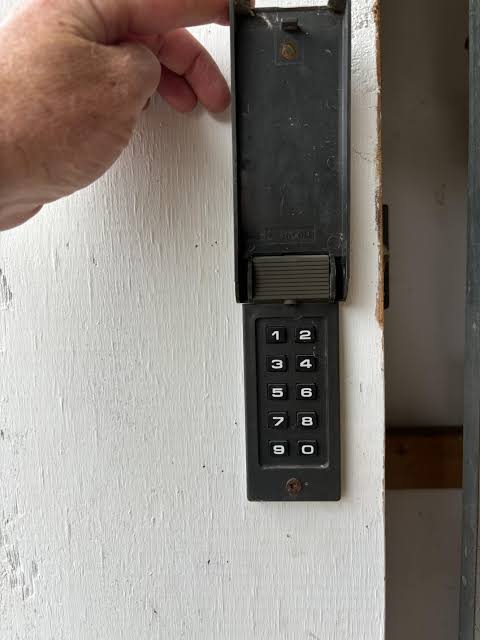
Introduction
There is nothing quite as frustrating as standing in your driveway, rain pouring down, and realizing your garage door keypad isn’t working. You might have changed the batteries, pressed the buttons repeatedly, or even considered calling a technician, but the door remains stubbornly shut. If you are wondering how to program a Sears garage door opener keypad, you are not alone. This is a common issue for many homeowners who rely on the convenience of keyless entry.
The good news is that you likely do not need professional help. Most Sears garage door openers, particularly those manufactured by Chamberlain or LiftMaster (the primary OEMs for Sears), have straightforward programming sequences. In this guide, we will walk you through the exact steps to sync your keypad, troubleshoot common errors, and ensure your home remains secure. Let’s get your garage door working smoothly again.
Understanding Your Sears Garage Door Opener Model
Before diving into the programming steps, it is crucial to identify which type of opener you have. Sears has sold various models over the decades, but most modern units fall into two categories: those with a “Learn” button and older models with DIP switches.
The “Learn” Button Era (Most Common)
If your opener was installed after 1993, it almost certainly uses a rolling code technology for security. You will find a colored button (usually yellow, purple, orange, or red) on the back or side of the motor unit. This is your Learn Button.
The DIP Switch Era (Older Models)
If your opener is from the 1980s or early 1990s, it may use small toggle switches inside the remote and the motor unit. These must match exactly for the system to work. However, since most users today have newer systems, we will focus primarily on the Learn Button method, which is the standard for modern Sears Craftsman openers.
Pro Tip: If you cannot find your model number, check the label on the back of the motor unit hanging from your garage ceiling. It usually starts with “139.” followed by a series of numbers.
Step-by-Step: How to Program a Sears Garage Door Opener Keypad
Programming your keypad requires patience and precision. Follow these steps exactly to ensure successful synchronization.
Step 1: Locate the Learn Button
Climb a sturdy ladder to access the motor unit. Look for the Learn Button on the back panel near the antenna wire. The color of this button is important because it dictates the timing for the next steps.
- Yellow/Orange: Standard programming.
- Purple: Smart/Security+ 2.0 technology.
- Red: Older Security+ models.
Step 2: Clear Old Codes (Recommended)
If you are reprogramming due to lost remotes or security concerns, clear the memory first. Press and hold the Learn button for about 6–10 seconds until the indicator light turns off. Release the button. Note: This will erase all previously programmed remotes and keypads, so you will need to reprogram them all.
Step 3: Initiate Programming Mode
Press and release the Learn button once. The indicator light will either glow steadily or blink, depending on the model. You typically have 30 seconds to complete the next step. If the light goes out before you finish, start over.
Step 4: Enter Your Desired PIN
Go to your wireless keypad within the 30-second window. Enter your desired 4-digit PIN. Immediately after entering the last digit, press and hold the “Enter” or “Send” button. Keep holding it until the lights on the motor unit blink or you hear two clicks.
Step 5: Test the Connection
Wait for the indicator light on the motor unit to stop blinking. Then, return to your keypad and enter your new PIN followed by the Enter button. The garage door should activate. If it does not, repeat the process, ensuring you are within range and the batteries are fresh.
Troubleshooting Common Programming Issues
Even with careful following of instructions, things can go wrong. Here are the most common hurdles and how to overcome them.
| Issue | Possible Cause | Solution |
|---|---|---|
| Keypad not responding | Dead batteries | Replace with fresh alkaline batteries. Avoid rechargeable ones as voltage may be too low. |
| Light blinks but door doesn’t move | Interference | Check for LED bulbs in garage fixtures. They can cause signal interference. Try turning them off during programming. |
| PIN accepted but door reverses | Safety sensor misalignment | Ensure the safety eyes at the bottom of the door tracks are aligned and clean. |
| Learn button light won’t stay on | Logic board failure | If the light dies instantly, the motor unit’s logic board may need replacement. |
For more technical details on garage door opener frequencies and security standards, you can refer to the general overview on Wikipedia’s Garage Door Opener page.
Why Keyless Entry Matters for Home Security
Using a keypad isn’t just about convenience; it’s a significant security upgrade. According to home security experts, over 30% of burglaries occur through unlocked or easily accessed entry points, including garages. A physical remote can be stolen from a car, but a PIN code stays in your head.
Furthermore, modern Sears openers use rolling code technology. This means the code changes every time you use the remote or keypad, making it nearly impossible for thieves to “capture” and replay the signal to open your door. By properly programming your keypad, you are leveraging this advanced security feature.
Maintaining Your Keypad for Longevity
Once you have successfully learned how to program a Sears garage door opener keypad, maintenance becomes key to ensuring it works for years.
- Battery Care: Change batteries annually, even if they seem fine. Corrosion from old batteries can damage the keypad’s internal contacts.
- Weather Protection: If your keypad is mounted outside, ensure the cover is sealed tightly. Moisture is the number one enemy of electronic keypads.
- Regular Testing: Test your PIN once a month to ensure the signal strength remains strong.
Frequently Asked Questions (FAQ)
1. Can I program multiple keypads to one Sears opener?
Yes, most Sears garage door openers can store up to 50 different remote controls and keypads. Simply repeat the programming steps for each additional device. Just remember that pressing the Learn button erases all codes if held down too long, so only tap it briefly for adding new devices.
2. What if I forgot my PIN code?
If you forgot the PIN, you cannot retrieve it from the keypad. You must reset the system. Clear the memory by holding the Learn button until the light goes out, then reprogram the keypad with a new PIN using the steps outlined above.
3. Does the keypad work during a power outage?
The keypad itself is battery-powered, so it will send a signal. However, the garage door opener motor requires electricity to function. If your home loses power, the door will not open unless you have a battery backup system installed on the opener unit.
4. Why does my keypad work intermittently?
Intermittent issues are often caused by weak batteries or radio frequency interference. Nearby appliances, LED light bulbs, or even a neighbor’s strong Wi-Fi signal can interfere. Try changing the batteries first. If the problem persists, try changing the location of the keypad slightly or shielding the motor unit’s antenna.
5. Is it safe to use a simple 4-digit PIN?
While a 4-digit PIN offers 10,000 combinations, it is generally secure enough for residential use, especially with rolling code technology. To enhance security, avoid obvious codes like “1234” or your birth year. Choose a random combination that is easy for you to remember but hard for others to guess.
Conclusion
Learning how to program a Sears garage door opener keypad is a valuable skill that saves you time and money. By understanding your model type, following the precise steps for the Learn button, and troubleshooting common issues, you can restore seamless access to your garage. Remember, a well-maintained keypad not only adds convenience but also enhances your home’s security profile.
Don’t let a malfunctioning keypad disrupt your daily routine. Take control of your home automation today. If you found this guide helpful, please share it with friends or neighbors who might be struggling with their own garage door issues. Stay secure, and enjoy the ease of keyless entry!



Leave a Reply