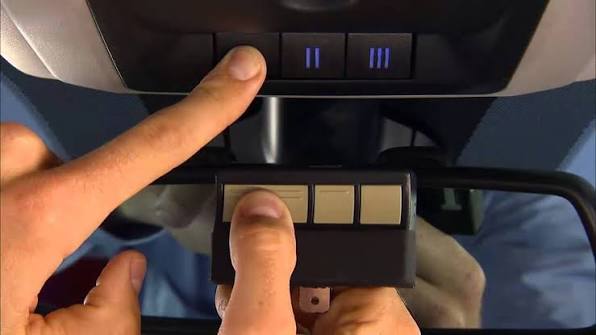
Struggling to connect your garage door to your 2020 Ram 1500? You’re not alone. Many truck owners face confusion when trying to program garage door opener 2020 Ram 1500 systems. This comprehensive guide will walk you through every step, ensuring your HomeLink system works perfectly with your garage door opener.
Understanding Your 2020 Ram 1500 HomeLink System
Before diving into the programming process, it’s essential to understand what you’re working with. The 2020 Ram 1500 comes equipped with a HomeLink wireless control system that can operate up to three different garage doors or gates. This integrated system eliminates the need for separate remote controls cluttering your vehicle.
The HomeLink system in your Ram 1500 uses radio frequency technology compatible with most major garage door opener brands manufactured after 1993. According to HomeLink’s official documentation, this system has become the industry standard for vehicle-integrated garage door controls, offering both convenience and enhanced security features.
What You’ll Need Before Starting
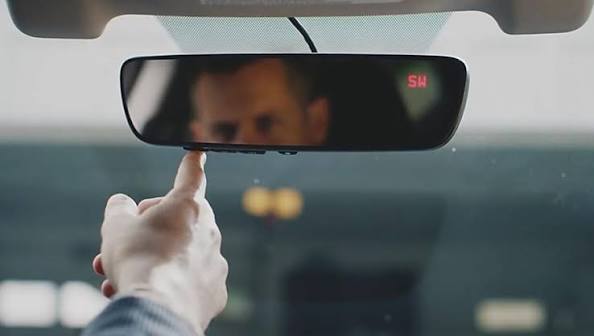
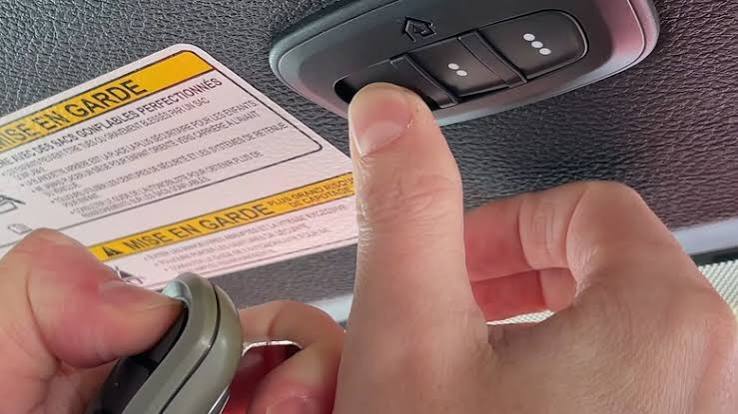
- Your 2020 Ram 1500 with HomeLink buttons (typically located on the rearview mirror or overhead console)
- A ladder to reach your garage door opener motor unit
- Your existing garage door remote control
- Approximately 15-20 minutes of uninterrupted time
- A helper (optional but recommended)
Step-by-Step Programming Instructions
Step 1: Clear Existing HomeLink Memory
If your HomeLink system has been previously programmed, you’ll need to clear it first:
- Turn your ignition to the “ON” position (engine doesn’t need to be running)
- Press and hold the two outer HomeLink buttons simultaneously
- Continue holding for 10-20 seconds until the indicator light begins flashing rapidly
- Release both buttons when the light changes from solid to flashing
Note: This erases all previously programmed devices, so ensure you want to start fresh.
Step 2: Prepare Your Garage Door Opener
Locate your garage door opener motor unit (usually mounted on the ceiling):
- Find the “Learn” or “Smart” button on your opener
- Note the color of the LED light next to this button (yellow, purple, red, or green)
- Have your original garage door remote handy
Important: Different opener brands use different learning protocols. Check your opener’s manual if you’re unsure about the button location.
Step 3: Program the HomeLink System
Follow these precise steps for successful programming:
- Position your vehicle within 1-3 feet of the garage door opener motor unit
- Turn ignition ON (keep engine off to save battery)
- Press and hold your chosen HomeLink button and your garage door remote button simultaneously
- Continue holding both buttons until the HomeLink indicator light flashes slowly, then rapidly
- Release both buttons once rapid flashing occurs
- Press the “Learn” button on your garage door opener within 30 seconds
- Return to your vehicle and press the programmed HomeLink button twice
- Test the connection by pressing the HomeLink button again
Step 4: Verify Successful Programming
Your programming is successful when:
- The garage door responds to the HomeLink button
- The HomeLink indicator light remains solid when pressed
- The door operates smoothly without hesitation
Troubleshooting Common Issues
Even with careful following of instructions, you might encounter problems. Here are solutions to the most common issues:
| Problem | Possible Cause | Solution |
|---|---|---|
| HomeLink light doesn’t flash | Weak remote battery | Replace remote battery |
| Door doesn’t respond | Wrong frequency | Reprogram using rolling code method |
| Intermittent operation | Distance too far | Move vehicle closer during programming |
| Light flashes but door won’t move | Security feature activated | Check opener’s security settings |
Rolling Code Programming Method
If standard programming fails, your opener likely uses rolling code technology:
- Complete Steps 1-3 from the standard method above
- After the HomeLink light flashes rapidly, press and release the “Learn” button on your opener
- Within 30 seconds, press and hold the HomeLink button for 2 seconds, release, then press again for 2 seconds
- Test the system
This method syncs the changing codes between your vehicle and opener, providing enhanced security against code theft.
Brand-Specific Considerations
Different garage door opener manufacturers have unique requirements:
Chamberlain/LiftMaster:
- Look for yellow or purple LED lights
- May require additional steps for Security+ 2.0 models
Genie:
- Typically uses red or green LEDs
- Some models need the remote held closer to the motor unit
Craftsman:
- Often compatible with Chamberlain procedures
- Check for DIP switches on older models
Linear/Other Brands:
- May require dip switch matching
- Consult manufacturer-specific guides for unusual setups
Safety Tips and Best Practices
Programming your garage door opener safely ensures long-term reliability:
- Always keep fingers clear of moving door parts during testing
- Test the auto-reverse feature monthly to ensure safety sensors work properly
- Never leave your vehicle running in an enclosed garage
- Keep a backup remote in case HomeLink programming fails
- Document your programming date for future reference
According to the Consumer Product Safety Commission, proper garage door maintenance prevents thousands of injuries annually. Taking time to program your system correctly contributes to overall home safety.
Maintaining Your HomeLink Connection
Once programmed, maintain optimal performance by:
- Testing monthly to ensure consistent operation
- Replacing vehicle battery promptly when weak
- Updating garage door opener firmware if applicable
- Cleaning HomeLink buttons regularly to prevent contact issues
- Reprogramming after battery replacement if connection becomes unreliable
Advanced Features and Customization
Your 2020 Ram 1500 HomeLink system offers several advanced options:
- Multiple device programming: Store up to three different openers
- Gate and lighting control: Program compatible outdoor devices
- Security enhancements: Use rolling codes for maximum protection
- Integration with smart home systems: Connect to compatible automation platforms
FAQ Section
Q: How long does it take to program a garage door opener in a 2020 Ram 1500?
A: The entire process typically takes 15-20 minutes, including troubleshooting time. Actual programming usually completes within 5 minutes if everything goes smoothly.
Q: Can I program multiple garage doors to my 2020 Ram 1500?
A: Yes, the HomeLink system supports up to three different devices. Each button can be programmed to a separate garage door, gate, or compatible lighting system.
Q: What should I do if my HomeLink stops working after programming?
A: First, check your vehicle’s battery strength. If the battery is good, try reprogramming using the rolling code method. If problems persist, consult your dealer or a certified technician.
Q: Is it safe to program my garage door opener myself?
A: Yes, programming is completely safe when you follow the instructions carefully. Just ensure your vehicle is parked safely and keep clear of moving door parts during testing.
Q: Will programming erase my other HomeLink settings?
A: Only if you choose to clear the memory first. You can program new devices without affecting existing ones unless you specifically reset the system.
Q: My garage door opener is very old. Will it still work with my 2020 Ram 1500?
A: Most openers manufactured after 1993 are compatible. However, very old models may require a compatibility bridge or receiver upgrade. Check with your opener manufacturer for specific compatibility information.
Conclusion
Learning how to program garage door opener 2020 Ram 1500 doesn’t have to be complicated. With patience and attention to detail, you can successfully integrate your garage door with your truck’s HomeLink system, enjoying the convenience of hands-free operation every time you arrive home.
Remember to follow each step carefully, troubleshoot methodically if issues arise, and maintain your connection through regular testing. The few minutes spent programming correctly will save you countless hours of frustration later.
Found this guide helpful? Share it with fellow Ram owners on social media! Your friends dealing with similar programming challenges will appreciate having a reliable resource at their fingertips.
Leave a Reply