Introduction
There is nothing quite as frustrating as standing in the rain or the sweltering heat, waving your remote at a stubborn garage door that refuses to budge. For many 2019 Jeep Wrangler owners, the integrated HomeLink system is a game-changer, offering the convenience of controlling up to three devices directly from your rearview mirror. However, figuring out how to program garage door opener 2019 Jeep Wrangler can sometimes feel like decoding a secret message if you don’t have the right instructions.
In this guide, we will walk you through the exact steps to sync your Jeep with your garage door opener. Whether you have a standard rolling code system or an older fixed-code unit, we have got you covered. By the end of this article, you will enjoy the seamless luxury of entering your home with just the push of a button.
Understanding the HomeLink System in Your 2019 Jeep
Before diving into the buttons and lights, it is essential to understand what you are working with. The 2019 Jeep Wrangler (JL model) comes equipped with the HomeLink Universal Transceiver. This system is designed to replace up to three hand-held radio-frequency (RF) remotes.
HomeLink works by learning the signal frequency and code from your existing garage door remote. It then replicates that signal to open or close your door. According to HomeLink’s official compatibility data, the system is compatible with over 95% of all garage door openers manufactured since 1993. This high compatibility rate means that regardless of whether you have a LiftMaster, Chamberlain, Genie, or Craftsman opener, your Jeep should be able to communicate with it effectively.
Why Use HomeLink?
- Convenience: No more digging through bags or pockets for a separate remote.
- Security: Rolling code technology ensures your signal cannot be easily intercepted.
- Cleanliness: Keeps your vehicle interior clutter-free by eliminating extra remotes.
Preparation: What You Need Before Starting
Programming your garage door opener is not a task you want to rush. Proper preparation ensures the process goes smoothly and prevents the need for repeated resets. Here is a checklist to get you ready:
- Your Vehicle: Ensure your 2019 Jeep Wrangler is parked outside your garage. This is a crucial safety precaution. You do not want the door to close on your vehicle during the testing phase.
- The Original Remote: Have your existing handheld garage door remote nearby. You will need this to transmit the signal to the Jeep.
- A Helper (Optional but Recommended): While you can do this alone, having a second person to hold the remote while you press the buttons in the Jeep makes the process significantly easier.
- Fresh Batteries: Check that both your car battery and your garage remote batteries are fresh. Weak signals are the most common cause of programming failure.
Step-by-Step: How To Program Garage Door Opener 2019 Jeep Wrangler
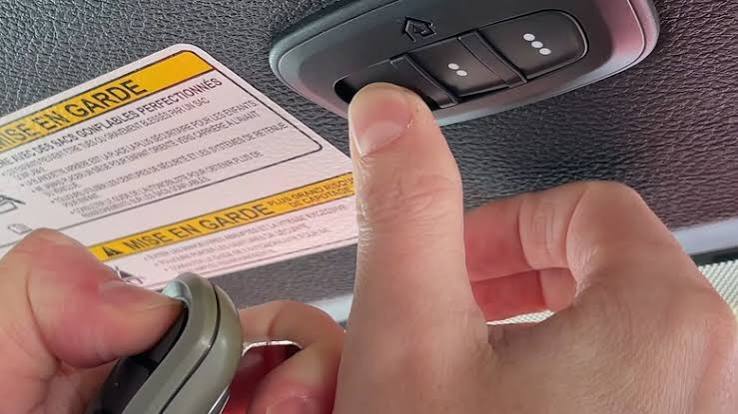
Now, let’s get to the core of the matter. Follow these steps precisely to sync your device. Note that the HomeLink buttons are located on the rearview mirror assembly.
Step 1: Clear Existing Codes (If Necessary)
If your HomeLink buttons have been used before, or if you are unsure of their status, it is best to clear them first. This ensures a clean slate for programming.
- Turn your Jeep’s ignition to the “ON” or “ACC” position. You do not need to start the engine, but the electronics must be active.
- Press and hold the two outer HomeLink buttons (Button 1 and Button 3) simultaneously.
- Hold them for about 20 seconds.
- Watch the indicator light. It will begin to flash slowly and then rapidly. Once it flashes rapidly, release the buttons.
- The memory is now cleared.
Step 2: Choose Your Button
Decide which of the three HomeLink buttons you wish to use for your garage door. For this guide, we will assume you are using Button 1.
Step 3: Initiate Programming Mode
- Press and hold the chosen HomeLink button (Button 1).
- Do not release it yet. You will see the indicator light start to flash slowly. This indicates the system is ready to learn a new signal.
Step 4: Transmit the Signal
This is the critical handshake moment between your remote and your Jeep.
- While still holding the HomeLink button in the Jeep, take your original garage door remote.
- Point the remote towards the rearview mirror in your Jeep. Ideally, keep it within 1 to 3 inches of the HomeLink buttons.
- Press and hold the button on your handheld remote that operates the garage door.
- Keep both buttons held down. Watch the HomeLink indicator light.
- The light will change from a slow flash to a rapid flash. This confirms that the Jeep has successfully received and learned the frequency and code from your remote.
- Release both buttons.
Step 5: Test the Connection
At this point, the basic programming is complete, but you need to verify it works.
- Press the programmed HomeLink button (Button 1) firmly.
- Observe your garage door. It should activate (open or close).
- If the door moves, congratulations! You have successfully programmed the device.
Troubleshooting Rolling Code Systems
If you followed the steps above and the garage door did not move, or if it moved only partially, you likely have a Rolling Code system. Most modern garage door openers (manufactured after 1996) use this security feature. The code changes every time you use the remote to prevent hacking.
To finalize the programming for rolling code systems, you must perform a “sync” at the garage door motor unit itself.
Locating the “Learn” Button
- Exit your vehicle and go to your garage door opener motor unit (the box mounted on the ceiling of your garage).
- Look for a button labeled “Learn,” “Smart,” or “Program.” It is usually located near the hanging antenna wire.
- The color of this button varies by brand (often yellow, purple, orange, or red).
Completing the Sync
- Press and release the “Learn” button on the motor unit. The indicator light on the motor will typically turn on or blink, indicating it is in pairing mode. You usually have 30 seconds to complete the next step.
- Return to your Jeep quickly.
- Press and hold the programmed HomeLink button for two seconds, then release it.
- Press and hold it again for two seconds, then release it.
- Repeat this “press-hold-release” cycle up to three times.
- The garage door should activate. If it does, the rolling code synchronization is complete.
Expert Tip: If you are unsure about the location of your “Learn” button, consult your garage door opener’s manual. Different manufacturers place this button in different locations.
Common Issues and Solutions
Even with careful following of instructions, issues can arise. Here is a quick reference table for common problems.
| Issue | Possible Cause | Solution |
|---|---|---|
| Light flashes rapidly but door doesn’t move | Rolling code not synced | Perform the “Learn” button sync at the motor unit. |
| Light does not flash at all | Dead battery or fuse issue | Check Jeep battery and HomeLink fuse; replace remote batteries. |
| Door reverses immediately after closing | Safety sensor obstruction | Check the photo-eye sensors at the bottom of your garage tracks for dirt or misalignment. |
| Intermittent operation | Signal interference | Try reprogramming closer to the garage door; avoid LED bulbs in the opener which can cause interference. |
FAQ: Frequently Asked Questions
1. Can I program multiple garage doors to my 2019 Jeep Wrangler?
Yes, the HomeLink system in your 2019 Jeep Wrangler can store up to three different devices. You can program a garage door, a gate, and even a home lighting system. Simply repeat the programming steps for each device using a different button (1, 2, or 3).
2. Why won’t my HomeLink program no matter what I do?
The most common reason is interference or distance. Ensure you are parking close to the garage door during programming. Additionally, some newer LED light bulbs in garage openers emit frequencies that interfere with RF signals. Try turning off the garage light bulb during programming to see if that resolves the issue.
3. Is it safe to program the garage door while inside the garage?
No. It is strongly recommended to park outside the garage during the initial programming and testing phases. This prevents accidental injury or damage to your vehicle if the door closes unexpectedly or if the safety sensors fail to detect the car.
4. Does programming HomeLink delete my handheld remote?
No. Programming your Jeep does not erase or disable your original handheld remote. Both the Jeep’s HomeLink system and your handheld remote will work independently to operate the garage door.
5. What if I sell my Jeep? Should I reset HomeLink?
Absolutely. For security and privacy reasons, you should always clear the HomeLink memory before selling or trading in your vehicle. Follow the “Clear Existing Codes” steps outlined in Section 3 to wipe all stored signals.
6. Can HomeLink control smart garage doors like MyQ?
Yes, but it may require additional setup. If your garage door uses a smart hub (like Chamberlain MyQ), you may need to ensure the hub is compatible with HomeLink. In some cases, you might need to use a specific “compatibility bridge” or follow specific instructions provided by the smart hub manufacturer to allow the RF signal from HomeLink to trigger the smart system.
Conclusion
Learning how to program garage door opener 2019 Jeep Wrangler is a small investment of time that yields significant daily convenience. By following the steps outlined above, you can transform your driving experience, making entry into your home smoother and more efficient. Remember, patience is key—especially when dealing with rolling code systems.
If you encountered any hurdles, refer back to the troubleshooting section or consult your vehicle’s owner’s manual for model-specific nuances. Now that your garage door is synced, take a moment to appreciate the seamless integration of technology in your daily life.
Did you find this guide helpful? Share this article with fellow Jeep enthusiasts on social media to help them master their HomeLink systems too! Happy driving!



Leave a Reply