Introduction
There is nothing quite as frustrating as sitting in your driveway, pressing the button on your car’s visor repeatedly, only to watch your garage door remain stubbornly closed. For many Mercedes GLC300 owners, integrating the vehicle with their home automation system is a priority for convenience and security. If you are wondering how to program garage door opener for Mercedes GLC300, you are not alone; this is one of the most common technical questions among luxury SUV owners.
The process is generally straightforward, but it requires precision and patience. This guide will walk you through every step, ensuring you can open your garage with the simple press of a button in your Mercedes. We will cover everything from identifying your system type to troubleshooting common connectivity issues, helping you save time and avoid unnecessary calls to service centers.
Understanding the HomeLink® System in Your GLC300
Before diving into the buttons, it is essential to understand what you are working with. Most Mercedes-Benz vehicles, including the GLC300, come equipped with HomeLink®. This is a universal transceiver that replaces handheld remotes for operating gate operators, garage door openers, home lighting, and security systems.
Why Does Compatibility Matter?
Not all garage door openers speak the same “language.” Older models use fixed codes, while newer ones use rolling codes for enhanced security. The Mercedes GLC300’s HomeLink system is designed to mimic your existing remote control. However, if you have a modern security-enabled opener (common in brands like Chamberlain, LiftMaster, or Genie), the pairing process involves an extra security step.
According to Wikipedia, HomeLink was the first integrated wireless control system in vehicles, patented in 1992, and has since become an industry standard for automotive convenience. Understanding that your car is essentially “learning” the signal from your old remote helps clarify why the process requires specific timing and repetition.
Step-by-Step Guide: How to Program Garage Door Opener for Mercedes GLC300
Programming your garage door opener involves two main phases: clearing any previous settings and then training the HomeLink module to recognize your garage door signal.
Phase 1: Clearing Previous Settings (If Necessary)
If you have previously programmed a button or bought a used GLC300, you must clear the memory first.
- Turn on your vehicle’s ignition (press the Start/Stop button twice without touching the brake pedal).
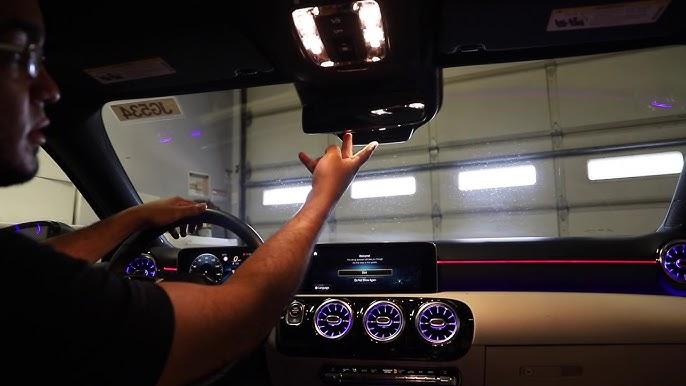
- Locate the three HomeLink buttons on your rearview mirror or overhead console.
- Press and hold the two outer buttons simultaneously.
- Keep holding them for about 20 seconds.
- Watch the indicator light. It will start flashing slowly and then change to a rapid flash.
- Once the light flashes rapidly, release the buttons. The memory is now cleared.
Phase 2: Training the HomeLink Module
This is the core process where your car learns the signal from your existing garage door remote.
- Position Your Vehicle: Park your GLC300 outside the garage, ensuring the front of the car is facing the garage door motor unit. Keep the engine running or the ignition in the “On” position to prevent the car from going to sleep during the process.
- Prepare Your Remote: Have your original handheld garage door remote ready. Ensure it has fresh batteries.
- Select a Button: Choose which of the three HomeLink buttons you want to use for the garage door.
- Initiate Learning Mode: Press and hold the chosen HomeLink button. The indicator light will begin to flash slowly. Do not release the button yet.
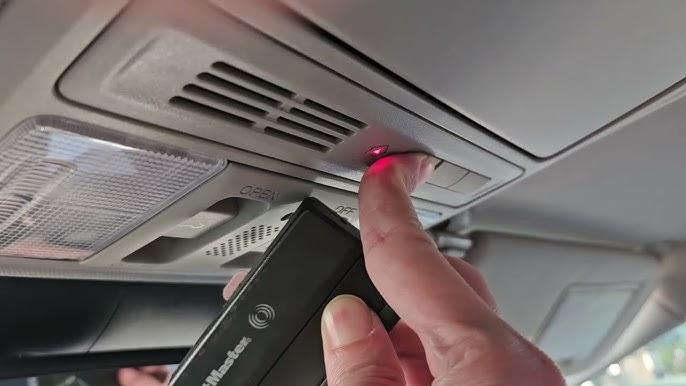
- Sync with Remote: While still holding the HomeLink button, bring your handheld remote 1–3 inches away from the HomeLink buttons on the mirror. Press and hold the button on your handheld remote.
- Wait for the Signal Change: Continue holding both buttons. The HomeLink indicator light will change from a slow flash to a rapid flash. This indicates that the frequency has been successfully learned.
- Release Buttons: Once the light flashes rapidly, release both buttons.
Phase 3: Testing the Connection
Now that the car has learned the frequency, test if it works.
- Press the programmed HomeLink button firmly and hold it for two seconds.
- Observe the garage door. If it moves, you are done!
- If the door does not move, repeat Phase 2, ensuring you are closer to the garage motor unit.
Handling Rolling Code Systems (Security+ 2.0)
If your garage door opener uses rolling code technology (most units manufactured after 1998), the steps above might not be enough. Rolling codes change every time you press the button to prevent hacking. You need to complete a final “handshake” at the motor unit.
Identifying a Rolling Code Opener
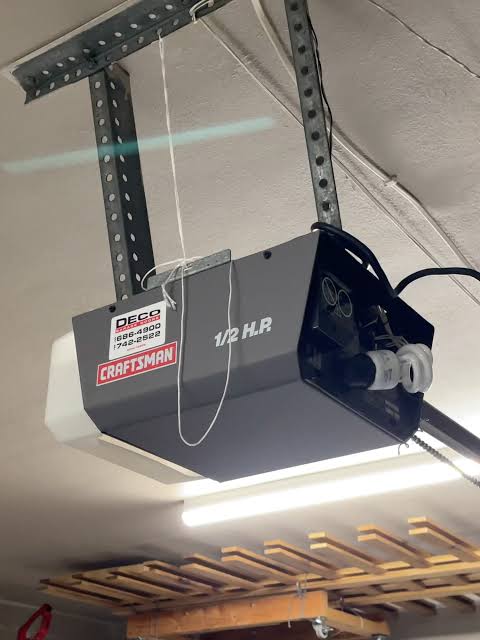
Look at your garage door motor unit. If you see a label that says “Security+,” “Learn Button,” or “Smart Button,” you likely have a rolling code system.
The Final Sync Step
- Locate the “Learn” or “Smart” button on your garage door motor unit (usually hanging from the ceiling). It is often colored yellow, purple, or red.
- Press and release the Learn button. The indicator light on the motor unit will usually turn on or blink, indicating it is in programming mode. You typically have 30 seconds to complete the next step.
- Return to your Mercedes GLC300.
- Press and hold the programmed HomeLink button for two seconds, release it, and press it again for two seconds. Repeat this cycle up to three times.
- The garage door should activate. If it does, the rolling code has been successfully synchronized.
Pro Tip: If you miss the 30-second window, simply press the Learn button on the motor unit again to reset the timer.
Troubleshooting Common Issues
Even with careful following of instructions, things can go wrong. Here is a breakdown of common problems and solutions.
| Issue | Possible Cause | Solution |
|---|---|---|
| Light flashes slowly but never fast | Interference or weak remote battery | Replace remote batteries; move car closer to the door. |
| Door moves partially then stops | Safety sensors blocked | Check the infrared sensors at the bottom of the garage tracks for dirt or obstruction. |
| HomeLink button does nothing | Memory not cleared | Perform the “Clearing Previous Settings” step again before reprogramming. |
| Works intermittently | Distance too great | Reprogram while parked directly under the garage door opener motor. |
Expert Insight on Interference
LED bulbs in your garage door opener can sometimes cause radio frequency interference. If you recently switched to LED bulbs in your garage opener unit and the HomeLink stopped working, try reverting to incandescent bulbs temporarily to test if this is the culprit. Many modern openers are shielded against this, but older units are sensitive.
Frequently Asked Questions (FAQ)
1. Can I program multiple garage doors to my Mercedes GLC300?
Yes, the HomeLink system in the GLC300 typically has three separate buttons. You can program each button to a different device, such as two different garage doors and a gate, or a garage door and a home lighting system. Each button must be programmed individually using the steps outlined above.
2. What if I lost my original garage door remote?
You cannot program HomeLink without an existing working remote or access to the motor unit’s “Learn” button. If you lost your remote, you will need to buy a universal replacement remote compatible with your garage door brand, program that remote to the door first, and then use it to teach the Mercedes HomeLink system.
3. Does programming HomeLink void my garage door warranty?
No, programming a universal transmitter like HomeLink does not void your garage door opener’s warranty. It functions exactly like any other approved remote control. However, always consult your garage door manual if you are concerned about specific proprietary security features.
4. Why does my garage door close immediately after opening via HomeLink?
This is usually a sign that the rolling code synchronization was incomplete. The car sent the code, the door opened, but the car didn’t receive the confirmation handshake. Go back to the motor unit, press the “Learn” button, and repeat the press-release-press cycle in the car to finalize the security link.
5. Can I reset HomeLink if I sell my car?
Absolutely. It is highly recommended to clear the HomeLink memory before selling or trading in your GLC300. Follow the “Phase 1: Clearing Previous Settings” instructions in this guide to wipe all stored codes, ensuring your new owner cannot access your garage.
Conclusion
Learning how to program garage door opener for Mercedes GLC300 is a small task that yields significant daily convenience. By understanding whether you have a fixed-code or rolling-code system, you can troubleshoot effectively and ensure a secure connection. Remember, patience is key—especially when syncing the rolling codes at the motor unit.
Once set up, you will enjoy the seamless integration of your home and vehicle, a hallmark of the Mercedes-Benz ownership experience. If you found this guide helpful, please share it with fellow Mercedes owners on social media or leave a comment below if you have any unique tips or questions. Safe driving and happy garaging!
Leave a Reply