Introduction
Struggling to sync your garage door with your Ram 1500’s built-in HomeLink system? You’re not alone. Many Ram owners face confusion when trying to program garage door opener on Ram 1500 vehicles, especially after purchasing a new truck or replacing their garage door opener. Whether you drive a 2019, 2020, 2021, 2022, 2023, 2024, or 2025 Ram 1500, this comprehensive guide will walk you through the exact steps needed to get your HomeLink system working perfectly. No more standing in the rain waiting for your garage door to open!
What Is HomeLink and Why Does Your Ram 1500 Have It?
HomeLink is a universal transceiver system integrated into many modern vehicles, including the Ram 1500. This technology allows your truck to communicate with garage door openers, gate operators, and even home lighting systems. According to Wikipedia, HomeLink was first introduced in 1992 and has since become the industry standard for vehicle-based home automation control.
The system works by learning the radio frequency signal from your existing garage door opener remote. Once programmed, your Ram 1500 essentially becomes a remote control itself, eliminating the need to carry separate remotes or key fobs.
Benefits of Using HomeLink in Your Ram 1500
- Convenience: No more searching for lost garage remotes
- Security: Rolling code technology prevents unauthorized access
- Versatility: Controls up to three different devices
- Integration: Works seamlessly with your vehicle’s existing systems
Before You Begin: Essential Preparation Steps
Before attempting to program your garage door opener, gather these items and complete these preliminary checks:
What You’ll Need
- Your Ram 1500 (ensure the battery is fully charged)
- Existing garage door remote (the one that currently works)
- A ladder (if your garage door opener motor is mounted high)
- Patience (the process typically takes 10-15 minutes)
Important Pre-Programming Checks
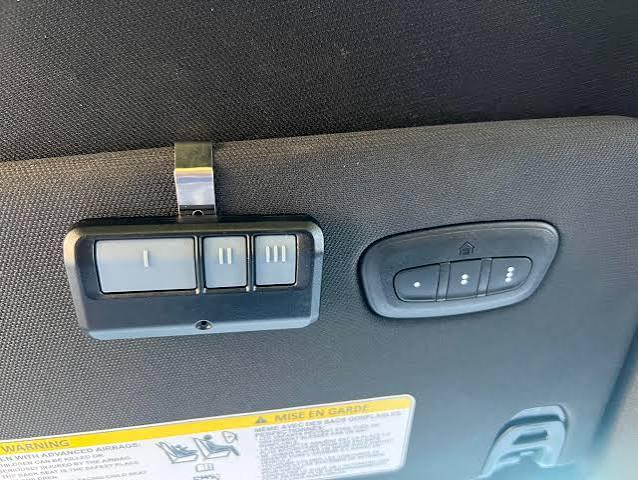
- Verify your Ram 1500 has the HomeLink system (look for three buttons on the rearview mirror or overhead console)
- Ensure your garage door opener is functioning properly with its original remote
- Check that your vehicle is parked outside the garage with the engine running or in accessory mode
- Clear any previously programmed codes if you’re reprogramming
Pro Tip: If you’ve recently replaced your garage door opener, make sure it’s fully installed and tested before attempting to program it with your Ram 1500.
Step-by-Step: How to Program Garage Door Opener on Ram 1500
The programming process varies slightly depending on your Ram 1500’s model year and whether your garage door opener uses fixed codes or rolling codes. Here’s the universal method that works for most scenarios:
Step 1: Clear Existing HomeLink Memory
Before programming a new device, clear any existing codes:
- Press and hold the two outer HomeLink buttons simultaneously
- Continue holding for approximately 20 seconds
- Wait until the indicator light changes from solid to rapidly flashing
- Release both buttons
This ensures no conflicting codes remain in the system.
Step 2: Position Your Vehicle Correctly
- Park your Ram 1500 outside the garage, facing the garage door opener motor
- Keep the engine running or turn the ignition to accessory mode
- Ensure you’re within 10-15 feet of the garage door opener unit
Step 3: Initiate Programming Mode
- Choose which HomeLink button you want to use (1, 2, or 3)
- Press and hold your chosen HomeLink button
- While holding the HomeLink button, bring your existing garage door remote within 1-3 inches of the HomeLink buttons
- Press and hold the button on your garage door remote that operates the door
Step 4: Complete the Learning Process
Continue holding both buttons until the HomeLink indicator light changes:
- For fixed-code systems: The light will change from slow blinking to rapid blinking (approximately 20-30 seconds)
- For rolling-code systems: The light pattern may vary; consult your garage door opener manual
Once the light changes, release both buttons.
Step 5: Test the Programming
- Press the programmed HomeLink button firmly
- Hold for 1-2 seconds
- Observe if the garage door responds
If the door doesn’t respond immediately, proceed to Step 6.
Step 6: Program Rolling Code Openers (If Applicable)
Many modern garage door openers use rolling code technology for enhanced security. If your initial programming didn’t work:
- Locate the “Learn” or “Smart” button on your garage door opener motor unit
- Press and release this button (you typically have 30 seconds to complete the next step)
- Return to your Ram 1500 within 30 seconds
- Press and hold the programmed HomeLink button for 2 seconds, release, then press again for 2 seconds
- Repeat this press-hold-release cycle up to three times
The garage door should now respond to your HomeLink button.
Troubleshooting Common Programming Issues
Even with careful following of instructions, problems can arise. Here are solutions to the most common issues:
| Problem | Possible Cause | Solution |
|---|---|---|
| HomeLink light doesn’t flash | Weak vehicle battery | Charge or replace battery |
| Garage door doesn’t respond | Wrong frequency | Verify compatibility (most work on 315-390 MHz) |
| Intermittent operation | Signal interference | Reprogram away from electronic devices |
| Can’t clear memory | Incorrect button combination | Hold both outer buttons for full 20 seconds |
When to Contact Professional Help
Consider seeking assistance if:
- You’ve attempted programming multiple times without success
- Your garage door opener is older than 15 years (may need replacement)
- You suspect electrical issues with your Ram 1500’s HomeLink system
Model-Year Specific Considerations
While the core programming process remains consistent across Ram 1500 generations, be aware of these variations:
2019-2021 Ram 1500
- HomeLink buttons located on rearview mirror
- Standard 3-button configuration
- Compatible with most garage door openers manufactured after 1995
2022-2025 Ram 1500
- Enhanced HomeLink system with faster programming
- Some models feature HomeLink with auto-reverse capability
- Improved compatibility with smart garage door systems
Note: Always consult your specific owner’s manual for model-year variations, as Ram occasionally updates the HomeLink system between production runs.
FAQ Section
Q1: How long does it take to program a garage door opener on a Ram 1500?
A: The entire process typically takes 10-15 minutes for first-time programming. If you’re reprogramming or dealing with a rolling code system, allow an additional 5-10 minutes. Having your existing remote handy significantly speeds up the process.
Q2: Can I program multiple garage door openers to my Ram 1500?
A: Yes! The HomeLink system in your Ram 1500 can store up to three different devices. This means you can program your home garage, a vacation property garage, and even a gated community entrance. Each button corresponds to one device.
Q3: Why won’t my HomeLink system program with my newer garage door opener?
A: Newer garage door openers often use advanced rolling code technology or encryption that may require additional steps. First, ensure you’re completing the “Learn button” step on your garage door motor unit. If problems persist, check if your garage door opener manufacturer offers a HomeLink compatibility kit or firmware update.
Q4: Will programming my garage door opener erase other HomeLink settings?
A: No. Each of the three HomeLink buttons operates independently. Programming or reprogramming one button won’t affect the other two. However, clearing the entire HomeLink memory (as described in Step 1) will erase all programmed devices.
Q5: What should I do if my Ram 1500’s HomeLink buttons aren’t responding at all?
A: First, check your vehicle’s battery strength, as weak batteries can affect electronic systems. Next, verify that you’re pressing the buttons firmly for 1-2 seconds. If the issue persists, consult your Ram dealership, as there may be a fuse issue or software update required for your HomeLink module.
Q6: Is it safe to program my garage door opener myself?
A: Absolutely! Programming your HomeLink system is completely safe and designed for owner completion. The process involves no electrical work or modifications to your vehicle. Just ensure your vehicle is in park with the parking brake engaged during programming for safety.
Conclusion
Learning how to program garage door opener on Ram 1500 doesn’t have to be complicated. With this step-by-step guide, you can successfully sync your garage door with your truck’s HomeLink system in under 15 minutes. Remember to prepare properly, follow each step carefully, and don’t hesitate to repeat the process if needed.
The convenience of opening your garage door directly from your Ram 1500 is invaluable—especially during bad weather or when your hands are full. Now that you’ve mastered this skill, you’ll wonder how you ever lived without it!
Did this guide help you successfully program your garage door opener? Share this article with fellow Ram owners on Facebook, Twitter, or Reddit who might be struggling with the same issue. Your share could save someone else 15 minutes of frustration!
Have questions or tips about your own HomeLink programming experience? Drop a comment below—we’d love to hear from you!



Leave a Reply