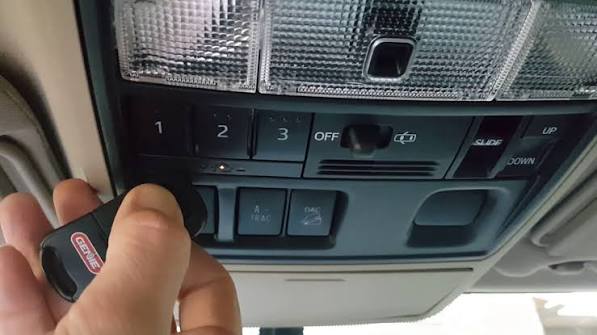
Struggling to sync your garage door with your Toyota 4Runner? You’re not alone. Many 4Runner owners find themselves frustrated when their built-in HomeLink system won’t connect to their garage door opener. Learning how to program garage door opener on Toyota 4Runner doesn’t have to be complicated. With the right steps and a bit of patience, you’ll have seamless garage access from your vehicle in no time.
What Is HomeLink and Why Does Your 4Runner Have It?
HomeLink is a universal transceiver system integrated into many Toyota vehicles, including the 4Runner. This technology allows your vehicle to communicate with various radio-frequency devices, primarily garage door openers, but also gate operators, home lighting systems, and security alarms.
According to Wikipedia, HomeLink was first introduced in 1992 and has since become the most widely used universal transmitter in North America, compatible with over 95% of garage door openers manufactured since 1990.
Your Toyota 4Runner typically features three programmable HomeLink buttons located on the overhead console near the rearview mirror. These buttons can store different devices, giving you convenient control over multiple systems from one central location in your vehicle.
What Tools and Information Do You Need Before Starting?
Before diving into the programming process, gather these essential items:
- Your Toyota 4Runner with the HomeLink system
- Your garage door remote control (the original handheld remote)
- A ladder or step stool to reach your garage door opener motor unit
- Access to your garage door opener’s “Learn” or “Smart” button
Pro tip: Take a photo of your garage door opener model number and brand before starting. This information proves invaluable if you encounter compatibility issues or need to consult your opener’s manual later.
Make sure your 4Runner is parked outside the garage with the engine running or in accessory mode. The HomeLink system requires power to complete the programming sequence successfully.
Step-by-Step Guide: How to Program Garage Door Opener on Toyota 4Runner
Step 1: Clear Existing HomeLink Memory (If Necessary)
If your HomeLink buttons have been previously programmed, clear them first:
- Press and hold the two outer HomeLink buttons simultaneously
- Continue holding for approximately 20 seconds
- Watch for the indicator light to flash rapidly, then turn off
- Release both buttons when the light changes
This reset ensures no conflicting codes interfere with your new programming attempt.
Step 2: Position Your Vehicle Correctly
Park your 4Runner directly in front of your garage door, maintaining a distance of 1-3 feet. Keep the engine running throughout the entire process to prevent power interruptions.
Step 3: Initiate Programming Mode
Choose which HomeLink button you want to program (1, 2, or 3):
- Press and hold your chosen HomeLink button
- While holding it, bring your garage door remote 1-3 inches from the HomeLink buttons
- Press and hold the button on your garage remote that operates the door
- Continue holding both buttons until the HomeLink indicator light changes from slow to rapid flashing
- This typically takes 20-30 seconds
Release both buttons once you see the rapid flashing pattern.
Step 4: Program the Garage Door Opener Unit
Now you need to teach your actual garage door opener to recognize the HomeLink signal:
- Locate the “Learn,” “Smart,” or “Program” button on your garage door opener motor unit (usually found on the back or side)
- Press this button once – an indicator light should illuminate or blink
- You typically have 30 seconds to complete the next step
- Return to your 4Runner and press the programmed HomeLink button three times in succession
- Wait 2-3 seconds between each press
Your garage door should activate during this process, confirming successful programming.
Step 5: Test the Connection
Press the programmed HomeLink button once more. Your garage door should open or close smoothly. If it doesn’t respond, repeat Steps 3 and 4, ensuring you’re following the timing precisely.
Troubleshooting Common Programming Issues
Even with careful execution, problems can arise. Here are solutions to frequent challenges:
| Problem | Possible Cause | Solution |
|---|---|---|
| HomeLink won’t enter programming mode | Weak vehicle battery | Ensure engine is running |
| Remote doesn’t trigger HomeLink learning | Distance too great | Move remote within 1-3 inches |
| Garage door doesn’t respond after programming | Rolling code incompatibility | Check if opener uses rolling codes |
| Indicator light doesn’t change | Button not held long enough | Hold for full 20-30 seconds |
Rolling Code Systems: A Special Consideration
Many modern garage door openers use rolling code technology for enhanced security. If your opener has a rolling code system (common in brands like Chamberlain, LiftMaster, and Genie), you may need additional steps:
- After completing Step 4 above, locate the learn button on your opener again
- Press and release it
- Within 30 seconds, press and hold the HomeLink button in your 4Runner for 2 seconds, release, then press again for 2 seconds
- Repeat this cycle up to three times until the door responds
Note: Some rolling code systems require you to reprogram all existing remotes after adding HomeLink. Consult your garage door opener manual for specific instructions.
Which Toyota 4Runner Models Include HomeLink?
HomeLink availability varies by model year and trim level:
- 2010-2015 4Runners: Available on Limited and Trail editions
- 2016-2020 4Runners: Standard on Limited, optional on SR5 Premium
- 2021-2026 4Runners: Available on most trims except base SR models
Check your owner’s manual or look for the three-button panel near your rearview mirror to confirm your vehicle has HomeLink capability.
Alternative Methods If Standard Programming Fails
If the standard method doesn’t work, try these alternatives:
Method 1: Direct Programming Without Remote Some newer garage door openers allow direct programming without using the handheld remote. Consult your opener’s manual for specific instructions.
Method 2: Professional Assistance Contact a certified HomeLink installer or your Toyota dealership. They have specialized equipment to diagnose and resolve compatibility issues.
Method 3: Universal Receiver Installation For older garage door openers incompatible with HomeLink, consider installing a universal receiver kit that bridges the communication gap.
Frequently Asked Questions
How long does it take to program a garage door opener on a Toyota 4Runner?
The entire process typically takes 10-15 minutes for first-time users. Once familiar with the steps, experienced users can complete programming in under 5 minutes. Factors affecting timing include garage door opener type, whether clearing previous codes is necessary, and troubleshooting any issues that arise.
Can I program multiple garage doors to my Toyota 4Runner?
Yes! Your 4Runner’s HomeLink system features three separate buttons, allowing you to program up to three different devices. This could include multiple garage doors, a gate operator, and even home lighting systems. Each button operates independently, so programming one doesn’t affect the others.
Why won’t my HomeLink system save the garage door code?
Several factors could prevent code saving: insufficient power (ensure engine is running), interference from other electronic devices, depleted batteries in your garage remote, or attempting to program while moving. Additionally, some garage door openers have time limits for programming – if you exceed the 30-second window at the opener unit, you’ll need to restart the process.
Is HomeLink programming different for newer vs. older 4Runner models?
The fundamental programming process remains consistent across model years. However, newer models (2020+) may feature enhanced HomeLink systems with faster programming sequences and better compatibility with modern rolling code systems. Older models might require more precise timing and additional attempts. Always refer to your specific year’s owner’s manual for model-specific guidance.
What should I do if my garage door opener uses encrypted rolling codes?
Encrypted rolling code systems require the additional synchronization steps outlined in the rolling code section above. If standard methods fail, contact your garage door opener manufacturer’s customer support. Many offer specific HomeLink integration guides for their products. In some cases, you may need to update your opener’s firmware or install a compatibility module.
Can I erase just one HomeLink button without clearing all three?
Unfortunately, no. The HomeLink system requires clearing all programmed buttons simultaneously. When you reset the system, all three buttons lose their stored codes. You’ll need to reprogram any devices previously saved to the other buttons. Plan accordingly and have all your remotes ready before starting the reset process.
Final Thoughts
Learning how to program garage door opener on Toyota 4Runner empowers you with convenient, secure garage access directly from your vehicle. While the process might seem intimidating initially, following these systematic steps ensures success for most users. Remember to exercise patience, follow timing instructions carefully, and don’t hesitate to consult your specific manuals for model-dependent variations.
Once programmed, you’ll appreciate the convenience of never fumbling for remotes again – especially during rain, snow, or when carrying groceries. Your 4Runner’s HomeLink system represents Toyota’s commitment to integrating practical technology that enhances daily life.
Did this guide help you successfully program your garage door opener? Share your experience on social media and help fellow 4Runner owners master their HomeLink systems!



Leave a Reply