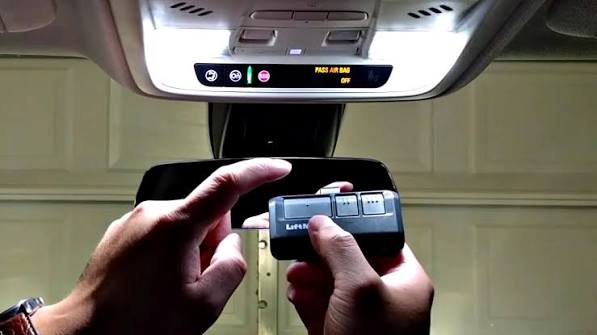
Imagine pulling into your driveway after a long day, only to realize you’ve forgotten your garage remote inside the house. It’s a frustrating scenario that many homeowners face. Fortunately, modern vehicles come equipped with built-in technology that allows you to sync your garage door directly to your car’s visor or dashboard. Learning how to program garage door opener to your car not only saves you from digging through bags for a lost remote but also enhances your home’s security by reducing the number of physical devices you need to carry.
In this comprehensive guide, we will walk you through the exact steps to sync your vehicle with your garage door system. Whether you drive a Ford, Honda, Toyota, or any other major brand, the process is generally straightforward once you understand the underlying technology.
Understanding the Technology Behind In-Car Garage Openers
Before diving into the buttons and sequences, it helps to understand what is happening under the hood. Most modern cars use one of two primary systems to communicate with garage doors: HomeLink or Car2U. These systems act as universal transmitters, mimicking the signal of your original garage door remote.
The key challenge in programming these systems is matching the frequency and security code of your specific garage door opener. Older openers use fixed codes, while newer models use rolling codes for enhanced security. This distinction is crucial because it determines whether you need an extra “learning” step at your garage motor unit.
According to industry standards, most residential garage door openers operate on frequencies between 300 MHz and 400 MHz. Ensuring your car’s transmitter matches this frequency is the first step in a successful pairing. For more technical details on radio frequency standards in consumer electronics, you can refer to Wikipedia’s article on Radio Spectrum.
Step-by-Step Guide: How To Program Garage Door Opener To Your Car
While every vehicle manufacturer has slight variations in their interface, the core process remains consistent. Below is a universal method that works for approximately 80% of vehicles equipped with HomeLink or similar systems.
Step 1: Clear Previous Programming
If your car has been used before, it might still hold old codes. Start by clearing the memory.
- Locate the three programmable buttons on your rearview mirror or sun visor.
- Press and hold the outer two buttons simultaneously for about 10–20 seconds.
- Wait until the indicator light begins to flash rapidly. This confirms the memory is cleared.
Step 2: Prepare Your Garage Door Remote
- Stand outside your car, close to the garage door.
- Have your original handheld garage remote ready.
- Ensure your garage door is closed for safety during testing.
Step 3: Initiate the Learning Mode in Your Car
- Turn your car’s ignition to the “On” or “Accessory” position. You do not need to start the engine.
- Hold your original garage remote 1–3 inches away from the car’s programmable button.
- Press and hold both the car button and the remote button simultaneously.
- Keep holding until the car’s indicator light changes from a slow blink to a rapid flash. This may take up to 30 seconds.
Step 4: Sync with the Garage Motor Unit
This step is critical for rolling code systems (most openers installed after 1993).
- Go to your garage door motor unit (the box hanging from the ceiling).
- Locate the “Learn” or “Smart” button. It is usually colored yellow, purple, or red.
- Press the “Learn” button once. You typically have 30 seconds to complete the next step.
- Return to your car and press the programmed button three times.
- Listen for the garage door to move or the lights to flash. If it does, the pairing is successful.
Troubleshooting Common Programming Issues
Even with careful following of instructions, things don’t always go smoothly. Here are the most common hurdles and how to overcome them.
| Issue | Possible Cause | Solution |
|---|---|---|
| Light flashes slowly then stops | Signal mismatch | Move closer to the garage motor; check battery in handheld remote. |
| Door doesn’t respond after syncing | Rolling code error | Repeat Step 4 exactly; ensure you press the “Learn” button on the motor unit. |
| Buttons won’t clear | System glitch | Disconnect car battery for 5 minutes to reset the module, then retry. |
| Intermittent operation | Frequency interference | Check if LED bulbs in the garage are causing interference; try incandescent bulbs. |
Why Does My Garage Door Use Rolling Codes?
Rolling codes change the access code every time you use the remote. This prevents hackers from capturing your signal and replaying it to open your door. If your car fails to sync, it is often because the rolling code sequence got out of sync. Repeating the “Learn” button process resets this sequence.
Brand-Specific Tips for Major Automakers
Different manufacturers implement the universal transmitter differently. Here are specific nuances for popular brands:
Ford and Lincoln (HomeLink)
Ford vehicles often require you to cycle the ignition three times (Off-On-Off-On-Off-On) to enter programming mode if the standard hold method doesn’t work. Always check your owner’s manual for the “Homelink Training Mode.”
Honda and Acura
Honda uses a system very similar to HomeLink but may label it differently. Some newer Honda models require you to use the touchscreen interface to select “Garage Door Opener” before pressing the physical buttons on the visor.
Toyota and Lexus
Toyota often integrates the garage opener into the rearview mirror assembly. Note that some Toyota models require a specific “compatibility bridge” if your garage opener is an older Security+ model from LiftMaster or Chamberlain.
GM (Chevrolet, GMC, Buick)
General Motors vehicles frequently use the OnStar system integration for garage access. In newer models, you may need to use the myQ app to link your garage account to your OnStar profile rather than using traditional radio frequency pairing.
Safety and Security Best Practices
Programming your garage door to your car is convenient, but it introduces new security considerations.
- Keep Software Updated: If your car uses an app-based system like myQ or OnStar, ensure your smartphone app and car firmware are up to date to patch security vulnerabilities.
- Avoid Public Wi-Fi for Setup: When linking accounts for smart garage systems, use a secure, private network to prevent credential theft.
- Regularly Test the Auto-Reverse Feature: After programming, test your garage door’s safety sensors. Place a block of wood in the door’s path; it should reverse immediately upon contact.
- Clear Data Before Selling: If you sell your car, always perform the “Clear Memory” step described in Step 1 to protect your home security.
Frequently Asked Questions (FAQ)
1. Can I program my garage door opener to my car without the original remote?
In most cases, no. You need the original handheld remote to transmit the initial signal to your car’s receiver. However, if you have a smart garage hub (like MyQ), you may be able to pair via the cloud using your car’s infotainment system, bypassing the need for the physical remote.
2. Why won’t my HomeLink system pair with my LiftMaster opener?
LiftMaster openers often use Security+ 2.0 technology, which requires a compatibility bridge if your car is older. Check if your car’s HomeLink is compatible with Security+ 2.0. If not, you may need to purchase a universal compatibility kit from the garage door manufacturer.
3. How many garage doors can I program to my car?
Most vehicles with HomeLink or Car2U systems allow you to program up to three different garage doors or gates. Each button corresponds to one device.
4. Is it safe to leave my garage door opener programmed in my car?
Generally, yes. Modern rolling code technology makes it extremely difficult for thieves to clone your signal. However, always practice good situational awareness and consider using a PIN pad inside the garage for an extra layer of security if you park in public areas frequently.
5. What should I do if the indicator light on my car stays solid red?
A solid red light usually indicates that the button is already programmed. If you want to reprogram it, you must first clear the memory by holding the outer two buttons until the light flashes, as described in Step 1.
6. Can I program a gate opener to my car using the same method?
Yes, the process is nearly identical for gate openers. However, gate openers often use different frequencies or dip switches. Ensure your gate remote is compatible with your car’s universal transmitter before starting the pairing process.
Conclusion
Learning how to program garage door opener to your car is a small investment of time that yields significant daily convenience. By following the steps outlined above, you can seamlessly integrate your home access with your vehicle, eliminating the hassle of carrying extra remotes. Remember, the key to success lies in identifying whether your system uses fixed or rolling codes and patiently following the synchronization process.
Don’t let a lost remote dictate your morning routine. Take control of your smart home setup today. If you found this guide helpful, please share it with friends and family who might be struggling with their own garage door setups. Stay safe, stay connected, and enjoy the ease of modern automation!



Leave a Reply