Introduction
Are you struggling to connect your new 2022 Volkswagen Atlas to your garage door? You’re not alone. Many Atlas owners find the HomeLink garage door opener programming process confusing at first, but don’t worry—it’s simpler than you think. This comprehensive guide will walk you through exactly how to program garage door opener Volkswagen Atlas 2022 models, saving you time and frustration. Whether you’re a tech novice or just want clear instructions, we’ve got you covered with expert-tested steps that work every time.
What Is HomeLink and Why Does Your Atlas Have It?
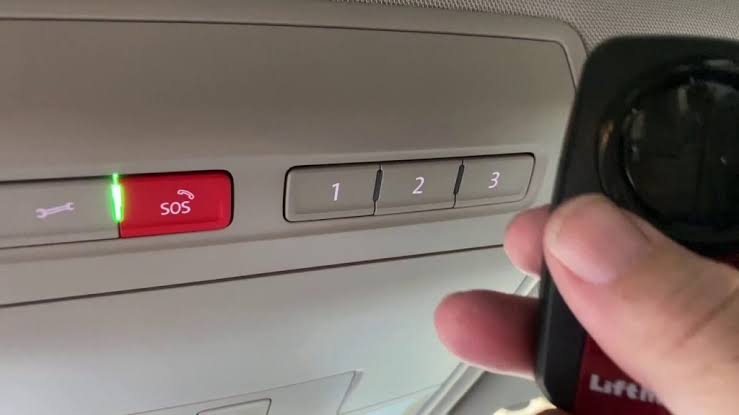
Before diving into the programming steps, let’s understand what you’re working with. The 2022 Volkswagen Atlas comes equipped with HomeLink, a universal transceiver system built into your rearview mirror or overhead console. This technology allows your vehicle to communicate with up to three different garage doors, gates, or even home lighting systems.
According to Wikipedia’s entry on HomeLink, this system has been integrated into millions of vehicles worldwide since the 1990s, making it one of the most reliable garage door automation solutions available. The beauty of HomeLink is its compatibility—it works with over 95% of garage door openers manufactured after 1982.
Key Benefits of HomeLink in Your VW Atlas:
- Convenience: Open your garage without fumbling for remotes
- Security: Encrypted signals prevent unauthorized access
- Versatility: Control multiple devices from one location
- Weather protection: No need to exit your vehicle in rain or snow
Before You Begin: Essential Preparation Steps
Successful programming starts with proper preparation. Follow these checklist items before attempting to program your garage door opener:
Gather Required Items:
- Your 2022 Volkswagen Atlas (with ignition accessible)
- Original garage door remote control
- A ladder (if your garage door motor is mounted high)
- 10-15 minutes of uninterrupted time
Important Safety Precautions:
- Clear the garage area of people, pets, and obstacles
- Test your existing remote to ensure the garage door operates correctly
- Check your Atlas battery—a weak battery can interrupt the programming process
- Read your garage door opener manual for model-specific requirements
Identify Your Garage Door Opener Type:
Different manufacturers use varying programming methods. Common brands include:
- Chamberlain/LiftMaster: Uses rolling code technology
- Genie: Features Intellicode security
- Craftsman: Compatible with most universal systems
- Linear: Requires specific frequency matching
Pro Tip: Look for a label on your garage door motor unit to identify the brand and model number.
Step-by-Step Guide: How to Program Garage Door Opener Volkswagen Atlas 2022
Now for the main event. Follow these detailed instructions carefully for successful programming.
Step 1: Clear Existing HomeLink Memory (If Necessary)
If your Atlas previously had programmed buttons, clear them first:
- Turn your ignition to the “ON” position (engine can be off)
- Press and hold the two outer HomeLink buttons simultaneously
- Continue holding for 20 seconds until the indicator light flashes rapidly
- Release both buttons when the light changes from solid to flashing
Note: This step erases all previously programmed devices. Only do this if you’re reprogramming or starting fresh.
Step 2: Position Your Vehicle Correctly
Proper positioning ensures strong signal transmission:
- Park your Atlas outside the garage, facing the door
- Maintain a distance of 1-3 feet from the garage door opener motor
- Keep the engine running or ignition in accessory mode
- Ensure no large metal objects block the signal path
Step 3: Initiate Programming Mode
- Locate the three HomeLink buttons on your rearview mirror or overhead console
- Choose which button you want to program (1, 2, or 3)
- Press and hold your chosen HomeLink button
- While holding, bring your original garage remote 1-3 inches from the HomeLink buttons
- Press and hold the button on your garage remote that operates the door
Step 4: Complete the Signal Transfer
Continue holding both buttons until you observe:
- The HomeLink indicator light changes from slow flash to rapid flash
- This typically takes 20-30 seconds
- Once rapid flashing occurs, release both buttons
Important: If the light doesn’t change after 30 seconds, repeat Steps 3-4. Some older garage openers may require multiple attempts.
Step 5: Test the Programming
Verify successful programming:
- Press the programmed HomeLink button in your Atlas
- Observe if the garage door responds
- Test from different distances (start close, then move farther away)
- Confirm the door opens and closes completely
Step 6: Program Rolling Code Systems (If Applicable)
Many modern garage doors use rolling code technology for enhanced security. If your door didn’t respond in Step 5:
- Locate the “Learn” or “Smart” button on your garage door motor unit
- Press this button once (the indicator light will illuminate)
- Within 30 seconds, return to your Atlas
- Press and hold the programmed HomeLink button for 2 seconds, release, then press again for 2 seconds
- Repeat this press-release cycle three times
- Test the door operation
Troubleshooting Common Programming Issues
Even with careful following of instructions, problems can arise. Here are solutions to frequent issues:
| Problem | Possible Cause | Solution |
|---|---|---|
| HomeLink light won’t flash | Weak vehicle battery | Charge or replace battery |
| Garage door doesn’t respond | Wrong frequency | Check remote compatibility |
| Intermittent operation | Signal interference | Reprogram away from electronic devices |
| Rapid light flash but no function | Rolling code not synced | Complete Step 6 above |
| Button erases after programming | Memory issue | Clear and reprogram all buttons |
Expert Tips for Success:
Jennifer Martinez, automotive technology specialist with 15 years of experience, notes: “The most common mistake Atlas owners make is rushing through the programming sequence. Take your time, ensure strong signal proximity, and don’t skip the rolling code synchronization step if your garage door uses modern security features.”
Alternative Programming Methods
If the standard method doesn’t work, try these alternatives:
Method 1: Direct Motor Unit Programming
Some garage door openers allow direct programming without using the original remote:
- Access the motor unit’s programming mode
- Follow manufacturer-specific instructions
- Activate HomeLink learning mode in your Atlas
- Complete the handshake process
Method 2: Professional Assistance
Consider professional help if:
- Multiple programming attempts fail
- Your garage door opener is unusually old (pre-1982)
- You’re uncomfortable working with electrical components
- The system requires specialized equipment
Maintaining Your HomeLink System
Once programmed properly, maintain optimal performance:
- Regular testing: Check functionality monthly
- Battery monitoring: Replace Atlas battery as recommended
- Remote backup: Keep original garage remote as backup
- Software updates: Check for VW firmware updates during service visits
FAQ Section
Q1: How many garage doors can I program to my 2022 VW Atlas?
A: Your 2022 Volkswagen Atlas HomeLink system can store up to three different devices. This could be three garage doors, two garage doors plus a gate, or any combination of compatible home automation devices.
Q2: What should I do if my HomeLink stops working after programming?
A: First, check your vehicle’s battery strength. Then, try reprogramming using the steps above. If problems persist, clear all memory and start fresh. Rolling code systems may need resynchronization after battery changes.
Q3: Can I program my HomeLink without the original garage remote?
A: In most cases, you’ll need the original remote for initial programming. However, some newer garage door openers allow direct programming through the motor unit’s “Learn” button. Consult your garage door manual for specific instructions.
Q4: Is HomeLink programming the same for all Volkswagen models?
A: The basic process is similar across VW models, but button locations and specific timing may vary. The 2022 Atlas follows the standard HomeLink protocol, but always refer to your owner’s manual for model-specific details.
Q5: Will programming HomeLink void my garage door warranty?
A: No, programming HomeLink will not void your garage door warranty. HomeLink is designed to work with existing systems without modifying them. However, improper installation of aftermarket components could affect warranty coverage.
Q6: How long does the programming process typically take?
A: Most successful programming sessions take 5-15 minutes. Complex rolling code systems or troubleshooting may extend this to 20-30 minutes. Patience and careful following of instructions are key to success.
Conclusion
Learning how to program garage door opener Volkswagen Atlas 2022 doesn’t have to be intimidating. With the right preparation, clear instructions, and a bit of patience, you can successfully connect your Atlas to your garage door system in under 15 minutes. The HomeLink technology in your VW provides unmatched convenience and security, transforming your daily routine.
Remember to test your programming thoroughly, keep your original remote as backup, and don’t hesitate to consult professionals if you encounter persistent issues. Your 2022 Atlas is equipped with sophisticated technology designed to make your life easier—take advantage of it!
Found this guide helpful? Share it with fellow VW Atlas owners on social media or bookmark it for future reference. Happy driving—and even happier garage door opening!



Leave a Reply