Introduction
Is your new Genie remote sitting useless in your pocket because it won’t open your garage? You are not alone. Many homeowners struggle with the initial setup of smart garage accessories, often fearing they might accidentally reset their entire system. Knowing how to program Genie garage door opener GITR-3 correctly is essential for restoring convenience and security to your daily routine without the hassle of calling a professional technician.
In this guide, we will walk you through the exact steps to sync your GITR-3 remote with your Genie opener. We will cover troubleshooting tips, safety precautions, and answers to common questions to ensure you get it right the first time.
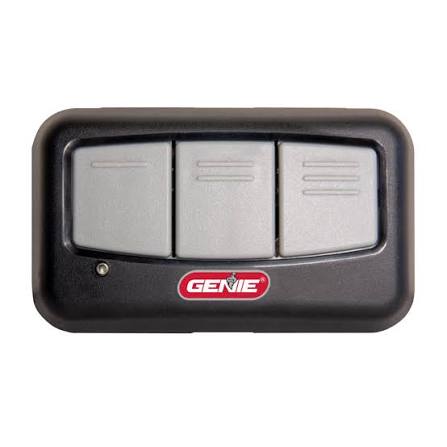
Understanding the Genie GITR-3 Remote
Before diving into the programming process, it is helpful to understand what you are working with. The Genie GITR-3 is a three-button universal remote designed to work with most Genie garage door openers manufactured after 1997. It utilizes Genie’s Intellicode® technology, which uses rolling code encryption. This means the code changes every time you use the remote, preventing hackers from intercepting the signal to open your garage.
Unlike older fixed-code remotes, the GITR-3 requires a specific “learning” process to pair with your opener’s main logic board. This ensures that only authorized devices can operate your door.
Key Features of the GITR-3
- Three Buttons: Allows control of up to three different garage doors or gate operators.
- Compact Design: Fits easily in visors, pockets, or keychains.
- Battery Efficient: Uses a single CR2032 lithium battery, lasting up to two years under normal use.
- Universal Compatibility: Works with Genie Intellicode, Intellicode 2, and many legacy models.
Preparation: What You Need Before Starting
Successful programming begins with preparation. Rushing the process often leads to errors or timeouts. Ensure you have the following items ready:
- A Stable Ladder: You will need safe access to the motor unit hanging from your garage ceiling.
- Fresh Battery: Even if the remote is new, check that the CR2032 battery is installed correctly. A weak battery can cause pairing failures.
- Clear Line of Sight: Stand within 10–15 feet of the motor unit during programming.
- Patience: The learning window on most Genie openers is short (usually 30 seconds).
Safety Note: Always keep your hands and fingers clear of moving parts like springs, cables, and the door itself while working near the opener.
Step-by-Step Guide: How To Program Genie Garage Door Opener GITR-3
Follow these instructions carefully. The process is generally consistent across most Genie Intellicode models, including the ChainLift, ScrewDrive, and SilentMax series.
Step 1: Locate the “Learn” Button
Climb your ladder and locate the motor head of your garage door opener. Look for a small button labeled “Learn,” “Program,” or sometimes just a colored square (often purple, orange, or red). It is usually located near the antenna wire hanging from the unit.
- Note: If you have an older model with DIP switches instead of a Learn button, this remote may require a different compatibility check. However, most units from the last 20 years use the Learn button method.
Step 2: Activate the Learning Mode
Press and release the Learn button on the motor unit. You will see an indicator light (LED) turn on or start blinking. This signifies that the opener is now in “programming mode” and is waiting to receive a signal from a remote.
- Timing is Critical: You typically have 30 seconds to complete the next step before the opener exits programming mode. If the light turns off, press the Learn button again to restart.
Step 3: Send the Signal from the GITR-3
While the LED on the motor unit is still lit or blinking, take your GITR-3 remote. Press and hold the button you wish to program (e.g., Button 1) for about 2–3 seconds, then release it.
- Do not hold it down for too long, as this might trigger other functions.
- Do not press it too quickly; a firm, steady press is best.
Step 4: Confirm the Pairing
Watch the LED light on the motor unit. If the programming was successful, the light will either blink twice or turn off completely, depending on your specific model. Simultaneously, you may hear a click from the motor unit.
To verify, stand back and press the same button on the remote again. The garage door should activate (open or close).
Step 5: Program Additional Buttons (Optional)
If you have multiple garage doors, repeat Steps 2–4 for each additional button on the GITR-3. Remember to press the Learn button on the motor unit each time you want to program a new button on the remote.
Troubleshooting Common Issues
Even with careful execution, things can go wrong. Here are the most common issues and how to fix them.
| Issue | Possible Cause | Solution |
|---|---|---|
| Remote doesn’t pair | Dead battery | Replace the CR2032 battery. Ensure the positive side faces up. |
| LED doesn’t light up | Opener not in mode | Press the Learn button again. Ensure you are within range. |
| Door moves but stops | Safety sensor blocked | Check the infrared sensors near the floor. Clean lenses and ensure alignment. |
| Pairing fails repeatedly | Interference | Unplug nearby electronics (LED bulbs, chargers) that may cause signal noise. |
The “LED Bulb” Interference Problem
A surprisingly common issue in modern homes is interference from LED light bulbs installed in the garage door opener fixture. Some cheap LED bulbs emit electromagnetic interference that disrupts the radio frequency of the remote.
If you cannot get the GITR-3 to program despite following all steps:
- Remove any LED bulbs from the opener’s light sockets.
- Replace them with standard incandescent bulbs temporarily.
- Try programming again.
- If successful, purchase high-quality, garage-door-rated LED bulbs that are shielded against interference.
For more technical details on radio frequency standards and garage door safety, you can refer to general industry guidelines on Wikipedia.
How To Reset the Genie GITR-3 Remote
If you have moved to a new house or sold your previous home, you may want to clear the codes from your remote. Note that the GITR-3 does not have a physical “reset” button. Instead, you must overwrite the existing codes.
- Follow the programming steps above for the same button.
- By programming it to a different opener (or re-programming it to the same one), the old code is effectively replaced.
- For total peace of mind, you can also clear the memory of your garage door opener by holding down the Learn button for 10 seconds until the LED goes out. This erases ALL remotes, so you will need to reprogram every device you own.
FAQ: Frequently Asked Questions
1. Can I program the GITR-3 to a non-Genie garage door opener?
The GITR-3 is designed primarily for Genie openers using Intellicode technology. While it may work with some other brands that use similar rolling code frequencies (like certain Chamberlain or LiftMaster models), compatibility is not guaranteed. It is best used with Genie units for reliable performance.
2. Why does my remote work intermittently?
Intermittent operation is usually caused by a weak battery or signal interference. First, replace the battery. If the problem persists, check for LED bulb interference or large metal objects blocking the line of sight between the remote and the motor unit.
3. How far away can I use the GITR-3?
Under ideal conditions, the GITR-3 has a range of up to 100 feet. However, walls, vehicles, and weather conditions can reduce this range. If you find the range is poor, try adjusting the position of the antenna wire on your motor unit so it hangs vertically.
4. What battery does the Genie GITR-3 use?
The Genie GITR-3 uses a standard CR2032 3V lithium coin cell battery. These are widely available at grocery stores, pharmacies, and electronics retailers.
5. Is it safe to leave the garage door opener in “Learning Mode”?
No. The learning mode typically times out after 30 seconds automatically. However, if you suspect it is stuck, unplug the opener for 10 seconds and plug it back in. This resets the logic board and closes the security window.
6. Can I program a keypad and a remote at the same time?
Yes, but you must do them one at a time. Enter programming mode via the Learn button, program the remote, then press the Learn button again to enter programming mode for the keypad. You cannot pair two devices simultaneously in a single learning window.
Conclusion
Learning how to program Genie garage door opener GITR-3 is a straightforward task that saves you time and money. By understanding the role of the Learn button, respecting the 30-second timing window, and checking for common interference sources like LED bulbs, you can ensure your remote works flawlessly.
Remember, security is paramount. Always test your remote after programming and ensure the safety sensors are functioning correctly. If you found this guide helpful, please share it with friends or family who might be struggling with their own garage door setups. A well-functioning garage door is the gateway to a stress-free home!
Did this tutorial help you get your garage door working? Let us know in the comments below or share this article on social media to help others!



Leave a Reply