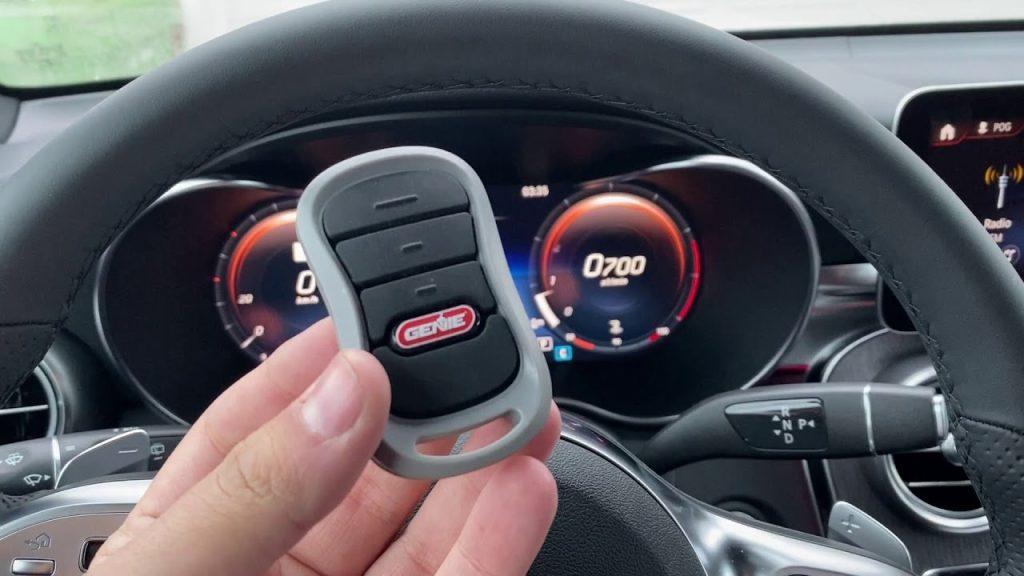
Have you ever stood in your driveway, frustrated because your car won’t open your garage door? You’re not alone. Many homeowners struggle with how to program Genie garage door opener in car, especially when switching vehicles or setting up a new system. The good news? It’s simpler than you think, and we’ll walk you through every step.
Understanding Your Genie Garage Door System
Before diving into the programming process, it’s essential to understand what makes Genie garage door openers unique. Genie has been a trusted name in home automation since 1954, offering reliable systems that integrate seamlessly with modern vehicles.
Genie openers use rolling code technology, which changes the access code each time you use it. This security feature prevents code grabbing by potential thieves. According to Wikipedia’s entry on garage door openers, rolling codes have become the industry standard since the 1990s, significantly improving home security.
Types of Genie Systems Compatible with Cars
Not all Genie models work the same way with vehicle integration. Here’s what you need to know:
- Genie Intellicode Models: These use advanced encryption and are compatible with most modern cars
- Genie SilentMax Series: Known for quiet operation and easy vehicle pairing
- Genie ChainLift Models: Traditional chain-drive systems that still support car programming
Most vehicles manufactured after 2010 come equipped with built-in garage door opener systems, commonly referred to as “HomeLink,” “Car2U,” or brand-specific names like Honda’s “Garage Door Opener” system.
Step-by-Step Guide: How to Program Genie Garage Door Opener in Car
Programming your Genie garage door opener to work with your car requires patience and attention to detail. Follow these precise steps for successful integration.
Step 1: Prepare Your Equipment
Before starting, gather these items:
- Your vehicle with built-in garage door opener buttons
- A sturdy ladder to reach your Genie opener unit
- The Genie remote control (if available)
- Owner’s manuals for both your car and Genie opener
Important: Ensure your garage door is closed and the area is clear before beginning the programming process.
Step 2: Locate the Learn Button on Your Genie Opener
The Learn button is typically found on the back or side of your Genie garage door opener motor unit. It’s usually:
- Purple, orange, or red in color
- Labeled “Learn,” “Program,” or “Smart”
- Located near the antenna wire
Press and release this button. The indicator light should blink or turn solid, indicating the unit is ready to receive a new code. You have approximately 30 seconds to complete the next step.
Step 3: Program Your Vehicle’s Built-in System
The exact process varies by vehicle manufacturer, but here’s the general procedure:
- Sit in your driver’s seat with the garage door visible
- Press and hold the desired garage door button in your car
- Watch for the indicator light in your car to change (usually from slow blink to rapid blink)
- Release the button once the light pattern changes
- Within 30 seconds, press the Learn button on your Genie opener again
- Return to your car and press the programmed button 3-4 times
For specific vehicle instructions:
- Ford/HomeLink: Hold the two outer buttons until the light flashes, then follow the prompts
- Honda: Press and hold the button until the indicator changes, then sync with the opener
- Toyota/Lexus: Use the “Add” function in your settings menu
Step 4: Test the Connection
After programming, test your setup:
- Drive away from your garage at least 20 feet
- Return and press the programmed button
- The garage door should respond within 2-3 seconds
If it doesn’t work immediately, don’t worry. Repeat Steps 2-4, ensuring you complete each action within the 30-second window.
Common Programming Challenges and Solutions
Even with careful following of instructions, issues can arise. Here’s how to troubleshoot common problems:
| Problem | Possible Cause | Solution |
|---|---|---|
| Light doesn’t blink on opener | Dead batteries in remote | Replace remote batteries |
| Car button won’t program | Wrong timing sequence | Restart the entire process |
| Door opens partially | Safety sensor misalignment | Check and realign sensors |
| Intermittent connection | Signal interference | Reprogram away from other electronics |
Signal Interference Issues
Modern homes contain numerous wireless devices that can interfere with garage door signals. If you experience inconsistent performance:
- Keep your car’s programming button away from cell phones during setup
- Avoid programming near Wi-Fi routers or microwave ovens
- Ensure your Genie opener’s antenna hangs freely and isn’t wrapped around metal
Advanced Tips for Optimal Performance
To ensure your Genie garage door opener works flawlessly with your car long-term, consider these expert recommendations:
Regular Maintenance: Check your Genie opener’s batteries every six months. Weak batteries cause programming failures and unreliable operation.
Multiple Vehicle Setup: Most Genie openers can store codes for up to 8 different remotes or vehicles. To add additional cars, simply repeat the programming process without erasing existing codes.
Security Best Practices: If you’ve recently moved into a new home, reset your Genie opener completely before programming your car. This ensures previous owners’ codes are eliminated.
When to Call a Professional
While most people successfully program their Genie garage door opener in car independently, contact a professional if:
- Your opener is more than 15 years old
- You’ve attempted programming three times without success
- Your garage door makes unusual noises during operation
- The safety sensors appear damaged or misaligned
Frequently Asked Questions
How long does it take to program a Genie garage door opener in my car?
The actual programming process takes approximately 2-5 minutes. However, allow 15-20 minutes total to account for reading instructions, positioning your ladder, and troubleshooting if needed. First-time users typically require more time than experienced individuals.
Can I program multiple cars to one Genie garage door opener?
Yes, most Genie garage door openers can accommodate 6-8 different remote controls or vehicle systems. Each car requires separate programming using the same Learn button process. There’s no need to erase previous codes when adding new vehicles.
Why won’t my car recognize the Genie garage door opener signal?
Several factors could cause this issue:
- Your car’s built-in system may need resetting
- The Genie opener might be using an older frequency incompatible with newer cars
- Signal interference from nearby electronic devices
- Weak batteries in either the car system or Genie remote
Try clearing your car’s memory and reprogramming from scratch. Consult both your vehicle and Genie manuals for specific reset procedures.
Is it safe to program my Genie garage door opener myself?
Absolutely. Programming your Genie garage door opener in car is designed to be user-friendly and safe. The process doesn’t involve electrical work or dangerous tools. Just ensure your garage door is closed during programming and keep children and pets away from the moving door.
What should I do if I accidentally erase all codes from my Genie opener?
Don’t panic. If you’ve cleared your Genie opener’s memory, you’ll need to reprogram all remotes and vehicles. Start with your primary car, then add additional vehicles and handheld remotes. Keep a written record of which devices are programmed to avoid confusion later.
Do all Genie garage door openers work with car systems?
Most Genie openers manufactured after 2000 work with modern vehicle systems. However, very old models using dip switches instead of rolling codes may not be compatible. Check your Genie model number against your car’s compatibility list. If uncertain, consult Genie’s customer support or website for specific compatibility information.
Conclusion
Learning how to program Genie garage door opener in car doesn’t have to be intimidating. With the right preparation and following our step-by-step guide, you can enjoy the convenience of opening your garage door directly from your vehicle in just minutes.
Remember, patience is key during the programming process. Take your time, follow each step carefully, and don’t hesitate to restart if something doesn’t work immediately. The convenience of seamless garage door access from your car is well worth the effort.
Did this guide help you successfully program your Genie garage door opener? Share your experience on social media and help other homeowners discover this simple solution. Tag us with your success story, and let’s make home automation accessible for everyone!
Have questions or encountered unique challenges? Drop a comment below—we’d love to hear from you and help fellow readers solve their programming puzzles.



Leave a Reply