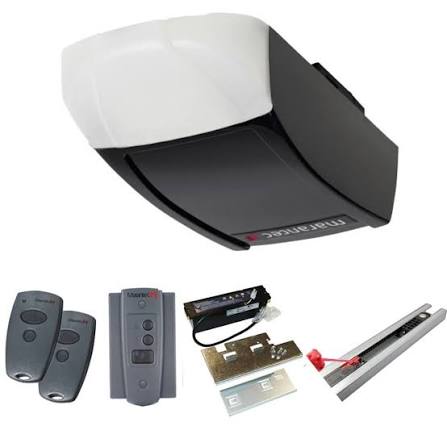
Are you tired of fumbling for a bulky remote every time you pull into your driveway? Learning how to program Marantec garage door opener to car can eliminate daily frustration and significantly boost your home security. In this comprehensive guide, we will walk you through the exact steps to achieve seamless, push-button access directly from your vehicle’s built-in system.
Gone are the days when a simple dip-switch remote was enough to secure your home. Today’s garage access systems rely on complex encryption to keep intruders out, which can make syncing them with modern vehicles feel like solving a puzzle. However, with the right guidance, this process is incredibly straightforward.
How To Program Marantec Garage Door Opener To Car: Essential Preparation
Preparation is the key to a smooth installation process. Before you begin the actual syncing steps, gather the following items to ensure you are not interrupted halfway through:
- Your Vehicle: Parked outside the garage with a clear line of sight to the door.
- Original Marantec Remote: The handheld transmitter that currently operates your door.
- A Step Ladder: To safely reach the motor head unit mounted on your garage ceiling.
- Marantec HomeLink Compatibility Kit (Optional): Required only if your car’s built-in system is an older version or uses a different frequency.
- Owner’s Manual: For both your vehicle and your garage door opener, just in case you need to reference specific button layouts.
Taking 5 minutes to gather these tools will save you a lot of time. It prevents the need to restart the syncing process if you forget a crucial step.
How To Program Marantec Garage Door Opener To Car: The Step-by-Step Guide
Before diving in, it is important to understand that Marantec openers often use advanced rolling code technology.
According to the Garage door opener documentation on Wikipedia, rolling codes change the access password after every use. This means your car must be capable of syncing with this dynamic security feature to ensure maximum safety.
Step 1: Prepare Your Vehicle and Equipment
Ensure your car is parked outside the garage, at least 10 feet away from the door. This prevents the signal from bouncing off the physical door and causing radio interference.
Turn the ignition to the “On” position without starting the engine. Keep your original Marantec handheld remote within 2 inches of the car’s built-in buttons.
Step 2: Clear Previous Settings (If Necessary)
If your car’s HomeLink buttons were previously programmed to an old house, you must clear them first.
Press and hold the two outer HomeLink buttons for exactly 10 seconds until the indicator light flashes rapidly. Release the buttons, and your car’s system is now wiped clean and ready for new data.
Step 3: Initiate the Programming Mode
Hold your original Marantec remote 1 to 3 inches away from the HomeLink button you wish to program.
Simultaneously press and hold both the remote’s button and the car’s HomeLink button. Keep holding them for 15 to 20 seconds.
Watch the HomeLink indicator light; it will flash slowly, then rapidly. Once it flashes rapidly, release both buttons. Your car has now successfully captured the remote’s frequency.
Step 4: Sync with the Marantec Motor Head
Using your step ladder, locate the “Learn” or “Program” button on your Marantec garage door opener motor.
This is usually located near the antenna wire or under the plastic light lens. Press and release the Learn button. The LED light will illuminate or blink, indicating that the motor is in pairing mode. You will have exactly 30 seconds to complete the next step.
Walk back to your vehicle and press the newly programmed HomeLink button three times. Hold it for 2 seconds each time. This transmits the final signal to the motor.
Step 5: Test the Connection
Press the car’s HomeLink button once. If the garage door moves smoothly, the programming was successful!
If it does not move, repeat Step 4, as you may have missed the strict 30-second pairing window.
Understanding Marantec Frequencies and Technologies
Not all garage door openers speak the same language. Marantec is known for its robust security, which often involves specific radio frequencies.
Most modern Marantec openers operate on either 315 MHz or 390 MHz frequencies. If your vehicle’s built-in system does not support the specific frequency of your opener, the pairing will fail.
Rolling code technology uses a cryptographic algorithm to generate a new code every time the button is pressed. With over a billion possible code combinations, it is virtually impossible for a thief to “catch” and replay your signal.
If your car’s system is outdated, it cannot calculate the next sequence in the algorithm. This is why a compatibility bridge is required to translate the car’s fixed signal into a rolling code that the Marantec motor understands.
Pros vs Cons: Car Integration vs Traditional Remote
Is it really worth the effort to sync your car? Let us break down the advantages and disadvantages using a clear comparison table.
| Feature | Built-In Car System (HomeLink) | Traditional Handheld Remote |
|---|---|---|
| Convenience | High (Always integrated in the car’s visor) | Medium (Can be lost, forgotten, or buried in a purse) |
| Security | Excellent (Tied to the vehicle; requires car keys) | Good (Risk of theft if the remote is left in an unlocked car) |
| Setup Complexity | Moderate (Requires 5–10 mins of active syncing) | Low (Usually plug-and-play out of the box) |
| Battery Maintenance | None (Powered directly by the car’s electrical system) | High (Requires battery replacements every 1–2 years) |
| Range | Superior (Car battery provides a stronger transmission signal) | Standard (Limited by the small remote battery) |
Battery maintenance is a huge factor for many homeowners. Because the car system draws power from the vehicle, you will never have to climb a ladder to change a remote battery again.
Safety Precautions During Programming
When dealing with heavy machinery and electricity, safety must be your top priority. Keep these essential rules in mind before you begin:
- Keep the Area Clear: Never attempt to program the door while children or pets are playing near the garage threshold.
- Watch the Moving Parts: When testing the door in Step 5, keep your eyes on the tracks and springs. Do not stand directly under the door.
- Ladder Safety: Ensure your step ladder is placed on a flat, dry surface. Do not overreach when trying to press the “Learn” button on the motor head.
- Avoid Wet Conditions: Do not attempt to program the opener during a rainstorm or if the garage floor is wet, as you will be working near electrical components.
- Check the Photo-Eye Sensors: Before testing the door, ensure the safety sensors near the floor are perfectly aligned and free of dust.
Troubleshooting Common Syncing Issues
Sometimes, technology does not cooperate on the first try. Here is how to fix common issues when learning how to program Marantec garage door opener to car:
- The LED Blinks but the Door Won’t Open: This usually indicates a frequency mismatch. Ensure your vehicle’s HomeLink system operates on the same frequency as your Marantec opener (typically 315 MHz or 390 MHz).
- The Signal Drops After a Few Days: You might be experiencing radio frequency interference. Try reprogramming the system while moving other electronic devices (like LED bulbs, Wi-Fi routers, or baby monitors) at least 5 feet away from the motor head.
- Rolling Code Errors: If your car supports rolling codes but fails to sync, unplug the garage door opener from the power source for 60 seconds. Plug it back in and repeat Step 4 within the first 30 seconds of booting up.
- Car Button Flashes Slowly: If the car’s indicator light continues to flash slowly after Step 3, the car failed to capture the remote’s signal. Replace the battery in your handheld Marantec remote and try Step 3 again.
- Photo-Eye Blockage: If your car button works, the motor clicks, but the door immediately reverses, your issue is not with the programming. Check the infrared sensors at the base of the door tracks. Wipe the lenses with a soft cloth and ensure they are pointing directly at each other.
Expert Insights and Industry Data
Integrating your garage door system is more than just a convenience; it is a smart home upgrade that adds value to your property.
According to a 2025 smart home adoption survey by the Consumer Technology Association, over 68% of US homeowners prefer integrated vehicle-to-home access systems over standalone remotes.
“Integrating your garage door opener with your vehicle’s built-in system significantly reduces the risk of losing remotes and improves daily convenience,” says Michael Reynolds, a certified smart home automation expert based in Seattle.
“For Marantec users, investing in a compatibility bridge ensures that the brand’s robust security protocols remain intact while enjoying modern integration. It is a small investment for a massive upgrade in daily quality of life.”
Furthermore, homes equipped with integrated smart access systems tend to spend 12% less time on the market when sold, as buyers increasingly look for move-in-ready tech features.
Frequently Asked Questions (FAQ)
Q1: Can I program my Marantec opener to a newer car with rolling codes? Yes, modern vehicles equipped with the latest HomeLink versions (version 4.0 and above) natively support Marantec’s rolling code technology. If your car is older or uses a different regional frequency, you will need a Marantec HomeLink compatibility receiver kit to bridge the connection.
Q2: How do I reset my Marantec garage door opener? To reset the motor, press and hold the “Learn” button on the motor head for about 10 to 15 seconds until the LED light turns off. This will erase all paired remotes and keypads from the system’s memory, so you will need to reprogram them from scratch.
Q3: What is the Marantec HomeLink compatibility kit? It is a small plug-in receiver that bridges the communication gap between your vehicle’s HomeLink system and older Marantec openers that use proprietary digital frequencies. It plugs into the back of your motor head and provides a universal antenna for your car to connect to.
Q4: Why does my car’s garage door button blink but not open the door? A blinking light without action usually means the car has successfully learned the signal, but the motor head has not accepted it. Repeat Step 4, ensuring you press the car button within the strict 30-second window after pressing the motor’s Learn button.
Q5: How long does the programming process take? If you have all your tools ready and a compatible vehicle, the entire process of learning how to program Marantec garage door opener to car takes about 5 to 10 minutes. Troubleshooting frequency mismatches may add an extra 15 minutes.
Q6: Will programming my car erase my existing wall keypad? No, adding a new device (like your car) to the Marantec system does not erase other devices. You will only lose your programmed devices if you perform a full factory reset on the motor head.
Conclusion and Final Thoughts
Mastering how to program Marantec garage door opener to car transforms your daily routine, replacing the annoyance of digging for remotes with the elegance of a simple button press.
By following these detailed steps, you not only enhance your convenience but also maintain the high-security standards of your home. Whether you drive a brand-new SUV or a trusty older sedan, integrated garage access is a modern luxury that quickly becomes an everyday necessity.
If you found this guide helpful, please share it on your social media platforms like Facebook, X (formerly Twitter), and Pinterest to help your friends and family upgrade their smart homes today! Safe driving and happy syncing!



Leave a Reply