Introduction
There is nothing quite as frustrating as pulling into your driveway after a long day, only to realize you cannot get your vehicle’s built-in system to sync with your home. If you are currently searching for how to program my Honda Pilot garage door opener, you are likely dealing with this exact annoyance, but rest assured that the solution is usually simpler than it appears. This guide will walk you through the official HomeLink programming process with empathy and precision, ensuring you can open your garage seamlessly without relying on a separate remote ever again.
Understanding HomeLink Technology in Your Honda Pilot
Before diving into the buttons, it is vital to understand what you are actually programming. Most Honda Pilot models from 2009 to present come equipped with HomeLink, a wireless radio frequency transmitter integrated directly into the overhead console or rearview mirror. Unlike standard remotes, HomeLink does not use batteries; it draws power from the vehicle’s electrical system.
According to automotive technology standards, HomeLink operates on frequencies between 288 MHz and 398 MHz, covering the vast majority of North American garage door openers. However, compatibility depends heavily on whether your home system uses fixed-code (older) or rolling-code (newer security) technology. Identifying this distinction early saves significant time during the programming phase.
Note: Always verify your specific trim level. While most Pilots have HomeLink, some base trims in older model years may lack this feature entirely. Check your overhead console for three distinct buttons labeled “HomeLink” or featuring a house icon.
Preparation: What You Need Before Starting
Programming fails most often due to poor preparation. Gather these items before sitting in the driver’s seat:
- Your Original Handheld Remote: Essential for rolling-code openers.
- Fresh Batteries: Replace the battery in your handheld remote before starting. Weak signals cause synchronization failures.
- Vehicle Owner’s Manual: For model-specific button locations.
- A Stepladder: May be needed to access the garage motor unit’s “Learn” button.
- Clear Line of Sight: Ensure no large metal objects block the signal path between car and garage.
Safety First
Never program your garage door opener while the vehicle is running in an enclosed space. Carbon monoxide buildup is a real risk. Always perform these steps with the engine off and the ignition in the “ON” or “ACC” position, preferably with the garage door open to prevent accidental entrapment.
Step-by-Step: How to Program My Honda Pilot Garage Door Opener
This section addresses the core user intent. Follow these steps precisely. The process differs slightly depending on your opener type, so we cover both scenarios.
Phase 1: Clearing Previous Codes (Recommended)
If you bought the Pilot used or previously programmed a different door, clear the memory first:
- Press and hold the two outer HomeLink buttons simultaneously.
- Hold for approximately 10–20 seconds until the indicator light flashes rapidly.
- Release both buttons. The system is now reset.
Phase 2: Programming Rolling-Code Openers (Most Common Post-2000)
Rolling-code systems change their access code each use for security. This requires a two-part handshake.
- Initiate Pairing: Press and hold your chosen HomeLink button. The indicator light will begin to flash slowly.
- Transmit Signal: While holding the HomeLink button, press and hold your handheld remote 1–3 inches away from the HomeLink module. Keep both pressed.
- Watch the Light: After several seconds, the HomeLink light will change from a slow flash to a rapid flash. This indicates successful signal capture. Release both buttons.
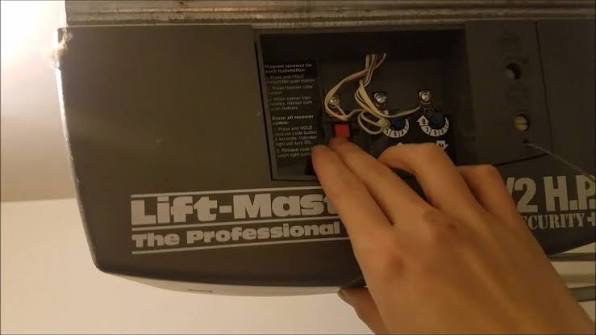
- Complete the Handshake: Go to your garage door motor unit. Locate the “Learn” or “Smart” button (usually yellow, orange, purple, or red). Press it firmly. You typically have 30 seconds to complete the next step.
- Final Sync: Return to your Pilot and press the newly programmed HomeLink button three times, holding each press for 2 seconds. The garage door should activate, confirming success.
Phase 3: Programming Fixed-Code Openers (Older Models)
If your handheld remote has DIP switches inside, you likely have a fixed-code system.
- Press and hold the desired HomeLink button.
- Simultaneously press your handheld remote 1–3 inches away.
- Wait for the rapid flash (may take up to 60 seconds).
- Test immediately. No trip to the motor unit is required for fixed-code systems.
| Feature | Rolling-Code System | Fixed-Code System |
|---|---|---|
| Manufacture Date | Typically post-1996 | Pre-1996 |
| Security Level | High (codes rotate) | Low (static code) |
| Motor Unit Step Required? | Yes | No |
| Programming Time | 2–5 minutes | 1–2 minutes |
| LED Behavior | Slow → Rapid Flash | Slow → Solid/Rapid |
Troubleshooting: When Programming Fails
Even experts encounter hiccups. If you are still wondering how to program my Honda Pilot garage door opener after following the steps above, consult this diagnostic checklist:
- Light Never Flashes Rapidly: Your handheld remote battery is likely dead, or the remote operates on an incompatible frequency. Try a fresh battery first.
- Door Opens Then Immediately Reverses: This is rarely a programming issue. It usually indicates obstructed safety sensors or incorrect travel limit settings on the motor unit itself.
- Works Intermittently: Signal interference from LED bulbs in the garage fixture is a known culprit. Swap to incandescent bulbs temporarily to test.
- Exceeded Maximum Attempts: HomeLink has a lockout feature. Turn the vehicle off, wait 60 seconds, and restart before retrying.
For deeper technical specifications regarding radio frequency protocols and regional compatibility standards, refer to the Wikipedia article on Garage Door Openers, which provides comprehensive background on the engineering principles behind these systems.
Expert Tips for Long-Term Reliability
- Reprogram After Battery Changes: Some older openers lose sync when the handheld remote battery is replaced. Keep your programming notes handy.
- Avoid Extreme Temperatures: Programming in sub-freezing conditions can affect electronic response times. Wait for moderate weather if possible.
- Test All Three Buttons: Even if you only need one, program all three while you have the setup ready. Future-proofing takes only minutes.
- Document Your Setup: Note which button corresponds to which door and the date programmed. This helps technicians diagnose future issues faster.
Frequently Asked Questions (FAQ)
Can I program my Honda Pilot garage door opener without the original remote?
Generally, no. For rolling-code systems, the original remote is required to initiate the secure handshake. However, if you have a fixed-code system, some aftermarket programmers can clone signals. If your remote is lost, contact your garage door manufacturer for a compatible replacement before attempting programming.
Why does my HomeLink work sometimes but not others?
Intermittent operation typically stems from three causes: weak handheld remote batteries, LED bulb interference in the garage fixture, or misaligned safety sensors. Start by replacing the remote battery and swapping garage lights to incandescent bulbs. If problems persist, inspect the photo-eye sensors near the floor for dirt or misalignment.
Is HomeLink compatible with all garage door brands?
HomeLink supports over 95% of North American garage door openers manufactured after 1996, including LiftMaster, Chamberlain, Genie, Craftsman, and Overhead Door. Compatibility issues arise primarily with very old fixed-code units or certain European/Asian imports. Check the official HomeLink compatibility database online if uncertain.
Do I need to reprogram after changing my car battery?
In most Honda Pilot models, HomeLink memory is non-volatile and survives battery disconnection. However, some electrical resets during battery replacement can occasionally clear stored codes. If your system stops working after a battery change, simply repeat the programming steps—your previous configuration serves as a reliable template.
How many devices can my Honda Pilot HomeLink store?
Standard HomeLink modules support up to three distinct devices. This could be three garage doors, or a combination of garage doors, gate operators, and home lighting systems. Each button operates independently, allowing flexible multi-device management from a single interface.
What if my Honda Pilot doesn’t have HomeLink buttons?
Some base-trim Pilots lack integrated HomeLink. In this case, consider purchasing an aftermarket HomeLink visor clip or mirror replacement kit. These OEM-approved accessories integrate seamlessly and follow identical programming procedures outlined in this guide. Installation typically requires basic tools and under 30 minutes.
Conclusion
Mastering how to program my Honda Pilot garage door opener transforms daily convenience and eliminates the clutter of extra remotes. By understanding your opener type, preparing properly, and following the precise rolling-code or fixed-code steps outlined above, you can achieve reliable synchronization in under five minutes. Remember that patience and fresh batteries solve the majority of programming challenges.
Now that your garage opens effortlessly at the touch of a button, why keep this knowledge to yourself? Share this guide on Facebook, X (Twitter), or Pinterest to help fellow Honda owners reclaim their driveway peace of mind. Have a unique troubleshooting story or tip? Drop it in the comments below—your experience might be exactly what another reader needs today!



Leave a Reply