Introduction
There are few things more frustrating than standing in your driveway, pressing the remote repeatedly, only to realize your garage door opener has stopped responding. Whether you have moved into a new home, lost a remote, or simply want to enhance your home security, knowing how to reset code for Genie garage door opener systems is an essential homeowner skill. This guide provides clear, safe, and manufacturer-aligned steps to get your system back on track without the need for expensive service calls.
Resetting your Genie opener isn’t just about convenience; it is a critical security measure. According to industry safety standards, regularly updating access codes prevents unauthorized entry from previous owners or lost devices. Below, we break down the process into manageable steps tailored to specific Genie models, ensuring you can restore access quickly and securely.
Why You Might Need to Reset Your Genie Opener Code
Before diving into the technical steps, it helps to understand why a reset is necessary. Genie openers utilize Intellicode® rolling code technology, which changes the access code with every use to prevent signal theft. However, synchronization can be lost due to power surges, battery replacements, or interference.
Common scenarios requiring a reset include:
- Moving into a new home: Erasing previous owner access is non-negotiable for safety.
- Lost or stolen remotes: Preventing unauthorized entry immediately.
- System glitches: When the opener light blinks but the door doesn’t move.
- Adding new devices: Syncing additional remotes or wireless keypads.
Expert Insight: “Many homeowners assume a broken opener when it’s actually a simple sync issue. Rolling code technology requires precise reprogramming sequences that differ significantly from older fixed-code systems.” — Certified Garage Door Technician
How To Reset Code For Genie Garage Door Opener (Step-by-Step)
This section addresses the primary user intent: executing the reset. Note that Genie has produced various models over the decades. The following instructions apply to modern Intellicode openers (typically manufactured after 1995), which represent the vast majority of units currently in US homes.
Step 1: Locate the Learn Button
The “Learn” button is the control center for resetting and programming. On most Genie overhead units, this is located under the light lens cover or on the rear panel near the antenna wire.
- Color Coding Matters: Identify your learn button color. Red/Orange buttons typically indicate Series II electronics, while Purple/Blue buttons indicate Series III. Using the wrong sequence for your series can cause programming failures.
- Safety First: Ensure the garage door area is clear of people and pets before beginning. Use a sturdy stepladder if the unit is mounted high.
Step 2: Clear Existing Codes (Factory Reset)
If you are securing a new home or removing lost remotes, perform a full memory wipe first.
- Press and hold the Learn Button for approximately 10 seconds.
- Watch the LED indicator. It will illuminate, then turn off after 10 seconds.
- Release the button. All remotes and keypads are now erased from the system memory.
- Note: This does not erase travel limits or force settings, only access devices.
Step 3: Reprogram Your Remote Control
Once memory is cleared (or if you are simply adding a device):
- Press the Learn Button once briefly. The LED will begin blinking slowly (approx. 1 second intervals). You have 30 seconds to complete the next step.
- Press the desired button on your Genie remote three times in succession.
- First press: Sends initial signal.
- Second press: Confirms frequency.
- Third press: Finalizes the rolling code sync.
- The LED should stop blinking and remain solid or turn off, indicating successful programming.
- Test the remote immediately. If the door operates smoothly, the reset was successful.
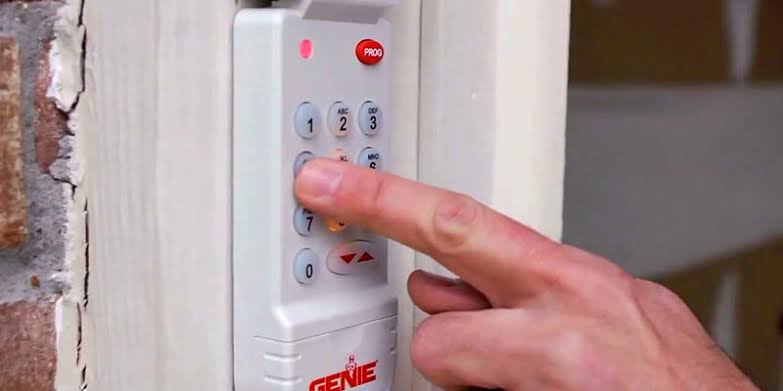
Step 4: Programming a Wireless Keypad
Keypads require a slightly different cadence. After pressing the Learn Button on the motor head:
- Enter your desired 4-digit PIN on the keypad.
- Press the Program/Set button on the keypad.
- Press the Program/Set button a second time.
- The keypad lights should flash, confirming acceptance.
| Feature | Series II (Red Learn) | Series III (Purple Learn) |
|---|---|---|
| Remote Presses | 3 presses required | 3 presses required |
| LED Behavior | Blinks then stays solid | Blinks rapidly then off |
| Compatibility | Older Intellicode remotes | Newer dual-frequency remotes |
| Reset Time | 10-second hold | 10-second hold |
For comprehensive technical specifications regarding frequency bands and encryption protocols used in these systems, refer to the Wikipedia article on Garage Door Openers, which details the evolution of rolling code security standards.
Troubleshooting: What If the Reset Doesn’t Work?
Even professionals encounter hiccups. If you have followed the steps above and the opener remains unresponsive, consider these diagnostic checks:
- Check the Antenna: Ensure the hanging antenna wire is fully extended and not touching metal surfaces or the wall. A coiled or obstructed antenna reduces range by up to 70%.
- Battery Health: Weak batteries are the #1 cause of failed programming. Replace remote batteries with fresh alkaline cells before attempting another reset. Lithium batteries are often recommended for extreme temperature climates.
- LED Error Codes: Count the flashes on the motor unit. Two red flashes usually indicate a sensor obstruction, while three flashes may signal a logic board fault. Consult your specific model’s manual for exact decode tables.
- Interference Sources: LED bulbs installed in the opener’s light socket can emit radio frequency interference. Temporarily unscrew the bulb and attempt reprogramming. If it works, replace the bulb with an RF-shielded garage-door-specific LED.
Frequently Asked Questions (FAQ)
1. How do I know which Genie model I have?
Check the label on the motor housing, typically located near the light lens or on the back panel. The model number (e.g., 3053, 7155) determines compatibility. If the label is faded, identify the learn button color as described above; this is often sufficient for determining the correct reset procedure.
2. Will resetting the code erase my travel limit settings?
No. Holding the learn button for 10 seconds only clears access device memory (remotes and keypads). Travel limits, force sensitivity, and Wi-Fi connectivity settings remain intact. A full factory reset that wipes all settings typically requires a different button combination detailed in advanced service manuals.
3. Can I use a universal remote with my Genie opener after resetting?
Yes, but compatibility varies. Universal remotes must specifically list Intellicode compatibility. After clearing the Genie’s memory, program the universal remote following its manufacturer instructions, using the Genie’s learn button as the receiver trigger. Always verify the universal remote supports the correct frequency (315 MHz or 390 MHz) for your unit.
4. How often should I reset my garage door opener code?
Security experts recommend resetting codes annually or whenever household composition changes (roommates moving out, divorces, etc.). Additionally, reset immediately if a remote is lost or stolen. Regular resets mitigate the risk of code cloning, though modern rolling code tech makes this increasingly difficult.
5. My Genie opener has no learn button. What should I do?
Units without a learn button are likely pre-1995 fixed-code models using DIP switches. These require manually matching switch positions inside both the remote and motor unit. Due to significant security vulnerabilities, upgrading to a modern Intellicode system is strongly advised rather than continuing to use fixed-code technology.
6. Is it safe to reset the opener myself, or should I hire a pro?
Resetting access codes is designed as a DIY task and is safe when basic ladder and electrical precautions are observed. However, if troubleshooting reveals mechanical issues (broken springs, frayed cables, misaligned sensors), contact a certified technician. Torsion springs store lethal energy and should never be adjusted by untrained individuals.
Conclusion
Mastering how to reset code for Genie garage door opener systems empowers you to maintain both convenience and security in your home. By understanding your specific model’s learn button type, following the precise three-press programming sequence, and performing regular security audits, you ensure reliable daily operation. Remember, a properly synced opener isn’t just about opening doors—it’s about protecting what’s behind them.
If this guide helped you regain access to your garage, please share it on social media to help fellow homeowners avoid costly service calls. Tag a friend who just moved into a new house—they’ll thank you later! Safe programming, and may your garage door always open on the first try.



Leave a Reply