Introduction
There are few things more frustrating than standing in your driveway, pressing a remote that refuses to open the garage. Whether you have moved into a new home, lost a remote, or suspect unauthorized access, knowing how to reset code for Chamberlain garage door opener systems is an essential homeowner skill. This comprehensive guide walks you through every reset method with clear, safe instructions so you can regain secure access to your property without unnecessary service calls.
Why You Might Need to Reset Your Chamberlain Opener
Before diving into the technical steps, it helps to understand why a reset is necessary. Chamberlain Group, one of the largest garage door opener manufacturers globally, designs their systems with security protocols that sometimes require manual intervention. Common triggers include:
- Security Breaches: Lost or stolen remotes necessitate wiping old codes to prevent unauthorized entry.
- New Ownership: Previous owners may still have active remotes or keypad codes.
- Technical Glitches: Power surges or logic board errors can corrupt stored frequencies.
- Remote Sync Issues: Adding a new remote sometimes requires clearing the memory bank first.
According to industry safety standards outlined by organizations referenced on Wikipedia, modern openers utilize rolling code technology (Security+ 2.0) to prevent code grabbing. However, this advanced encryption means that when a sync error occurs, a simple battery change won’t fix it; a full system reset is often required.
How to Identify Your Chamberlain Model Type
The reset procedure varies significantly depending on whether your unit uses DIP switches, Learn Buttons, or Wi-Fi integration. Misidentifying your model can lead to frustration or accidental factory resets.
| Feature | Older Models (Pre-1997) | Security+ (1997–2011) | Security+ 2.0 / MyQ (2011–Present) |
|---|---|---|---|
| Identification | 8–12 tiny sliding switches inside remote & motor | Orange, Red, Purple, or Yellow “Learn” button | Yellow “Learn” button + Wi-Fi logo |
| Reset Method | Match physical switch positions | Press & hold Learn button | Press & hold Learn button + App reset |
| Code Type | Fixed binary code | Rolling code (390 MHz) | Rolling code (310/315/390 MHz tri-band) |
| LED Indicator | None | LED next to Learn button | LED + Digital display on some units |
⚠️ Safety Warning: Always ensure the garage door area is clear of people, pets, and vehicles before performing any reset or programming. The door may cycle unexpectedly during the process.
Step-by-Step: Resetting Remotes and Keypads (Learn Button Models)
This is the most common answer to how to reset code for Chamberlain garage door opener queries. Most units manufactured after 1997 use the “Learn Button” method.
1. Locate the Learn Button
Find the motor head unit mounted on your garage ceiling. On the back or side panel, locate the square “Learn” button. It is typically colored yellow (for Security+ 2.0), orange/red (Security+), or purple. A small LED light sits adjacent to it.
2. Clear All Stored Codes
To wipe all remotes and keypads from the system’s memory:
- Press and hold the Learn button for approximately 6 to 10 seconds.
- Watch the LED indicator. It will stay lit initially, then turn off completely.
- Release the button once the light goes out.
- Test your existing remotes; they should no longer operate the door, confirming the memory is cleared.
3. Re-program Your Devices
After resetting, you must re-sync each device individually:
- Briefly press and release the Learn button (the LED will illuminate or blink).
- Within 30 seconds, press and hold the button on your remote you wish to program.
- Hold until the motor unit lights flash or you hear two clicks.
- Repeat for additional remotes and wireless keypads.
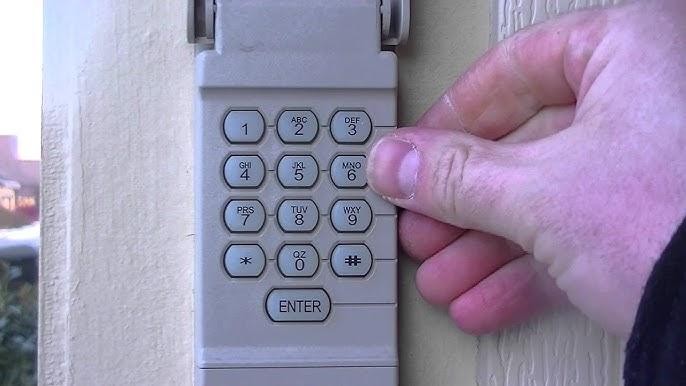
4. Resetting the Wireless Keypad Specifically
If you only need to change the PIN without wiping remotes:
- Enter your current 4-digit PIN.
- Press and hold the # button until the opener light blinks twice.
- Enter your new 4-digit PIN and press Enter.
- Wait for the light to stop blinking to confirm the new code is saved.
How to Reset Chamberlain MyQ Wi-Fi Openers
For smart openers integrated with the MyQ ecosystem, the reset involves both hardware and software components. Simply holding the learn button clears RF devices but does not disconnect Wi-Fi credentials.
Hardware Reset (Wi-Fi Module)
- Locate the yellow Learn button on the motor head.
- Press and hold for 10+ seconds until the LED turns off (clears remotes).
- Continue holding for another 10 seconds until you hear a beep or see the Wi-Fi LED flash rapidly (clears network settings).
Software Reset (MyQ App)
- Open the MyQ app on your smartphone.
- Navigate to Device Settings > Garage Door Opener.
- Select “Remove Device” to unlink it from your account.
- Follow the in-app “Add Device” wizard to reconnect to your 2.4GHz Wi-Fi network and establish fresh encryption keys.
Expert Tip: If your MyQ opener fails to connect after a reset, check your router’s band settings. Chamberlain MyQ devices only support 2.4GHz networks. They cannot communicate via 5GHz bands, which is the #1 cause of post-reset connection failures.
Troubleshooting: When the Reset Doesn’t Work
Even professionals encounter stubborn units. If you have followed the steps above and still cannot operate your door, consider these diagnostic checks:
- Check the Logic Board Capacitor: On older units, failed capacitors can prevent the Learn button circuit from functioning. Look for bulging or leaking components on the internal PCB.
- Verify Antenna Integrity: Ensure the hanging wire antenna is not cut, coiled, or touching metal conduit. A damaged antenna reduces signal range to near zero.
- Battery Voltage Under Load: A remote battery may show 3V on a multimeter but drop to 1.8V when transmitting. Always test with a brand-new CR2032 or alkaline battery during troubleshooting.
- Interference Sources: LED bulbs in garage fixtures can emit RF noise that blocks Chamberlain signals. Temporarily unscrew nearby LEDs to test if interference is the culprit.
Frequently Asked Questions (FAQ)
Q1: Will resetting my Chamberlain opener erase my MyQ smart features?
Yes, performing a full factory reset (holding the Learn button for 20+ seconds) will clear Wi-Fi credentials and unlink the device from the MyQ app. You will need to re-run the setup process in the app to restore smart functionality. However, a standard 6-second reset only clears remotes and keypads, leaving Wi-Fi intact.
Q2: How often should I reset my garage door opener code for security?
Security experts recommend resetting your garage door codes at least once per year or immediately after any life event involving access changes (breakups, tenant turnover, lost remotes). Regular rotation prevents code cloning and ensures only authorized users have entry.
Q3: Can I reset a Chamberlain opener without a ladder?
Generally, no. The Learn button is located on the motor housing mounted to the ceiling. While some newer models offer wall-mounted control panels with programming functions, a complete memory reset almost always requires physical access to the overhead unit. Always use a stable step ladder and have someone spot you.
Q4: What if my Chamberlain opener has no Learn button?
Units manufactured before 1997 typically use DIP switches instead of a Learn button. To reset these, open both the remote and motor housing, then physically slide the 8–12 tiny switches to a new matching pattern. There is no electronic memory to clear; security relies entirely on the physical switch configuration.
Q5: Does resetting the code affect the auto-reverse safety sensors?
No. The photo-eye safety sensors operate on a separate hardwired circuit independent of the RF code memory. Resetting codes will not disable or recalibrate your safety reversal system. However, always test the auto-reverse function after any maintenance by placing a 2×4 board under the door to verify it reverses upon contact.
Q6: Why does my Chamberlain opener accept the reset but not reprogram?
This usually indicates the logic board’s receiver module has failed or the unit has reached its maximum device capacity (typically 8 remotes + 2 keypads for Security+ 2.0). Try clearing memory again and programming just one remote. If it still fails, the internal receiver likely needs professional replacement.
Conclusion
Understanding how to reset code for Chamberlain garage door opener systems empowers you to maintain both the security and functionality of your home’s primary entry point. Whether you are clearing old codes for peace of mind or troubleshooting a sync issue, the methods outlined above cover everything from legacy DIP-switch models to modern MyQ smart openers. Remember to prioritize safety, verify your model type before starting, and always test your auto-reverse sensors after any work.
A properly reset garage door opener isn’t just about convenience—it’s about protecting what matters most. If this guide helped you regain access to your garage, share it on social media to help fellow homeowners avoid costly service calls. Tag a friend who’s been struggling with their garage door, and let’s make home maintenance less intimidating together! 🔧🏠



Leave a Reply