Introduction
There are few things more frustrating than standing in your driveway, locked out because you forgot the code or bought a home with an old system. If you are searching for how to reset password on Chamberlain garage door opener, you are not alone; this is one of the most common maintenance tasks homeowners face. Whether you have lost your MyQ app credentials or need to reprogram a wireless keypad, this guide provides safe, manufacturer-aligned steps to get you back inside quickly.
Understanding Chamberlain Security Systems
Before diving into buttons and codes, it is vital to understand that “password” can mean three different things in the Chamberlain ecosystem. Identifying which system you need to reset saves time and prevents accidental lockouts.
- MyQ Smart App Password: The digital credential used to control your garage from a smartphone.
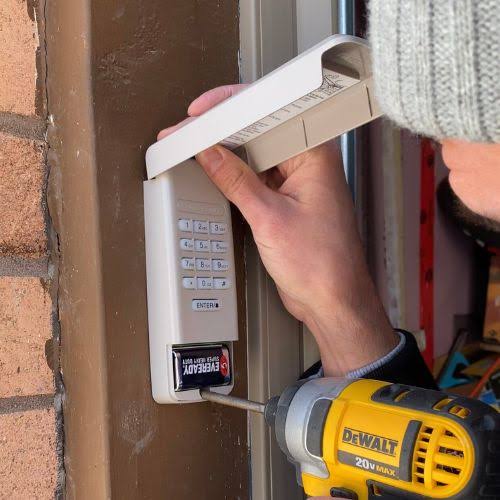
- Wireless Keypad PIN: The 4-digit code entered on the exterior wall-mounted pad.
- Remote/Transmitter Code: The rolling code signal between your car visor remote and the motor head.
According to industry data on smart home adoption, over 30% of garage door opener issues stem from user credential errors rather than mechanical failure. Understanding the distinction ensures you apply the correct fix. For broader context on how these security protocols evolved, you can refer to the history of garage door openers on Wikipedia.org, which details the shift from fixed DIP switches to modern rolling-code encryption.
How to Reset Your MyQ Account Password
If your issue is digital, resetting your MyQ password is straightforward. This is the most common interpretation of “password” for newer Chamberlain models with Wi-Fi connectivity.
Step-by-Step MyQ Reset
- Open the MyQ App or visit the MyQ website login page.
- Tap “Forgot Password?” located directly below the login fields.
- Enter the email address associated with your account and tap “Submit.”
- Check your email inbox (and spam folder) for a reset link from myq@chamberlain.com.
- Click the link within 24 hours to create a new password.
- Create a strong password: Minimum 8 characters, including one uppercase letter, one number, and one symbol.
- Log in with the new credentials to verify access.
⚠️ Critical Security Tip: Never reuse your email or banking passwords for your MyQ account. Because garage doors provide physical entry to your home, treat this credential with the same severity as a front door key.
Troubleshooting MyQ Reset Issues
| Issue | Likely Cause | Solution |
|---|---|---|
| No email received | Typo in email or spam filter | Verify spelling; check junk/promotions folders |
| Link expired | Waited >24 hours | Request a fresh reset link |
| Account locked | Too many failed attempts | Wait 30 minutes before retrying |
| App won’t load | Outdated app version | Update via App Store or Google Play |
How to Reset a Chamberlain Wireless Keypad PIN
When users ask how to reset password on Chamberlain garage door opener, they often actually mean the exterior keypad PIN. This does not require a digital password but rather a physical reprogramming sequence.
Reprogramming the Keyless Entry Pad
Most Chamberlain keypads (models 940EV, 974LM, etc.) follow this universal sequence:
- Locate the LEARN button on the garage door opener motor unit. It is typically yellow, red, purple, or orange and found on the back or side panel near the antenna wire.
- Press and release the LEARN button. The LED indicator will light up solidly for 30 seconds.
- Within those 30 seconds, go to your exterior keypad and enter your desired new 4-digit PIN.
- Press and hold the ENTER button until the motor unit lights flash or you hear two distinct clicks. This confirms the new PIN is stored.
- Test the new PIN immediately to ensure it operates the door smoothly.
💡 Pro Note: If the learn LED does not stay lit, unplug the opener for 60 seconds, plug it back in, and try again. Power cycling resolves approximately 40% of programming glitches.
Clearing All Old Keypad Codes
If you moved into a new home or suspect unauthorized access, wipe all previous codes first:
- Press and hold the LEARN button on the motor unit for 6–10 seconds until the LED turns off completely.
- Release the button. All remote and keypad codes are now erased.
- Reprogram every remote and keypad you wish to keep using the standard pairing process.
How to Reset Remote Control Codes (Rolling Code)
While not a “password,” remote codes function similarly. If your visor remote stopped working after a power outage or battery change, resync it:
- Press the LEARN button on the motor head (LED illuminates).
- Within 30 seconds, press and hold the button on your remote for 3 seconds.
- Release when the opener lights flash or clicks.
- Test operation from at least 15 feet away to confirm range.
Safety Precautions Before Resetting
Security resets should never compromise physical safety. Always observe these protocols:
- Clear the Door Path: Ensure no people, pets, or objects are in the door’s travel zone before testing any newly programmed code.
- Test Safety Sensors: After any reset, wave an object under the photo-eye sensors while the door closes. The door must reverse immediately. If it doesn’t, do not use the opener until sensors are realigned.
- Disconnect Power for Hardware Resets: When performing extended LEARN-button holds or factory resets, consider unplugging the unit to prevent accidental activation during the process.
- Update Firmware: For MyQ-enabled units, check the app for firmware updates after resetting credentials. Outdated firmware can cause recurring sync failures.
Frequently Asked Questions (FAQ)
1. How often should I reset my Chamberlain garage door password?
Security experts recommend changing your MyQ password every 6 months and reprogramming keypad PINs annually or whenever someone with access moves out. Regular rotation minimizes risk from credential leaks or social engineering.
2. Can I reset my Chamberlain password without the original code?
Yes. For MyQ accounts, use the “Forgot Password” email recovery flow—no old password needed. For keypads, use the LEARN button on the motor unit to overwrite old PINs without knowing them. Physical access to the motor head is required for keypad resets.
3. Why won’t my new keypad PIN work after resetting?
Common causes include entering the PIN outside the 30-second LEARN window, weak keypad batteries (replace with fresh 9V alkaline), or interference from LED bulbs near the motor. Replace batteries first, then reprogram using a non-LED bulb temporarily to rule out RF interference.
4. Does resetting the password erase my programmed remotes?
Resetting a MyQ password does NOT affect remotes or keypads. However, holding the LEARN button for 6+ seconds to clear keypad codes WILL erase all paired remotes. Only perform full clears when intentionally wiping all access devices.
5. What if I don’t have access to the motor unit’s LEARN button?
For rental properties or shared garages where motor access is restricted, contact the property manager or a licensed Chamberlain dealer. There is no secure bypass for physical reprogramming without motor-unit access—this is by design to prevent unauthorized entry.
6. Is the MyQ password the same as my Wi-Fi password?
No. These are entirely separate credentials. Your MyQ password authenticates your identity to Chamberlain’s cloud servers, while your Wi-Fi password connects the opener hardware to your local network. Changing your Wi-Fi password requires reconnecting the opener via the app’s device setup flow, but does not change your MyQ login.
Conclusion
Knowing how to reset password on Chamberlain garage door opener empowers you to maintain both convenience and security without costly service calls. Whether recovering a MyQ account, reprogramming a keypad PIN, or resyncing remotes, the processes are designed for homeowner execution with minimal tools. Remember to prioritize safety sensor checks after any reset and rotate credentials regularly to protect your home.
Found this guide helpful? Share it on Facebook, X (Twitter), or Pinterest to help fellow homeowners regain secure access to their garages. Tag a friend who just moved into a new house—they’ll thank you later! 🔧🏠



Leave a Reply