Introduction
There are few things more frustrating than standing in your driveway, locked out because you forgot the code or moved into a new home with an old access PIN. If you are searching for how to reset password on LiftMaster garage door opener, you have come to the right place to regain secure entry. This comprehensive guide will walk you through the exact steps to clear old codes and program new ones safely, ensuring your home remains protected without the need for expensive service calls.
Why Resetting Your LiftMaster Code Matters for Home Security
Before diving into the technical steps, it is vital to understand why this maintenance task is crucial. According to crime prevention experts, garage doors are one of the most common entry points for burglars. When you move into a new house, hire a contractor, or lose a keypad, the previous codes remain active until manually erased.
Resetting your system does more than just update a number; it re-establishes the chain of custody for your home’s security. Modern LiftMaster units utilize rolling code technology, which changes the transmission signal every time the door operates. However, the static PIN on your exterior keypad requires manual intervention to stay secure. By learning how to reset password on LiftMaster garage door opener, you are actively participating in what security professionals call “access control hygiene.”
For a deeper understanding of how these mechanical security systems have evolved over decades, you can refer to the historical context of garage door openers on Wikipedia, which details the transition from simple dip switches to modern encrypted wireless protocols.
How To Reset Password On LiftMaster Wireless Keypad (Model 877MAX)
The wireless keypad is the most common point of confusion for homeowners. The process varies slightly depending on whether you want to change an existing code or completely wipe the device. Below is the definitive method for the industry-standard 877MAX and similar models.
Step-by-Step: Changing an Existing PIN
If you know your current code and simply want to update it for security:
- Enter Current Code: Type in your existing 4-digit PIN.
- Press and Hold # Key: Hold the pound (#) button until the keypad light blinks twice. Release the button.
- Enter New Code: Input your desired new 4-digit PIN.
- Confirm: Press the ENTER button. The lights should blink once to confirm.
- Test Immediately: Wait 5 seconds, then enter the new code and press ENTER to ensure the door activates.
Step-by-Step: Factory Reset (Erasing All Codes)
Use this method if you bought a used keypad or cannot remember the old password. This answers the core intent of how to reset password on LiftMaster garage door opener when locked out of the admin settings.
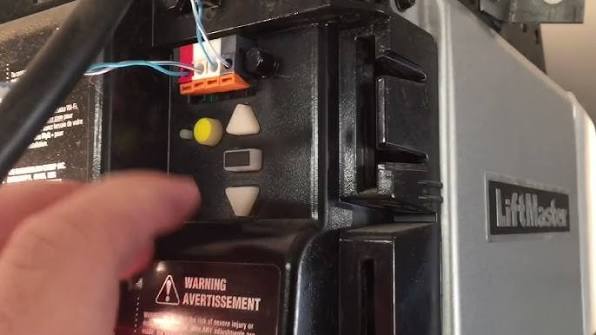
- Locate Learn Button: Find the “Learn” button on your actual garage door motor unit (usually yellow, red, purple, or orange).
- Clear Memory: Press and hold the Learn button for approximately 6–10 seconds until the LED indicator turns off. Note: This erases ALL remotes and keypads paired to the opener.
- Reprogram Keypad: Return to the exterior keypad. Enter your new 4-digit PIN.
- Sync: Press and hold ENTER while simultaneously pressing the Learn button on the motor unit (you may need a helper or a ladder). Alternatively, on newer models, press ENTER on the keypad, then press the Learn button on the motor within 30 seconds.
- Verify: The motor unit lights should flash, or you will hear two clicks indicating successful pairing.
⚠️ Safety Warning: Always keep the garage door visible while programming. Never program a keypad with the door closed or obstructed, as accidental activation during testing could cause injury or damage.
Resetting Smart Garage Openers (MyQ & Wi-Fi Models)
Technology has shifted from physical buttons to digital apps. If you own a LiftMaster Elite Series or a Wi-Fi enabled model, “resetting the password” often refers to the MyQ app credentials or the local Wi-Fi connection rather than a physical PIN.
App vs. Physical Reset Comparison
Understanding the difference saves significant troubleshooting time. Use this table to identify which path you need:
| Feature | Physical Keypad Reset | MyQ / Smart App Reset |
|---|---|---|
| Primary Use | Exterior guest/contractor access | Remote monitoring & primary user control |
| Reset Method | Learn button + PIN entry | App settings > Device > Delete/Add |
| Time Required | 2–5 minutes | 5–10 minutes (includes Wi-Fi sync) |
| Requires Ladder? | Yes (to reach motor unit) | No (unless resetting Wi-Fi hub) |
| Security Level | Local rolling code encryption | Cloud-based AES-256 encryption |
Reconnecting to Wi-Fi After Router Change
Many users search for how to reset password on LiftMaster garage door opener when they actually mean their Wi-Fi password changed.
- Open the MyQ app and select your device.
- Navigate to Device Settings > Wi-Fi Setup.
- Press the Learn button on the opener until the blue LED begins flashing.
- Follow the in-app prompts to enter your new Wi-Fi credentials.
- Wait for the solid blue light, indicating a stable cloud connection.
Troubleshooting: What To Do When The Reset Fails
Even professionals encounter hiccups. If the standard procedures above do not work, consult this diagnostic checklist before calling a technician.
- Battery Check: 90% of keypad failures are due to weak batteries. Replace with fresh alkaline batteries (not lithium, as voltage curves differ) before assuming a programming error.
- LED Diagnostic Codes: Count the flashes on the motor unit. Two flashes typically indicate a safety sensor misalignment, which prevents any programming. Five flashes suggest RPM sensor failure.
- Interference Issues: LED bulbs in the opener housing can interfere with radio frequencies. Temporarily unscrew the bulb and retry the reset.
- Capacitor Failure: If the motor hums but doesn’t move during testing, the logic board capacitor may be blown. This requires professional repair.
- Antenna Position: Ensure the hanging wire antenna is vertical and not touching metal surfaces. A horizontal antenna reduces range by up to 70%.
Frequently Asked Questions (FAQ)
1. How often should I reset my LiftMaster garage door password?
Security best practices recommend resetting your code every 6 months or immediately after giving temporary access to contractors, house sitters, or tenants. Regular rotation minimizes the risk of unauthorized duplication.
2. Can I reset the password without accessing the motor unit?
For a simple PIN change on a wireless keypad, yes—you only need the keypad itself. However, if you are performing a factory reset, erasing lost remotes, or syncing a new device for the first time, physical access to the motor unit’s Learn button is mandatory.
3. Will resetting the password erase my car visor remotes?
It depends on the method. Changing a keypad PIN via the # button does not affect remotes. However, holding the Learn button for 10 seconds performs a full system wipe, deleting all paired devices including car remotes and indoor wall consoles. Always have all devices present when doing a full reset.
4. What is the default master password for LiftMaster openers?
LiftMaster units do not ship with a universal default master password for security reasons. The initial code is set by the installer or homeowner during first setup. If you purchased a home with an unknown code, you must perform the factory reset procedure outlined above to establish a new master credential.
5. Why does my keypad accept the new code but the door won’t open?
This usually indicates a safety sensor obstruction or a travel limit issue rather than a password problem. Check that the infrared sensors at the bottom of the door tracks are aligned (solid amber/green lights) and that nothing blocks the beam. Also verify the door moves freely when disengaged from the trolley.
6. Is it safe to use a generic keypad with a LiftMaster opener?
While third-party keypads exist, using OEM LiftMaster equipment ensures compatibility with Security+ 2.0 rolling code encryption. Generic keypads may lack firmware updates and could create vulnerabilities. For optimal security when learning how to reset password on LiftMaster garage door opener, stick to manufacturer-approved accessories.
Conclusion
Mastering how to reset password on LiftMaster garage door opener empowers you to maintain both convenience and security without relying on costly service visits. Whether you are updating a wireless keypad PIN, reconnecting a smart opener to new Wi-Fi, or performing a complete factory reset after moving homes, the steps outlined above provide a reliable roadmap. Remember to test your system immediately after any change, replace batteries proactively, and rotate your codes seasonally to keep your home truly secure.
Found this guide helpful? Share it with friends, family, or neighbors who might be struggling with their garage door security! Tag us on social media or forward this article to someone who just moved into a new home—your small action could prevent a major security headache. Stay safe, and keep those garages secure! 🔒🏠



Leave a Reply