Introduction
There is nothing quite as frustrating as pulling into your driveway after a long day, only to realize you cannot get your truck’s built-in remote to communicate with your garage. If you are struggling to figure out how to set garage door opener in Ram 1500, please know that you are not alone; this is one of the most common questions new Ram owners ask. The good news is that programming the HomeLink system in your truck is a straightforward process that takes less than ten minutes when you have the right instructions. This guide will walk you through every step with empathy and precision, ensuring you can open your garage seamlessly from the comfort of your driver’s seat.
Understanding the HomeLink System in Your Ram 1500
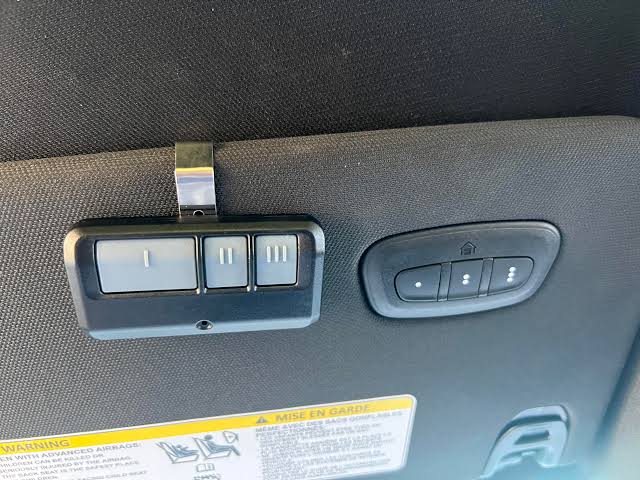
Before diving into the buttons, it is helpful to understand what you are actually programming. The Ram 1500 utilizes the HomeLink Universal Transceiver, a wireless control system integrated directly into the overhead console or rearview mirror. Unlike older universal remotes that used simple dip switches, modern HomeLink systems use rolling-code technology for enhanced security.
According to automotive electronics standards, HomeLink is compatible with over 99% of garage door openers sold in the United States. However, the specific programming sequence can vary slightly depending on whether your Ram 1500 is equipped with the standard three-button HomeLink or the newer single-button smart integration found in higher trims like the Limited or TRX. Knowing your specific setup prevents unnecessary trial and error.
Why Proper Programming Matters
- Security: Correct syncing ensures rolling codes update properly, preventing code grabbing.
- Convenience: Eliminates the need for cluttered visor clips and separate remotes.
- Resale Value: A fully functional integrated opener is a selling point for future buyers.
Step-by-Step: How To Set Garage Door Opener In Ram 1500
This tutorial covers the standard three-button HomeLink system found in most Ram 1500 models from 2019 to present. Please ensure your vehicle is parked outside the garage during programming to prevent accidental door movement.
Phase 1: Clearing Previous Codes (Essential First Step)
Even if your truck is new, residual factory test data can interfere. Always start fresh.
- Locate the three HomeLink buttons on your overhead console.
- Press and hold the two outer buttons simultaneously.
- Hold for approximately 10–20 seconds until the indicator LED flashes rapidly (usually amber or red).
- Release both buttons. The system is now erased and ready for new programming.
Phase 2: Programming the Transmitter
You will need your original handheld garage door remote for this phase.
- Hold your handheld remote 1–3 inches away from the HomeLink button you wish to program.
- Simultaneously press and hold the handheld remote button AND the chosen HomeLink button.
- Watch the HomeLink indicator light closely:
- Slow Flash: Still learning. Keep holding.
- Rapid Flash/Solid Light: Programming successful. Release both buttons.
- Test the newly programmed button. If the garage door activates, you are done with Phase 2.
⚠️ Safety Note: Never program your HomeLink while the vehicle is inside a closed garage. Carbon monoxide buildup from idling engines is a serious health hazard. Always perform these steps outdoors with adequate ventilation.
Phase 3: Handling Rolling Code Openers
If your HomeLink light flashed rapidly but the door did not move, your opener likely uses rolling-code technology (standard on all openers manufactured after 1996). You must complete this synchronization step at the garage motor unit.
- Locate the “Learn” or “Smart” button on your garage door opener motor head. It is typically yellow, purple, orange, or green.
- Press and release the Learn button. You usually have 30 seconds to complete the next step.
- Return to your Ram 1500 and press the programmed HomeLink button three times in succession (press-release, press-release, press-release).
- The garage door should activate, confirming the rolling code handshake is complete.
For more technical background on how these security protocols evolved, you can reference the Wikipedia article on Garage Door Openers, which details the transition from fixed-code to rolling-code systems and why modern synchronization requires this two-step verification.
Troubleshooting Common Programming Issues
Even experienced DIYers encounter hiccups. Use this table to diagnose problems quickly without guessing.
| Symptom | Likely Cause | Recommended Solution |
|---|---|---|
| Light never flashes | Button not held long enough | Reset system and hold buttons for full 20 seconds |
| Slow flash won’t turn rapid | Frequency mismatch | Check opener compatibility at HomeLink.com |
| Rapid flash but no door movement | Rolling code sync incomplete | Repeat Phase 3 within 30-second window |
| Works intermittently | Weak handheld remote battery | Replace CR2032 battery in original remote first |
| Programs then loses memory | Electrical interference | Check fuse #F30 and overhead console wiring harness |
When to Seek Professional Help
If you have attempted all steps above and the system still fails, your Ram 1500 may have a faulty HomeLink module or an incompatible opener frequency. Some European-imported openers operate on frequencies outside the US HomeLink range. In such cases, purchasing a HomeLink Compatibility Bridge (approximately $30–$50) often resolves the issue without requiring dealership intervention.
Optimizing Your Setup for Daily Use
Once you have successfully learned how to set garage door opener in Ram 1500, consider these optimization tips for better daily performance:
- Antenna Positioning: Ensure your garage opener’s antenna hangs vertically and is not obstructed by metal shelving or LED lighting transformers, which can cause RF interference.
- Multiple Vehicles: Each HomeLink button can store one device. Program Button 1 for your primary garage, Button 2 for gates, and Button 3 for community amenities or lighting.
- Battery Maintenance: While HomeLink draws power from your truck, keeping your original handheld remote’s battery fresh ensures reliable reprogramming if you ever need to reset the system.
- Voice Integration: Newer Ram 1500 models with Uconnect 5 may support voice commands like “Open my garage.” Check your infotainment settings under Connected Services to enable this hands-free feature.
Frequently Asked Questions (FAQ)
Can I program my Ram 1500 HomeLink without the original remote?
Generally, no. The original handheld transmitter is required to transfer the unique frequency and code to your truck. If you have lost your remote, you must purchase a compatible replacement or hire a technician to clone the signal directly from the motor unit. Some newer Chamberlain/LiftMaster openers allow direct-to-vehicle pairing via QR code, but this is model-specific.
Why does my HomeLink work sometimes but not others?
Intermittent operation usually indicates either a weak battery in your original remote (used during programming), RF interference from nearby LED bulbs, or an incomplete rolling-code sync. Start by replacing the remote battery and re-running Phase 3. Also, verify that no new electronic devices have been installed near your garage motor recently.
Is the HomeLink system in Ram 1500 compatible with all garage brands?
HomeLink is compatible with approximately 99% of US-market garage door openers, including LiftMaster, Chamberlain, Genie, Craftsman, and Sommer. However, some older fixed-code openers (pre-1996) or non-US frequency models may require a compatibility bridge. Always check the official HomeLink compatibility database before assuming failure.
How do I erase a single HomeLink button without clearing all three?
Unfortunately, most Ram 1500 HomeLink systems do not support individual button erasure. You must clear all three buttons simultaneously using the two-outer-button method described in Phase 1, then reprogram any buttons you wish to retain. This security feature prevents unauthorized partial access.
Will disconnecting my truck battery erase HomeLink programming?
No. HomeLink memory is stored in non-volatile flash memory, meaning your programmed codes persist even after battery replacement or disconnection. You will only lose programming if you manually perform the factory reset procedure outlined in Phase 1.
My Ram 1500 has only one HomeLink button instead of three. What changes?
Single-button systems (often found in trucks with auto-dimming mirrors) follow the same programming logic but use sequential presses rather than simultaneous holds. Consult your specific owner’s manual supplement for the single-button variant, as the timing windows differ slightly from the three-button system detailed above.
Conclusion
Mastering how to set garage door opener in Ram 1500 transforms your daily routine from fumbling with plastic remotes to effortless, integrated convenience. By following the three-phase process—clearing old codes, programming the transmitter, and completing the rolling-code handshake—you ensure secure, reliable operation for years to come. Remember, patience during the initial setup pays dividends every single time you pull into your driveway.
Now that your HomeLink is perfectly synced, why keep this knowledge to yourself? Share this guide on Facebook, X (Twitter), or your favorite Ram truck forum to help fellow owners avoid the frustration you just conquered. Tag a friend who just bought a Ram 1500—they will thank you next time they roll up to their garage with confidence. Safe driving and happy programming! 🚛🏠



Leave a Reply