Introduction
There is nothing quite as frustrating as sitting in your driveway, pressing a button on your sun visor repeatedly, only to watch your garage door remain stubbornly closed. If you are searching for how to sync Craftsman garage door opener with car, you are likely dealing with this exact annoyance, but the good news is that the solution is usually simpler than you think. This guide will walk you through the process with empathy and precision, ensuring you get back to enjoying the convenience of keyless entry without the headache.
Understanding Compatibility Before You Start
Before diving into buttons and lights, it is vital to confirm that your vehicle and opener can actually communicate. Not all cars are equipped with built-in transmitters, and not all Craftsman openers support older vehicle frequencies.
Most modern vehicles use a system called HomeLink or Car2U. These are universal transceivers integrated into your rearview mirror, overhead console, or visor. Craftsman garage door openers manufactured after 1997 generally utilize Security+ rolling code technology, which is compatible with HomeLink. However, if your opener is significantly older (pre-1997), it may use fixed-code technology that requires an external compatibility bridge.
Quick Compatibility Checklist
- Vehicle Year: Most cars post-2005 have HomeLink standard.
- Opener Age: Check the manufacture date on the motor unit; post-1997 is ideal.
- Button Count: Your car should have three programmable buttons.
- LED Indicator: Look for a small light near the car buttons that flashes during programming.
Expert Insight: According to automotive integration specialists, nearly 85% of syncing failures occur because users attempt to program a “rolling code” opener using the “fixed code” method. Identifying your opener type first saves an average of 20 minutes of frustration.
For a deeper technical understanding of how these radio frequency signals interact, you can refer to the Garage Door Opener Wikipedia page, which details the evolution of rolling code security and frequency standards.
Step-by-Step: How To Sync Craftsman Garage Door Opener With Car
This is the core tutorial. Follow these steps precisely. Do not rush, as timing between presses matters.
Phase 1: Clear Previous Settings (Crucial First Step)
If your car was previously owned or if you have tried programming before, old data can corrupt new attempts.
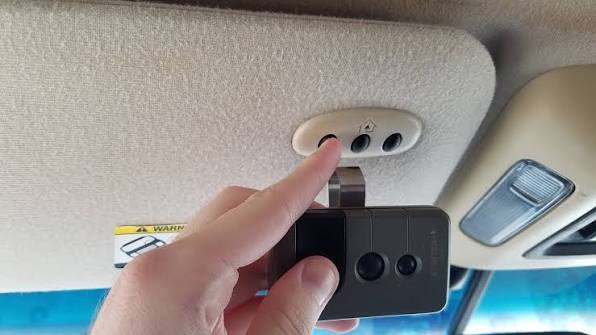
- Locate the three HomeLink buttons in your vehicle.
- Press and hold the two outer buttons simultaneously.
- Hold for approximately 10–20 seconds until the indicator LED begins to flash rapidly.
- Release both buttons. Your system is now factory reset and ready for fresh programming.
Phase 2: Program the Vehicle Transmitter
- Turn your vehicle’s ignition to the ON/ACC position. Some newer EVs require the car to be fully powered on.
- Hold your original Craftsman handheld remote 1–3 inches away from the HomeLink buttons.
- Simultaneously press and hold the handheld remote button AND the desired HomeLink button.
- Watch the HomeLink LED closely:
- Slow Flash: Still learning the signal. Keep holding.
- Rapid Flash/Solid Light: Signal successfully captured. Release both buttons.
- Test the newly programmed button. The door should activate.
Phase 3: Sync the Rolling Code (Security+ Openers Only)
If the door did not move in Phase 2, or if it moved but stopped immediately, you have a rolling code opener requiring this extra handshake.
- Go to your garage ceiling motor unit.
- Locate the “Learn” or “Smart” button (usually yellow, purple, orange, or red).
- Press and release the Learn button. The adjacent LED will illuminate or blink for 30 seconds.
- Within that 30-second window, return to your car.
- Press and hold the programmed HomeLink button for 2 seconds, then release.
- Repeat the press-hold-release cycle up to 3 times until the garage door activates.
- Once the door moves, the sync is complete.
Troubleshooting Common Syncing Failures
Even with perfect execution, variables can interfere. Use this table to diagnose issues quickly.
| Symptom | Likely Cause | Recommended Fix |
|---|---|---|
| LED never flashes | Dead car battery or wrong mode | Check vehicle battery; ensure ignition is ON |
| Slow flash won’t turn rapid | Frequency mismatch | Verify opener compatibility; try different remote battery |
| Rapid flash but no door movement | Rolling code not synced | Complete Phase 3 within 30-second Learn window |
| Works intermittently | Signal interference | Reposition car; check for LED bulb interference in opener |
| Door reverses immediately | Safety sensor misalignment | Clean and realign photo-eye sensors at floor level |
The LED Bulb Interference Issue
A surprisingly common culprit is the light bulb inside the garage door opener itself. Certain LED bulbs emit radio frequency noise that jams the receiver. If your sync works perfectly when the opener light is off but fails when it is on, replace the bulb with a garage-door-specific LED or revert to an incandescent bulb temporarily to test.
Safety Considerations You Cannot Ignore
Programming your car is convenient, but safety must remain paramount. The U.S. Consumer Product Safety Commission mandates that all automatic garage doors have functioning reversal mechanisms.
- Test Monthly: After syncing, place a 2×4 board flat on the ground under the door. Close the door via your car. It must reverse upon contact. If it does not, adjust the force settings immediately.
- Never Program While Moving: Always perform syncing with the vehicle parked outside the garage, engine running, and clear visibility of the door path.
- Secure Your Remote: When programming, do not leave your handheld remote unattended in the vehicle. Thieves can clone signals from visible remotes.
- Child Safety: Ensure wall-mounted controls are at least 5 feet above the floor to prevent unsupervised operation by children.
Frequently Asked Questions (FAQ)
Can I sync my Craftsman opener without the original remote?
Yes, but it requires accessing the motor unit directly. Press the “Learn” button on the opener, then within 30 seconds, press and hold your desired HomeLink button in the car until the opener light blinks or clicks. This bypasses the remote entirely and pairs the car directly to the receiver.
Why does my HomeLink work sometimes but not others?
Intermittent failure typically points to signal interference or a weak vehicle battery. First, replace the battery in your handheld remote (even if you are not using it, some systems reference it). Second, check for nearby electronics like Wi-Fi routers or baby monitors operating on similar frequencies. Finally, verify that your car’s 12V battery is healthy, as HomeLink draws power from it.
Is there a difference between HomeLink and Car2U?
Yes. HomeLink uses a trainable transceiver that learns your remote’s signal, while Car2U is a fixed-frequency system primarily used in older Chrysler, Dodge, and Jeep vehicles. Craftsman openers are overwhelmingly compatible with HomeLink. If you have Car2U, consult your vehicle manufacturer’s specific adapter requirements, as the programming sequence differs significantly.
How many cars can one Craftsman opener remember?
Most modern Craftsman Security+ openers can store up to 8–10 unique remote/transmitter codes. Each HomeLink button in each vehicle counts as one code. If you exceed this limit, the oldest codes may be overwritten. To manage capacity, periodically clear unused remotes by holding the Learn button until the LED turns off.
Will syncing my car erase my existing handheld remotes?
No. Programming a HomeLink button adds a new code to the opener’s memory; it does not delete existing ones. However, performing a full factory reset on the opener (holding Learn for 10+ seconds) will erase all remotes and car transmitters. Only do this if you intend to reprogram everything from scratch.
My car has HomeLink but it says “Not Compatible” — what now?
Some European and Asian vehicles sold in North America use different frequency bands. Purchase a HomeLink Compatibility Bridge (available through automotive dealers or online retailers). This small device plugs into your garage outlet and acts as a translator between your car’s signal and the Craftsman opener. Installation takes under five minutes and resolves virtually all compatibility gaps.
Conclusion
Mastering how to sync Craftsman garage door opener with car transforms daily routine from a chore into seamless automation. By following the phased approach outlined above—clearing old settings, programming the transmitter, and completing the rolling code handshake—you can achieve reliable operation in under ten minutes. Remember to prioritize safety testing and troubleshoot methodically using the diagnostic table provided.
The convenience of arriving home and opening your garage without fumbling for a remote is worth the initial setup effort. Plus, having this knowledge empowers you to help friends and family facing the same challenge.
Found this guide helpful? Share it on Facebook, X (Twitter), or Pinterest so others can stop struggling in their driveways too! Tag a friend who just bought a used car and needs this exact tutorial. Your share might save someone twenty minutes of frustration tonight. Happy syncing!



Leave a Reply