Introduction
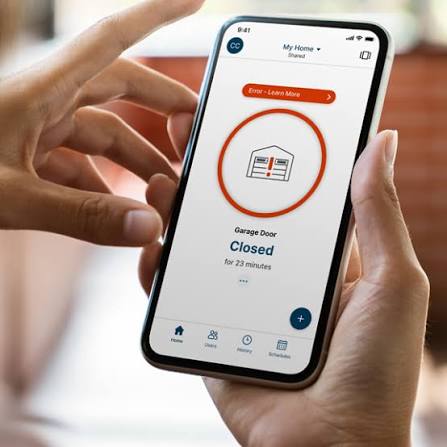
Are you tired of digging through your purse or pockets for your garage remote every time you pull into the driveway? Or perhaps you’ve left home and suddenly panicked, wondering if you remembered to close the garage door? You are not alone. Millions of homeowners face this daily inconvenience and anxiety. Learning how to use MyQ app to open garage door can transform this hassle into a seamless, secure, and modern experience. With just a few taps on your smartphone, you can control access to your home from anywhere in the world.
What Is the MyQ App and Why Do You Need It?
Before diving into the technical steps, it is essential to understand what you are installing. The MyQ ecosystem, developed by Chamberlain Group, is one of the most popular smart home solutions in the United States. It allows you to monitor and control your garage door opener via Wi-Fi.
According to recent smart home adoption studies, over 40% of US households now utilize some form of smart home technology, with security and convenience being the primary drivers. The MyQ app bridges the gap between traditional mechanical openers and modern digital connectivity.
Key Benefits of Using MyQ
- Remote Access: Open or close your door from work, vacation, or the grocery store.
- Real-Time Alerts: Receive notifications whenever your garage door opens or closes.
- Guest Access: Grant temporary access to dog walkers, cleaners, or family members without giving them a physical key.
- Integration: Works seamlessly with Amazon Alexa, Google Assistant, and Apple HomeKit (with specific hubs).
For more detailed technical specifications on Wi-Fi protocols used in smart home devices, you can refer to Wikipedia’s page on Smart Home Technology.
Prerequisites: What You Need Before Starting
To successfully learn how to use MyQ app to open garage door, you must ensure you have the necessary hardware and environment. Not all garage door openers are compatible out of the box.
Hardware Checklist
- A Compatible Garage Door Opener: Most Chamberlain, LiftMaster, and Craftsman openers manufactured after 2011 are compatible. If you have an older model, you may need a MyQ Smart Garage Hub.
- Smartphone: iOS (14.0 or later) or Android (8.0 or later).
- Wi-Fi Connection: A stable 2.4 GHz Wi-Fi network. Note: Most smart home devices do not support 5 GHz networks due to range limitations.
- MyQ Account: A free account registered via email.
Compatibility Check
If you are unsure if your opener is compatible, look for a yellow “Learn” button on your motor unit. If it has a yellow button, it is likely compatible with the MyQ system. If it has a red or purple button, you might need additional hardware or a different solution.
Step-by-Step: How To Use MyQ App To Open Garage Door
This section breaks down the process into manageable steps. Follow these instructions carefully to ensure a smooth setup.
Step 1: Download and Install the App
Go to the Apple App Store or Google Play Store. Search for “MyQ” and download the official app developed by Chamberlain Group. Avoid third-party apps that claim to offer similar functionality, as they may lack security updates.
Step 2: Create Your MyQ Account
- Open the app and select “Sign Up.”
- Enter your email address and create a strong password.
- Verify your email through the link sent to your inbox.
- Log in to the app using your new credentials.
Step 3: Add Your Device
- Tap the “Add Device” button on the home screen.
- Select “Garage Door Opener.”
- The app will ask you to identify your opener. You can either scan the QR code located on the motor unit or enter the serial number manually.
- Follow the on-screen prompts to connect the device to your Wi-Fi network. You will need to enter your Wi-Fi password during this step.
Pro Tip: Ensure your phone is within 10 feet of the garage door opener during setup to ensure a strong signal connection.
Step 4: Name Your Device
Give your garage door a recognizable name, such as “Main Garage” or “Side Entrance.” This is crucial if you have multiple doors or plan to add more smart devices later.
Step 5: Test the Connection
Once the setup is complete, stand outside your garage and tap the “Open/Close” button in the app. The door should respond within 2–5 seconds. If it does not, check your Wi-Fi signal strength in the garage.
Troubleshooting Common Connectivity Issues
Even with a perfect setup, you might encounter issues. Here are the most common problems and their solutions.
| Issue | Possible Cause | Solution |
|---|---|---|
| Device Offline | Weak Wi-Fi Signal | Move your router closer or install a Wi-Fi extender. |
| Delayed Response | Network Congestion | Restart your router and the MyQ hub. |
| App Crashes | Outdated Software | Update the MyQ app to the latest version. |
| Authentication Error | Wrong Password | Reset your MyQ account password via email. |
Important Note on Wi-Fi Bands
As mentioned earlier, ensure your garage door opener is connected to the 2.4 GHz band. Many modern routers combine 2.4 GHz and 5 GHz into a single SSID (network name). If you experience connectivity issues, try separating these bands in your router settings and connect the MyQ device specifically to the 2.4 GHz network.
Advanced Features: Maximizing Your MyQ Experience
Once you know how to use MyQ app to open garage door, you can explore advanced features that enhance security and convenience.
1. Setting Up Schedules
You can automate your garage door to close at a specific time every night. This is ideal for forgetful homeowners.
- Go to Settings > Schedules.
- Select “Close Door.”
- Set the time (e.g., 10:00 PM).
- Choose the days of the week.
2. Integrating with Voice Assistants
Linking MyQ with Alexa or Google Assistant allows you to open your garage door using voice commands.
- Alexa: Enable the “MyQ” skill in the Alexa app and link your account.
- Google Home: Add the “Chamberlain MyQ” service in the Google Home app.
Security Warning: For safety reasons, most voice assistants require a PIN code to open the garage door, but will allow you to close it without a PIN. This prevents unauthorized voice access.
3. Managing Guest Access
You can invite family members or service providers to use your garage door without sharing your main password.
- Go to Settings > Family & Guests.
- Enter the guest’s email address.
- Set permissions (e.g., “View Only” or “Control Access”).
- Set an expiration date for temporary guests.
Security Best Practices for Smart Garage Doors
While convenient, smart devices introduce cybersecurity risks. Follow these guidelines to keep your home secure.
- Enable Two-Factor Authentication (2FA): This adds an extra layer of security by requiring a code sent to your phone when logging in from a new device.
- Update Firmware Regularly: Chamberlain releases updates to patch security vulnerabilities. Ensure your app and hub are set to auto-update.
- Monitor Activity Logs: Regularly check the activity log in the app to see who accessed your garage and when. If you see unfamiliar activity, change your password immediately.
- Use Strong Passwords: Avoid using simple passwords like “123456” or “password.” Use a combination of letters, numbers, and symbols.
FAQ Section
Q1: Can I use the MyQ app without Wi-Fi?
A: No, the MyQ app requires an active internet connection to communicate with your garage door opener. However, you can still use your physical remote control or wall button if the Wi-Fi is down.
Q2: Is the MyQ app free to use?
A: Yes, the basic features of the MyQ app, including opening/closing the door and receiving alerts, are free. There is a premium subscription called “MyQ Protect” that offers video storage and extended warranty, but it is optional.
Q3: Why is my MyQ device showing as “Offline”?
A: This usually indicates a loss of Wi-Fi connection. Check if your router is working, ensure the 2.4 GHz band is active, and restart the MyQ hub by unplugging it for 10 seconds and plugging it back in.
Q4: Can I control multiple garage doors with one app?
A: Absolutely. You can add multiple garage door openers to the same MyQ account. Each door will appear as a separate tile on the home screen, allowing you to control them individually.
Q5: Does MyQ work with Apple HomeKit?
A: Native HomeKit support requires a specific hub, such as the “MyQ Home Bridge.” Standard MyQ hubs do not directly integrate with HomeKit without this additional hardware.
Q6: How far away can I be to open my garage door?
A: As long as your smartphone has an internet connection (via cellular data or Wi-Fi), you can open your garage door from anywhere in the world. There is no distance limit.
Conclusion
Learning how to use MyQ app to open garage door is a small step that yields significant benefits in convenience, security, and peace of mind. By following the steps outlined above, you can transform your traditional garage into a smart entry point for your home. Whether you are letting in a delivery driver while you are at work or simply checking if you closed the door after leaving, MyQ puts control at your fingertips.
Don’t let outdated technology hold you back. Set up your MyQ app today and experience the freedom of a truly connected home. If you found this guide helpful, please share it with friends and family on social media who might also benefit from smarter garage management!



Leave a Reply