Experience the ease of access with our guide on “How To Program The Garage Door Opener.” Explore step-by-step instructions and valuable insights for seamless programming.
Demystifying the Process: How To Program The Garage Door Opener
Programming your garage door opener can enhance your daily routine. In this comprehensive guide, we will navigate the intricacies of “How To Program The Garage Door Opener,” providing clear instructions and valuable tips for a hassle-free experience.
Read too: How Long Should Garage Door Spring Last and Tips for Prolonging Their Lifespan? Decoding Durability
How To Program The Garage Door Opener: Step-by-Step Guide
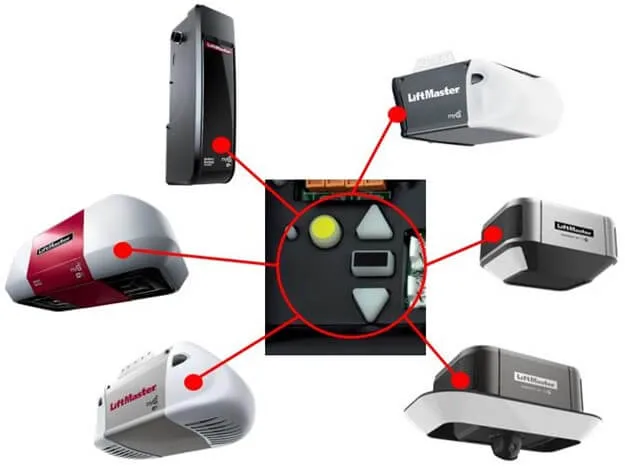
1. Locating the Programming Button:
- Identify the programming button on your garage door opener.
- This button is typically located on the opener motor unit.
2. Activating the Programming Mode:
- Press and hold the programming button until a light indicator activates.
- This signals that the opener is ready for programming.
3. Entering the Code:
- Enter your desired code on the keypad or remote control.
- Follow the manufacturer’s instructions for code entry.
Understanding the Benefits of Programming Your Garage Door Opener
1. Enhanced Security:
- Personalized codes contribute to enhanced security.
- Restrict access and ensure only authorized individuals can operate the garage door.
2. Convenient Access:
- Programmed openers offer convenient access without the need for physical keys.
- Enjoy the ease of entering your garage with a personalized code.
3. Multi-Device Compatibility:
- Many modern garage door openers allow programming with multiple devices.
- Sync your keypad, remote control, and smartphone for versatile control.
Troubleshooting: Common Challenges in Programming Garage Door Opener
1. Weak Batteries:
- Ensure that the batteries in your remote control or keypad are fresh.
- Weak batteries can hinder the programming process.
2. Interference Issues:
- Check for interference from other electronic devices.
- Move devices causing interference away from the opener.
3. Code Entry Errors:
- Double-check your code entry for accuracy.
- Incorrect entries can prevent successful programming.
Additional Tips for Successful Programming
1. Referencing User Manual:
- Consult your garage door opener’s user manual for specific programming instructions.
- Manufacturers may have unique procedures.
2. Testing the Code:
- After programming, test the code to ensure proper functionality.
- Open and close the garage door to confirm successful programming.
3. Regular Maintenance:
- Include programmed opener checks in your regular maintenance routine.
- Ensure codes remain secure and operational.
Conclusion: Effortless Control at Your Fingertips
In conclusion, mastering “How To Program The Garage Door Opener” empowers you with convenient and secure access to your garage. By following our step-by-step guide and understanding the benefits of programming, you ensure a seamless experience with your garage door opener.
Remember, personalized codes and multi-device compatibility offer enhanced security and convenience. Incorporate these practices into your routine, and relish the ease of effortlessly accessing your garage with a programmed opener.



Leave a Reply