Introduction
There is nothing quite like the frustration of sitting in your driveway, pressing the button in your car, and watching your garage door remain stubbornly closed. For owners of the latest flagship SUVs, integrating smart home features should be effortless, yet the process can sometimes feel ambiguous. If you are wondering how to program garage door opener on 2024 Suburban, you are not alone. This guide will walk you through the exact steps to sync your vehicle’s HomeLink system with your garage door, ensuring you enjoy the convenience and security you paid for.
Understanding the HomeLink System in the 2024 Suburban
Before diving into the buttons, it is essential to understand what you are working with. The 2024 Chevrolet Suburban utilizes the HomeLink wireless control system. This technology allows your vehicle to communicate with radio-frequency (RF) devices, such as garage door openers, gate operators, and even home lighting systems.
Unlike older models that might have required complex dip-switch adjustments, the 2024 Suburban uses a digital learning process. However, compatibility varies depending on the age and brand of your garage door opener. Most modern openers manufactured after 1995 are compatible, but some newer “smart” openers use rolling code technology that requires an extra step during programming.
Why Use HomeLink Instead of a Remote?
- Convenience: No more digging through bags or sun visors for a separate remote.
- Security: Your car is less likely to be stolen if the remote isn’t visible inside the cabin.
- Aesthetics: Keeps your interior clutter-free and streamlined.
Step-by-Step: How To Program Garage Door Opener On 2024 Suburban
Programming your HomeLink system is generally a straightforward process, but precision is key. Follow these steps carefully to ensure a successful connection.
Step 1: Prepare Your Vehicle and Garage
- Park your 2024 Suburban outside the garage, facing the door. Ensure the engine is running or the ignition is in the “On/Run” position. Note: Some systems require the vehicle to be in park.
- Clear the area around the garage door opener motor unit (usually mounted on the ceiling of your garage). You will need access to the “Learn” or “Smart” button on this unit.
- Have your original handheld garage door remote ready. It is highly recommended to keep this remote handy in case the programming fails or needs to be reset.
Step 2: Clear Existing HomeLink Buttons (If Necessary)
If you are replacing an old device or if the buttons were previously programmed, you must clear the memory first.
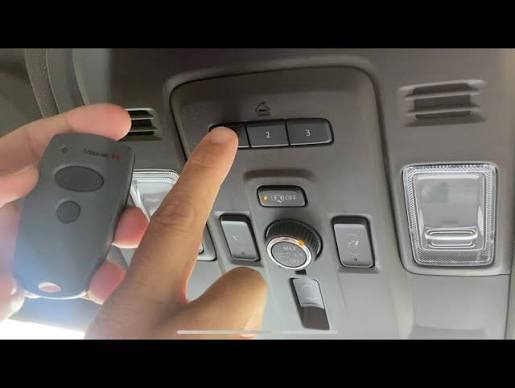
- Press and hold the two outer HomeLink buttons simultaneously.
- Keep holding them for about 20 seconds.
- Watch the indicator light. It will begin to flash slowly, then rapidly. Once it flashes rapidly, release the buttons.
- The memory is now cleared. Do not skip this step if you are reprogramming.
Step 3: Initiate the Programming Mode
- Choose the HomeLink button you wish to use (e.g., Button 1).
- Press and hold the chosen HomeLink button and your original handheld remote button simultaneously.
- Hold both buttons until the HomeLink indicator light changes from a slow blink to a rapid flash. This usually takes between 10 to 30 seconds.
- Once the light flashes rapidly, release both buttons.
Step 4: Sync with the Garage Door Motor Unit
This is the most critical step for rolling code openers (which most 2024-compatible openers are).
- Locate the “Learn” or “Smart” button on your garage door opener motor unit inside the garage. It is often colored yellow, purple, or red, depending on the brand (LiftMaster, Chamberlain, Genie, etc.).
- Press and release the “Learn” button. You typically have 30 seconds to complete the next step.
- Return to your Suburban within those 30 seconds.
- Press and hold the programmed HomeLink button for 2 seconds, then release.
- Repeat this press-and-hold cycle three times.
- Test the door by pressing the HomeLink button. The garage door should activate.
Pro Tip: If the door does not move, try standing closer to the garage door while pressing the button. Signal strength can vary based on interference from other electronic devices.
Troubleshooting Common Issues
Even with careful execution, things don’t always go according to plan. Here are solutions to common problems encountered when learning how to program garage door opener on 2024 Suburban.
| Issue | Possible Cause | Solution |
|---|---|---|
| Light doesn’t flash rapidly | Weak remote battery or incorrect timing. | Replace the battery in your handheld remote. Ensure you are holding both buttons firmly. |
| Door moves partially then stops | Safety sensors are blocked or misaligned. | Check the infrared sensors at the bottom of the garage door tracks. Clean lenses and ensure they are aligned. |
| Programming fails repeatedly | Incompatible frequency or rolling code error. | Verify your opener’s frequency (usually 315 MHz or 390 MHz). Consult your opener’s manual for specific “rolling code” instructions. |
| HomeLink button feels unresponsive | System glitch or fuse issue. | Try clearing the memory again (Step 2). If persistent, check the vehicle’s fuse box for any blown fuses related to the accessory power. |
The Importance of Rolling Codes
Modern garage door openers use rolling code technology to prevent hackers from intercepting your signal. Each time you press the button, the code changes. This is why Step 4 (syncing with the motor unit) is mandatory for most post-1995 openers. Without this step, the car sends a code, but the garage door ignores it because it doesn’t match the current expected sequence.
For more detailed technical specifications on radio frequency standards, you can refer to the general overview on Wikipedia.
Expert Tips for a Seamless Experience
To ensure long-term reliability and ease of use, consider these expert recommendations:
- Label Your Buttons: Use a small piece of tape or a label maker to mark which HomeLink button controls which device (e.g., “Home,” “Gate,” “Office”). This prevents accidental activations.
- Update Firmware: While rare, some HomeLink systems can receive updates via the dealership. If you experience persistent connectivity issues, ask your Chevrolet service center if there are any software updates for your infotainment module.
- Check Battery Health: A weak car battery can sometimes affect the power output of auxiliary systems. Ensure your Suburban’s battery is in good condition, especially if the vehicle has been sitting for extended periods.
- Interference Awareness: LED light bulbs in your garage can sometimes emit electromagnetic interference that disrupts RF signals. If programming fails, try turning off the garage lights temporarily during the setup process.
FAQ Section
1. Can I program multiple garage doors to my 2024 Suburban?
Yes, the HomeLink system in the 2024 Suburban typically supports up to three different devices. You can program one button for your home garage, another for a vacation home, and a third for a gated community entrance. Simply repeat the programming steps for each individual button.
2. What if I don’t have the original handheld remote?
Programming without the original remote is difficult but not impossible. Some garage door openers allow you to put the motor unit into “learn mode” directly and then trigger the HomeLink button in the car. However, this method is less reliable. It is strongly advised to purchase a universal replacement remote compatible with your opener brand to facilitate the initial pairing.
3. Does programming HomeLink void my garage door warranty?
No, programming your vehicle’s HomeLink system does not void your garage door opener’s warranty. It is a standard feature designed to work with major brands. However, always consult your garage door opener’s manual to ensure you are following their specific guidelines for third-party remotes.
4. Why does my garage door close immediately after opening?
This is usually a safety feature triggered by misaligned sensors. If the infrared beams at the bottom of the door tracks are blocked or misaligned, the door will reverse direction to prevent injury. Check that nothing is blocking the sensors and that the lenses are clean. It is rarely an issue with the HomeLink programming itself.
5. Can I use HomeLink for devices other than garage doors?
Absolutely. HomeLink is versatile and can control gate operators, entry doors, home lighting systems, and even security alarms. The programming process is identical: clear the button, pair with the original remote, and sync with the receiver unit if required.
6. Is the process different for a Suburban with the High Country trim?
The core HomeLink functionality remains the same across all trims of the 2024 Suburban, including the LS, LT, Z71, RST, Premier, and High Country. However, the location of the buttons may vary slightly depending on the interior package. In most 2024 models, the buttons are located on the overhead console near the rearview mirror.
Conclusion
Learning how to program garage door opener on 2024 Suburban is a simple task that significantly enhances your daily driving experience. By following the steps outlined above—clearing the memory, pairing with your remote, and syncing with the motor unit—you can enjoy seamless access to your home. Remember to keep your original remote handy for troubleshooting and ensure your garage sensors are clean for optimal performance.
Did you find this guide helpful? Share this article with fellow Suburban owners on social media to help them master their vehicle’s tech features. If you have any unique tips or encountered a specific issue, leave a comment below to help build our community knowledge base!



Leave a Reply