Garage doors have become an essential part of modern homes, offering security and convenience. Chamberlain, one of the leading garage door opener manufacturers, designs its systems with user-friendly programming features. If you own a Chamberlain opener, chances are you’ve noticed the colored Learn Button on your unit. One of the most common variations is the Purple Learn Button, and understanding how to use it is key to programming remotes correctly.
This detailed guide will walk you through everything you need to know about Chamberlain garage door opener remote programming purple learn button—from identifying the button to step-by-step instructions, troubleshooting, and helpful safety tips.
Read too: Door and Garage Door Companies: Choosing the Right Partner for Your Needs
What Is the Purple Learn Button on a Chamberlain Garage Door Opener?
Chamberlain garage door openers use a Learn Button to connect remotes and keypads to the opener. The button color indicates compatibility with specific remotes and keypads.
The Purple Learn Button typically means the unit operates on 315 MHz frequency. This detail is important because only remotes designed for that frequency will work with your opener.
You’ll usually find the Learn Button:
- On the back or side of the motor unit
- Under the light cover panel
- Near the antenna wire hanging down
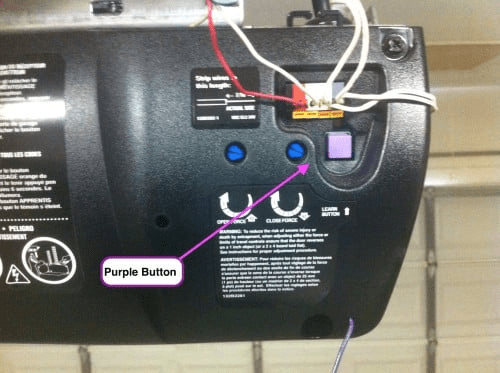
Other colors you may see on Chamberlain openers include Yellow, Green, and Red/Orange. Each corresponds to different models and frequencies.
Why Programming the Purple Learn Button Matters
Programming your garage door remote is more than just convenience—it’s about security and functionality. Proper programming allows you to:
- Easily open and close the garage door without manually entering a code.
- Add multiple remotes for family members.
- Connect wireless keypads for keyless entry.
- Reset access quickly if you lose a remote.
With the Chamberlain garage door opener remote programming purple learn button, you can ensure only authorized devices control your garage.
Chamberlain Garage Door Opener Remote Programming Purple Learn Button: Step-by-Step Guide
Follow these simple steps to program your Chamberlain remote using the purple Learn Button:
Step 1: Locate the Learn Button
- Use a ladder if needed and carefully remove the light lens cover.
- Look for the small purple square button near the back of the opener unit.
Step 2: Prepare the Remote Control
- Ensure the remote you’re programming is compatible with 315 MHz frequency.
- Have fresh batteries installed in the remote.
Step 3: Press the Learn Button
- Press and release the purple Learn Button once.
- A small LED light next to the button will glow solid for about 30 seconds.
Step 4: Press the Remote Button
- Within those 30 seconds, press and hold the button on your remote that you want to link.
- Release the button when you hear a click or see the garage light blink.
Step 5: Test the Remote
- Stand back and press the programmed remote button.
- The garage door should respond smoothly.
If the door doesn’t respond, repeat the process. Sometimes it takes a second attempt to properly sync.
Adding Multiple Remotes with the Purple Learn Button
You can program several remotes or even a wireless keypad to the same opener. Repeat the steps above for each new device.
Tip: Each time you press the Learn Button, it resets the programming cycle for 30 seconds. Be sure to finish pairing each remote within that window.
Erasing All Remotes and Keypads
If you’ve lost a remote or want to reset access, you can erase all programmed devices:
- Locate the purple Learn Button.
- Press and hold it for about 6–8 seconds until the LED light turns off.
- This clears all remotes and keypads from memory.
After this, you’ll need to reprogram each device individually.
Troubleshooting Purple Learn Button Programming
Even with simple instructions, issues sometimes come up. Here’s how to handle common problems:
Remote Doesn’t Program
- Ensure the remote is compatible with 315 MHz systems.
- Replace the remote’s battery.
- Make sure you pressed the Learn Button firmly (but not holding too long).
Door Only Responds Intermittently
- Check for interference from nearby electronics.
- Inspect the opener’s antenna wire—ensure it’s hanging straight down.
- Reprogram the remote closer to the opener.
Lost Remote Access
- Use the Learn Button to erase all remotes for safety.
- Purchase a replacement Chamberlain-compatible remote with purple Learn Button support.
Safety Tips When Programming Your Garage Door Remote
- Use a sturdy ladder if accessing the opener in the ceiling.
- Never program while standing directly under the door in case it activates.
- Limit remote sharing to trusted family members only.
- Regularly test the safety reversal system to ensure the door stops and reverses correctly if obstructed.
Compatibility Notes for Purple Learn Button Models
Remotes compatible with the purple Learn Button often include Chamberlain models with the following part numbers:
- Chamberlain 950CD
- Chamberlain 953CD
- LiftMaster remotes marked with 315 MHz frequency
When buying replacement remotes, always double-check that they match the purple Learn Button frequency.
Frequently Asked Questions
1. How many remotes can I program with the purple Learn Button?
Most Chamberlain units allow up to 5–7 remotes plus a keypad.
2. Do I need to reprogram remotes after a power outage?
No, the opener retains programming even after power is lost.
3. Can I program a universal remote?
Yes, as long as the universal remote supports Chamberlain 315 MHz frequency systems.
4. What if my Learn Button isn’t purple?
Follow instructions specific to your button color. Each color indicates a different frequency and compatible remote type.
Final Thoughts
Programming your Chamberlain garage door opener remote programming purple learn button is a straightforward process once you understand the steps. The purple button signifies a 315 MHz system, and with the right remote, you can easily pair devices, add new remotes, or erase old ones for security.
Whether you’re replacing a lost remote, adding extra controls for family members, or simply learning more about your system, mastering the purple Learn Button will save you time and stress. With careful attention to compatibility and proper safety practices, your Chamberlain garage door opener will continue to provide convenience and security for years to come.



Leave a Reply