Introduction
Managing a heavy garage door requires a robust and reliable opener. The Craftsman Garage Door Opener 3/4 Hp Chain Drive 53990 is designed for durability and smooth operation, but proper setup is essential. Homeowners often encounter issues like uneven movement, noise, or misaligned travel limits without proper guidance. This guide walks you through installation, programming, and maintenance for optimal performance.
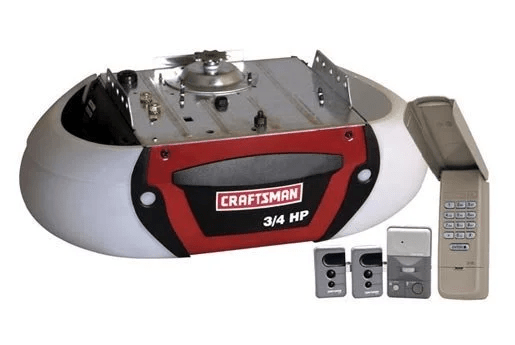
What Is the Craftsman 3/4 Hp Chain Drive 53990?
People Also Ask: What makes the 53990 model unique?
The Craftsman 3/4 Hp Chain Drive 53990 is a heavy-duty garage door opener featuring:
- 3/4 horsepower motor suitable for single and double doors
- Chain drive system for powerful, long-lasting performance
- Compatibility with Craftsman 3-function remotes
- Automatic safety reversal for accident prevention
- Battery backup options for uninterrupted operation
Read too: How To Replace Garage Door Roller Like a Pro? Step-by-Step Guide
According to Craftsman, the chain drive design provides consistent performance over time, especially for heavier doors, making it ideal for residential use with frequent operation.
Tools and Materials Needed
Before installing the opener, gather:
- Ladder and safety gloves
- Screwdrivers and adjustable wrenches
- Power drill with bits
- Level and measuring tape
- Craftsman 3/4 Hp Chain Drive 53990 kit and user manual
- Safety goggles
Preparation ensures a faster, safer installation without interruptions.
Step-by-Step Installation Guide
People Also Ask: How do I install the Craftsman 3/4 Hp Chain Drive 53990?
Step 1: Prepare the Garage Door
- Ensure the door is fully closed and moves freely manually.
- Disconnect any existing opener if applicable.
Step 2: Mount the Motorhead
- Position the motorhead on the ceiling according to instructions.
- Attach the rail and chain assembly to the motorhead.
- Ensure the unit is level for smooth operation.
Step 3: Connect the Door Bracket and Arm
- Attach the bracket to the garage door.
- Connect the arm to the trolley and door bracket.
Step 4: Adjust Travel Limits
- Locate the up and down limit screws.
- Press the wall control to move the door to the desired open and closed positions.
- Adjust screws until the door opens fully and closes safely without binding.
Step 5: Set Force Settings
- Adjust the up and down force dials to ensure the door reverses upon obstruction.
- Avoid excessive force, which may damage the opener or door.
Step 6: Program Remotes
- Press the learn button on the motorhead.
- Within 30 seconds, press and hold the remote button until the LED flashes.
- Test each programmed remote to ensure proper function.
Troubleshooting Common Issues
| Problem | Solution |
|---|---|
| Door doesn’t open | Check power, chain alignment, and motorhead connections |
| Door reverses unexpectedly | Adjust down force and limit settings |
| No response from remote | Replace battery or reprogram remote |
| Excessive noise | Lubricate chain and check alignment |
Maintenance Tips
- Lubricate chain and moving parts every six months.
- Inspect safety sensors monthly to ensure proper alignment.
- Tighten loose hardware to prevent rattling.
- Test auto-reverse monthly for safety.
- Replace remotes or batteries as needed.
Proper maintenance prolongs the opener’s lifespan and ensures smooth operation.
Safety Considerations
- Stand clear while testing the door.
- Keep children and pets away during setup.
- Avoid touching wiring or moving parts while powered.
- Always use a stable ladder when accessing the motorhead.
FAQ Section
Q1: Can this opener handle double garage doors?
A1: Yes, the 3/4 Hp motor is rated for heavier and wider doors, including double doors.
Q2: How often should the chain be lubricated?
A2: Every six months or when noise increases.
Q3: Can I program multiple remotes?
A3: Yes, up to three remotes can be programmed to the opener.
Q4: What if the door doesn’t reverse properly?
A4: Adjust force settings and check sensor alignment; clean lenses if needed.
Q5: Is battery backup available?
A5: Yes, certain kits include battery backup for operation during power outages.
Q6: Can this opener be installed on a non-standard garage ceiling?
A6: Yes, but ensure proper support and level alignment for safety.
Conclusion
The Craftsman Garage Door Opener 3/4 Hp Chain Drive 53990 combines power, reliability, and safety for any residential garage door. By following this step-by-step guide for installation, programming, and maintenance, you can enjoy smooth, quiet, and secure operation. Share this article to help friends and family optimize their Craftsman chain drive openers!



Leave a Reply