If you drive a Lincoln MKZ and want to sync your garage door opener with your vehicle’s built-in HomeLink system, you’re in the right place. Many Lincoln MKZ owners appreciate the convenience of opening and closing their garage doors with just a button inside their car. But if you’ve never programmed it before, you might be wondering: How do I program my Lincoln MKZ garage door opener?
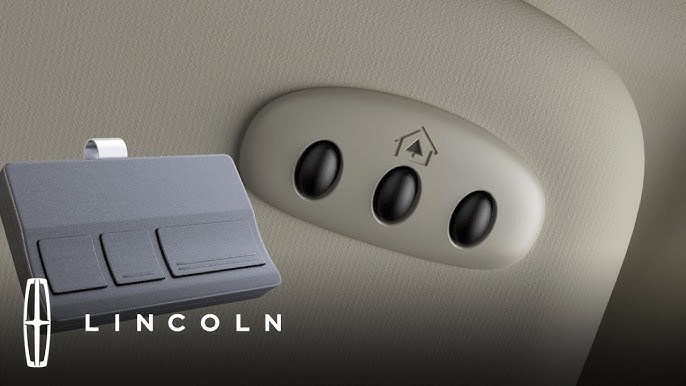
In this guide, we will walk you through the step-by-step process of setting up your Lincoln MKZ garage door opener, including preparing your garage door opener, syncing it with HomeLink, troubleshooting common issues, and ensuring everything works smoothly.
Read too: Mastering Quantum Garage Door Opener Programming: A Comprehensive Guide
Why Program Your Lincoln MKZ Garage Door Opener?
Before we dive into the steps, let’s look at why programming your garage door opener with your Lincoln MKZ is beneficial.
1. Convenience and Safety
With a programmed garage door opener, you don’t need to fumble with a separate remote control. Simply press the built-in HomeLink button inside your car to open or close your garage door.
2. Clean and Clutter-Free Dashboard
Instead of keeping a bulky garage remote clipped to your visor, your car’s HomeLink system provides a seamless and integrated solution.
3. Enhanced Security
Garage door remotes can be lost or stolen. But with HomeLink, your garage door controls are built into your vehicle, reducing the risk of unauthorized access.
How Do I Program My Lincoln MKZ Garage Door Opener?
The Lincoln MKZ uses HomeLink technology, which works with most garage door openers. Follow these steps carefully to program your garage door opener with your vehicle’s HomeLink system.
Step 1: Prepare Your Garage Door Opener and Your Lincoln MKZ
Before programming, ensure the following:
✅ Your garage door remote control is working properly.
✅ Your vehicle is parked outside the garage to avoid accidents.
✅ The Lincoln MKZ ignition is switched to the ON position but the engine does not need to be running.
Step 2: Locate the HomeLink Buttons in Your Lincoln MKZ
The HomeLink buttons are usually located on:
🔹 The overhead console, near the map lights.
🔹 The sun visor, depending on the Lincoln MKZ model year.
You will see three buttons. Any of these can be programmed to open your garage door.
Step 3: Erase Previous Programming (If Necessary)
If your HomeLink system has been used before, you may need to reset it.
- Press and hold the first and third HomeLink buttons at the same time.
- Keep holding for about 20 seconds until the indicator light starts blinking rapidly.
- Release the buttons. The system is now reset.
Note: If your HomeLink system is brand new and has never been programmed, you can skip this step.
Step 4: Sync the HomeLink Button with Your Garage Door Remote
- Hold your garage door opener remote about 1-3 inches away from the HomeLink buttons.
- Press and hold the button on your garage door remote and the HomeLink button you want to program at the same time.
- The HomeLink indicator light will start blinking slowly at first and then rapidly.
- Once the blinking speeds up, release both buttons.
If your garage door opener uses a fixed code system, your programming is now complete. Test it by pressing the HomeLink button to see if the garage door operates.
If the door does not move, you may have a rolling code garage door opener, which requires additional steps (see Step 5).
Step 5: Sync HomeLink with a Rolling Code Garage Door Opener
Many modern garage door openers use rolling code technology for added security. If your garage door did not respond after Step 4, follow these extra steps:
- Locate the “Learn” button on your garage door motor unit.
- It is usually near the antenna wire or under a light cover.
- The button may be labeled “Learn” or “Program” and is often red, yellow, purple, or green.
- Press the Learn Button
- Press and release the “Learn” button on the garage door opener.
- You have 30 seconds to complete the next step.
- Press the HomeLink Button in Your Car
- Go back to your Lincoln MKZ and press the programmed HomeLink button for two seconds.
- Release the button and repeat this up to three times until the garage door moves.
If successful, your HomeLink system is now programmed!
Troubleshooting HomeLink Programming Issues
If your garage door opener does not respond, try these troubleshooting tips:
1. Check Compatibility
- HomeLink works with most garage door openers, but some very old models (pre-1996) may not be compatible.
- If your garage door opener is outdated, you may need a HomeLink compatibility bridge.
2. Reset HomeLink and Try Again
- Hold the first and third HomeLink buttons for 20 seconds to reset.
- Then, repeat the programming process.
3. Check Your Garage Door Opener’s Antenna
- Ensure that the antenna wire on the garage motor is hanging down and not damaged.
4. Replace Your Garage Door Remote Battery
- If your garage door opener remote has a weak battery, the signal might not be strong enough to sync with HomeLink.
Testing and Using Your Lincoln MKZ HomeLink System
Once programmed, you can use HomeLink just like a garage remote:
🚗 Press and hold the HomeLink button you programmed for about 2 seconds.
🚗 Your garage door should open or close as expected.
🚗 If the door doesn’t move, try pressing and holding the button for a longer duration.
Pro Tip: You can program up to three different garage doors or gates using the three HomeLink buttons!
Final Thoughts
Now that you know the answer to “How do I program my Lincoln MKZ garage door opener?”, you can enjoy the convenience of opening your garage door with just a press of a button inside your vehicle.
With the HomeLink system, you no longer need to carry a separate remote, making your driving experience safer and clutter-free. By following the step-by-step programming guide and troubleshooting tips, you can quickly sync your Lincoln MKZ with your garage door opener and enjoy hassle-free access to your home.
If you encounter any issues, don’t hesitate to consult your Lincoln owner’s manual or reach out to your garage door opener manufacturer for additional support.



Leave a Reply