If your Liftmaster garage door opener is storing old or unwanted codes, it can compromise security or prevent proper operation. Understanding How To Clear Codes On Liftmaster Garage Door Opener helps homeowners regain control, protect their garage, and ensure smooth functionality. This guide offers clear, step-by-step instructions suitable for beginners and DIY enthusiasts.
Why Clearing Codes Matters
Clearing codes on your Liftmaster garage door opener is essential for:
- Security: Old codes or lost remotes can allow unauthorized access.
- Functionality: Prevents conflicts between multiple remotes and the opener.
- Troubleshooting: Resolves issues with unresponsive or misprogrammed devices.
Read too: The Complete Guide to Tighten Chain On Garage Door Opener for Smooth Operation
Expert Insight: Garage security specialist John Peters notes, “Regularly clearing codes ensures only authorized users can operate your garage, reducing the risk of break-ins.”
Step-by-Step Guide: Clearing Codes on Liftmaster Garage Door Openers
1. Locate the “Learn” Button
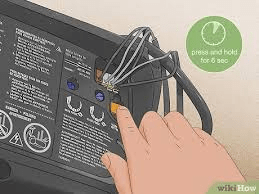
- Most Liftmaster openers have a Learn button on the back or side of the motor unit.
- It is usually colored red, yellow, or purple depending on the model.
- Pressing this button allows you to program or erase remote codes.
2. Prepare to Clear Codes
- Disconnect all remotes and keypads temporarily.
- Make sure the garage door is closed for safety.
3. Clear All Remotes and Keypads
For standard Liftmaster openers:
- Press and hold the Learn button for 6–10 seconds until the LED light turns off.
- Release the button—this erases all programmed codes.
- Test by pressing a remote; it should no longer operate the opener.
Pro Tip: If your model has a “Smart Control” feature, check the LED pattern in the manual to confirm codes are cleared.
4. Reprogram Authorized Remotes
- Press the Learn button once; the LED will blink.
- Press the remote button you want to program within 30 seconds.
- Test the remote to ensure proper operation.
5. Reprogram Keypads (Optional)
- Press the Learn button on the motor unit.
- Enter a new PIN on the keypad and press the “Enter” button.
- LED will blink to confirm programming.
6. Safety Check
- Ensure no remotes are left in vehicles that shouldn’t have access.
- Test all authorized devices to confirm functionality.
- Check that the garage door reverses correctly when obstructed for safety compliance.
Advantages vs Disadvantages of Clearing Codes
| Advantage | Disadvantage |
|---|---|
| Improves security | Requires reprogramming all authorized remotes |
| Prevents code conflicts | May temporarily disable access if not planned |
| Resolves remote issues | Need to locate the Learn button on some models |
| Quick DIY process | Not suitable for malfunctioning openers (mechanical issues) |
Common Mistakes to Avoid
- Holding Learn Button Too Long: Some models erase only one remote; follow timing guidelines.
- Not Testing Remotes: Always verify programmed remotes before finishing.
- Ignoring Keypads: Old PINs may remain active if only remotes are cleared.
- Skipping Safety Check: Ensure all devices operate correctly to avoid accidents.
FAQ Section
Q1: Can I clear codes without removing the opener cover?
Yes, the Learn button is often accessible from below or the side, but check your model’s manual.
Q2: How long does it take to clear all codes?
Typically 1–2 minutes, plus time to reprogram authorized devices.
Q3: Will clearing codes fix a malfunctioning opener?
Only if the issue is related to programming. Mechanical or sensor problems require additional troubleshooting.
Q4: Can I selectively erase one remote?
Some newer models allow selective clearing, but older openers erase all codes at once.
Q5: Is there a way to reset my keypad PIN?
Yes, press the Learn button and follow the keypad programming instructions to set a new PIN.
Q6: Do I need professional help?
Most users can safely clear codes themselves, but electricians or garage door specialists can assist with complex models or troubleshooting.
Conclusion
Knowing How To Clear Codes On Liftmaster Garage Door Opener is crucial for security, convenience, and proper operation. By following this guide, you can quickly erase old codes, reprogram authorized devices, and ensure your garage remains safe and fully functional.



Leave a Reply