If your Chamberlain garage door opener is not responding correctly or storing old remote codes, it’s time to clear its memory. Knowing How To Clear Memory On Chamberlain Garage Door Opener ensures your system works reliably and remains secure. This guide provides a detailed, beginner-friendly approach to erasing all stored codes and reprogramming authorized devices.
Why Clearing Memory Matters
Clearing the memory of your Chamberlain opener is essential for:
- Security: Prevents lost or unauthorized remotes from accessing your garage.
- Functionality: Resolves conflicts when multiple remotes are used.
- Troubleshooting: Fixes unresponsive remotes or programming issues.
Read too: The Complete Guide to Tighten Chain On Garage Door Opener for Smooth Operation
Expert Insight: John Peters, a garage security specialist, explains, “Regularly clearing the memory prevents old codes from creating conflicts and ensures your garage operates smoothly.”
Step-by-Step Guide: Clearing Chamberlain Opener Memory
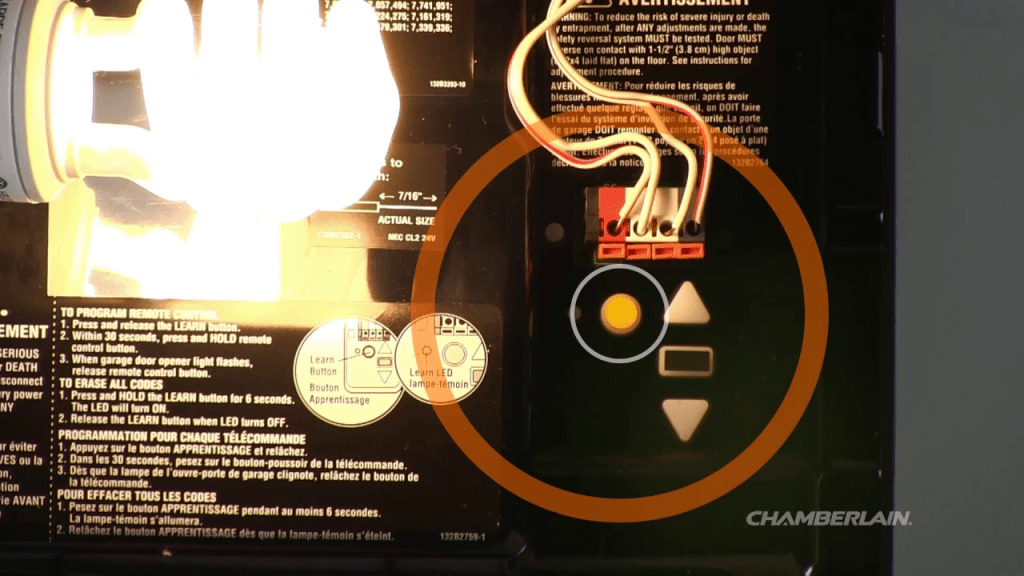
1. Locate the “Learn” Button
- Most Chamberlain openers have a Learn button on the back or side of the motor unit.
- Button colors may vary: yellow, purple, or red, depending on the model.
- Pressing this button allows you to program or erase remote codes.
2. Prepare for Reset
- Disconnect all remotes temporarily.
- Ensure the garage door is closed for safety.
3. Clear All Stored Codes
- Press and hold the Learn button for approximately 6–10 seconds until the indicator light turns off.
- Release the button—this erases all previously stored codes.
- Test a remote; it should no longer operate the opener.
Pro Tip: Some models flash the LED differently; refer to your manual to confirm memory is cleared.
4. Reprogram Authorized Remotes
- Press the Learn button once; the LED will start blinking.
- Within 30 seconds, press the remote button you want to program.
- Verify operation by pressing the remote to confirm the garage opens.
5. Optional: Reprogram Keypads
- Press the Learn button on the motor unit.
- Enter a new PIN on the keypad and press Enter.
- The LED will blink to indicate successful programming.
6. Safety Check
- Remove remotes from unauthorized vehicles.
- Test all programmed remotes and keypads to ensure correct operation.
- Verify garage door safety features, including auto-reverse, are functional.
Advantages vs Disadvantages of Clearing Memory
| Advantage | Disadvantage |
|---|---|
| Improves security | Must reprogram all devices |
| Resolves conflicts | Time-consuming if multiple remotes |
| Easy DIY process | Some models need rolling code sync |
| Ensures reliable operation | Temporary loss of access if not planned |
Common Mistakes to Avoid
- Holding the Learn Button Too Short/Long: May not erase codes properly.
- Not Reprogramming Remotes: Only cleared devices can regain access.
- Ignoring Keypads: Old PINs may still work if only remotes are cleared.
- Skipping Safety Tests: Always verify garage door reversal and operation.
FAQ Section
Q1: Can I clear the opener memory without opening the garage door?
Yes, the garage door should remain closed for safety, but clearing codes doesn’t require it to open.
Q2: How long does it take to clear all codes?
Approximately 1–2 minutes, plus time to reprogram authorized devices.
Q3: Will clearing memory fix a non-responsive garage door opener?
Only if the issue is related to stored codes. Mechanical or sensor issues need separate troubleshooting.
Q4: Can I selectively erase one remote?
Most Chamberlain models erase all codes at once. Selective erase is usually not supported.
Q5: Do I need professional help?
No, most homeowners can safely clear memory and reprogram remotes themselves.
Q6: Can I use multiple vehicles with the same garage opener?
Yes, each vehicle must be reprogrammed individually after clearing the memory.
Conclusion
Knowing How To Clear Memory On Chamberlain Garage Door Opener is essential for security, reliable operation, and smooth troubleshooting. Following these steps ensures old codes are erased, authorized devices are properly reprogrammed, and your garage remains safe.
Share this guide with friends or family to help them manage their Chamberlain garage opener efficiently!



Leave a Reply