Knowing the model number of your Chamberlain garage door opener is essential for troubleshooting, purchasing replacement parts, or upgrading your system. If you’re asking yourself, “How to find model number on Chamberlain garage door opener?”, you’re in the right place.
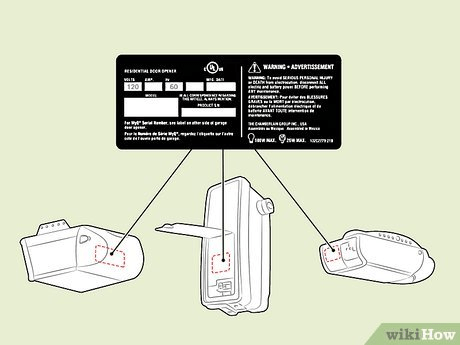
In this comprehensive guide, we’ll walk you through where to locate the model number, why it’s important, and how to use it for maintenance and upgrades. Whether you need a replacement remote, keypad, or motor unit, finding your model number is the first step.
Read too: Door and Garage Door Companies: Choosing the Right Partner for Your Needs
Why Is the Model Number Important?
Your Chamberlain garage door opener model number is crucial for several reasons:
- Replacement Parts: Ensures compatibility when purchasing remotes, keypads, safety sensors, and other parts.
- User Manual & Troubleshooting: Helps you find the correct manual and specific troubleshooting steps.
- Software & Compatibility: Some newer openers support Wi-Fi and MyQ technology, and the model number helps verify compatibility.
- Warranty & Support: If your opener is under warranty, Chamberlain customer support may ask for the model number to assist you.
How To Find Model Number On Chamberlain Garage Door Opener
If you’re wondering where to look for the model number on a Chamberlain garage door opener, here are the key places to check:
1. Check the Garage Door Opener Unit
The easiest and most direct way to find the model number is to look at the main opener unit. The model number is usually located on a sticker or label on the motor housing. Here’s how to locate it:
- Step 1: Look at the bottom of the opener unit, near the light cover.
- Step 2: If not visible, check the back panel or side of the motor housing.
- Step 3: The label should include the model number, serial number, and manufacturing date.
Example: A model number might look like “WD832KEV” or “041A5021-1M”.
2. Inspect the User Manual
If you still have the user manual that came with your Chamberlain garage door opener, the model number will be listed on the front cover or inside the first few pages.
3. Look on the Wall-Mounted Control Panel
Some Chamberlain garage door openers store the model number on the wall-mounted control panel or keypad. If you have a smart control panel, you might be able to check system info for the model number.
4. Check the Remote or Keypad
While remotes and keypads don’t always display the garage door opener model number, they do have their own model numbers. You can use this to cross-reference and find a compatible opener model.
5. Chamberlain’s Website or Customer Support
If you cannot locate the model number on the unit, manual, or remote, you can:
- Visit Chamberlain’s official website and search for your opener based on its features and appearance.
- Contact Chamberlain customer support and provide details about your opener. They may ask for the serial number to identify the correct model.
Understanding Chamberlain Model Number Formats
Chamberlain garage door openers have different model number formats, and understanding them can help you quickly identify your unit.
1. Residential Garage Door Openers
- Common model numbers: LW9000W, HD750WF, B970, C450
- These typically begin with a letter followed by a number.
2. Replacement Parts & Accessories
- Example: 041A5021-1M (Logic Board)
- These part numbers are different from the full model number of the opener.
3. MyQ-Enabled & Smart Garage Door Openers
- Example: B6753T, RJO20, B2405
- Often include Wi-Fi, MyQ, and battery backup features.
What To Do Once You Find Your Model Number
Now that you’ve found your Chamberlain garage door opener model number, here’s how to use it:
1. Download the User Manual
- Visit Chamberlain’s website and enter your model number to download the correct manual.
2. Order Replacement Parts
- Use the model number to purchase compatible remotes, keypads, sensors, and light covers.
3. Check for Software Updates
- If you have a Wi-Fi-enabled Chamberlain opener, you may need updates for MyQ or other smart features.
4. Contact Customer Support for Troubleshooting
- If you experience issues like a malfunctioning remote or a stuck door, Chamberlain support can help using your model number.
Frequently Asked Questions (FAQs)
1. Where is the serial number on my Chamberlain garage door opener?
The serial number is usually found on the same label as the model number, located on the motor housing of the opener.
2. Can I find my Chamberlain model number using the MyQ app?
If your opener is MyQ-compatible, you may be able to find system details in the MyQ app settings under “Device Info”.
3. What if my Chamberlain garage door opener model number is missing or unreadable?
If the label is worn out or missing, check the user manual, control panel, or Chamberlain’s website for assistance.
4. Do all Chamberlain garage door openers have the model number in the same location?
Most Chamberlain openers have the model number on the motor housing, but placement can vary slightly depending on the model.
Conclusion
Finding the model number on your Chamberlain garage door opener is essential for maintenance, troubleshooting, and purchasing compatible parts. By following the steps in this guide, you can easily locate your model number and ensure your garage door opener remains in top working condition.
Now that you know how to find model number on Chamberlain garage door opener, you can confidently manage your garage door system and access the right support when needed.



Leave a Reply