Introduction
Struggling to sync your garage door with your new 2022 Toyota Camry? You’re not alone. Many drivers find themselves frustrated when their vehicle’s built-in garage door opener won’t communicate with their home system. Learning how to program 2022 Toyota Camry garage door opener correctly can save you countless trips back and forth, eliminating the hassle of carrying separate remotes. This comprehensive guide will walk you through every step, ensuring a smooth setup process that works reliably every time.
The 2022 Toyota Camry comes equipped with the HomeLink universal transceiver system, allowing you to control up to three different garage doors or gates directly from your vehicle. Whether you’re a first-time Toyota owner or upgrading from an older model, understanding this feature can significantly enhance your daily convenience.
Understanding the HomeLink System in Your 2022 Camry
Before diving into the programming process, it’s essential to understand what you’re working with. The HomeLink system integrated into your 2022 Toyota Camry is a sophisticated radio frequency transmitter that mimics your original garage door remote. According to HomeLink’s official documentation, this technology has been licensed by over 50 automakers worldwide, making it one of the most widely used vehicle-based garage door control systems.
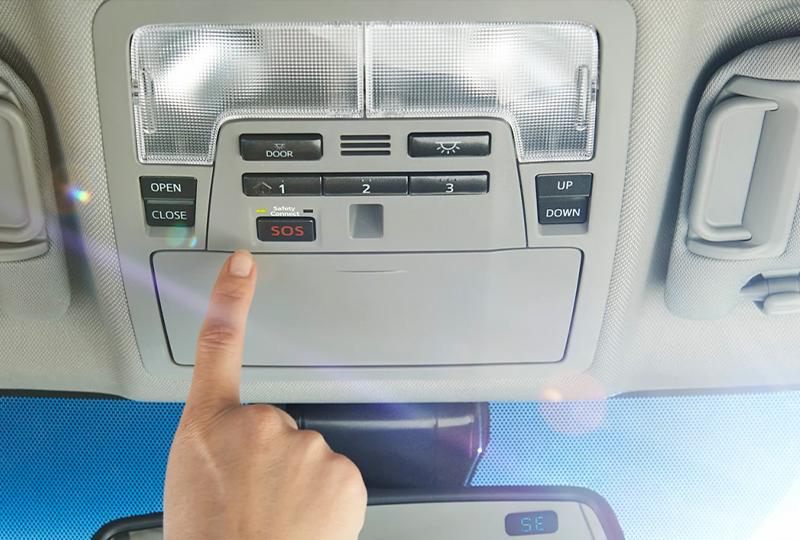
Your Camry’s HomeLink buttons are typically located on the overhead console near the rearview mirror. The system operates on various frequencies, including 315 MHz and 390 MHz, which cover most residential garage door openers manufactured after 1982.
Key Components You’ll Need
- Your 2022 Toyota Camry with functioning HomeLink system
- Original garage door remote control
- Access to your garage door opener motor unit
- A ladder (if needed to reach the motor unit)
- Approximately 15-20 minutes of uninterrupted time
Step-by-Step Programming Guide
Step 1: Prepare Your Vehicle and Garage
Park your 2022 Camry outside your garage, ensuring the engine is running or the ignition is in the “ON” position. Clear any obstacles around your garage door and ensure you have clear access to both the vehicle’s HomeLink buttons and your garage door opener motor unit.
Important: Make sure your garage door is closed before beginning the programming process for safety reasons.
Step 2: Clear Existing HomeLink Memory
If your HomeLink system has been previously programmed, you’ll need to clear it first:
- Press and hold the two outer HomeLink buttons simultaneously
- Continue holding for approximately 20 seconds
- Watch for the indicator light to flash rapidly, then turn off
- Release both buttons once the light changes
This process erases all previously stored codes, giving you a clean slate for programming.
Step 3: Initiate the Programming Mode
Now you’ll put your HomeLink system into learning mode:
- Choose which of the three HomeLink buttons you want to program
- Press and hold your chosen button along with your original garage door remote button
- Hold both buttons simultaneously for 20-30 seconds
- Watch the HomeLink indicator light – it should change from slow blinking to rapid flashing
The rapid flashing indicates that your Camry has successfully learned the basic signal from your remote.
Step 4: Program the Rolling Code (If Applicable)
Most modern garage door openers use rolling code technology for enhanced security. If your opener uses this system (most units manufactured after 1996 do), you’ll need to complete an additional step:
- Locate the “Learn” or “Smart” button on your garage door opener motor unit
- Press and release this button – you typically have 30 seconds to complete the next step
- Return to your Camry within those 30 seconds
- Press and hold the programmed HomeLink button for 2 seconds, then release
- Repeat this press-and-hold cycle two more times
This process synchronizes the rolling code between your vehicle and garage opener, ensuring secure communication.
Step 5: Test the Connection
After completing the programming steps:
- Stand outside your garage with your Camry
- Press the programmed HomeLink button
- Your garage door should activate within 2-3 seconds
- Test the button multiple times to ensure consistent operation
If the door doesn’t respond, don’t worry – troubleshooting is covered in the next section.
Troubleshooting Common Issues
Even with careful following of instructions, you might encounter some challenges. Here are solutions to the most common problems:
| Problem | Possible Cause | Solution |
|---|---|---|
| No response from garage door | Weak remote battery | Replace remote battery and retry |
| Inconsistent operation | Distance too great | Move vehicle closer during programming |
| Light doesn’t flash rapidly | Wrong button combination | Ensure both buttons held simultaneously |
| Door reverses immediately | Safety sensor obstruction | Check and clean safety sensors |
When Standard Programming Doesn’t Work
Some garage door brands require specific procedures. Chamberlain, LiftMaster, and Genie openers sometimes need alternative programming methods. Consult your garage door opener’s manual for brand-specific instructions, or visit the manufacturer’s website for detailed guidance.
If you’ve tried multiple approaches without success, consider contacting a professional installer. They can verify compatibility and ensure proper setup, especially for complex multi-door systems.
Tips for Optimal Performance
To ensure your programmed HomeLink system works reliably long-term:
- Keep your vehicle battery charged: A weak car battery can affect HomeLink performance
- Update garage door opener firmware: Modern openers may receive security updates
- Test monthly: Regular testing helps identify issues before they become problems
- Document your settings: Note which HomeLink button controls which door
Frequently Asked Questions
How many garage doors can I program to my 2022 Toyota Camry?
Your 2022 Camry’s HomeLink system can store up to three different garage door or gate codes. Each of the three buttons can be programmed to control a separate device, making it perfect for households with multiple garage doors or gates.
What if my garage door opener is very old?
Garage door openers manufactured before 1982 may not be compatible with the HomeLink system due to different frequency requirements. If you have an older opener, consider upgrading to a modern unit with rolling code technology for better security and compatibility.
Can I reprogram a button that’s already set up?
Yes, you can easily reprogram any HomeLink button. Simply follow the clearing procedure for that specific button by holding it until the light changes, then proceed with the standard programming steps using your desired remote.
Why does my garage door work sometimes but not others?
Intermittent operation usually indicates one of several issues: weak batteries in either the vehicle or remote, interference from other electronic devices, or incomplete rolling code synchronization. Try reprogramming following the complete procedure, ensuring you complete all steps within the required timeframes.
Is it safe to program the HomeLink system myself?
Absolutely. The HomeLink programming process is designed for consumer use and poses no safety risks when performed correctly. Just ensure your garage door area is clear and the door is closed during programming. Always prioritize safety by keeping hands and objects clear of the door mechanism.
What should I do if none of the troubleshooting steps work?
If you’ve exhausted all troubleshooting options, contact Toyota customer support or visit your local dealership. They can diagnose potential issues with your HomeLink system. Alternatively, consult a certified garage door technician who can verify your opener’s compatibility and functionality.
Conclusion
Learning how to program 2022 Toyota Camry garage door opener doesn’t have to be complicated. With patience and attention to detail, you can successfully sync your vehicle with your garage door in under 30 minutes. The convenience of controlling your garage door directly from your Camry enhances both security and daily efficiency.
Remember to test your setup thoroughly and keep this guide handy for future reference. If you found this tutorial helpful, share it with fellow Toyota owners who might benefit from these instructions. Happy driving, and enjoy the seamless integration of your smart vehicle with your smart home!
Did this guide help you successfully program your HomeLink system? Share your experience in the comments below or spread the word on social media to help other Camry owners!



Leave a Reply