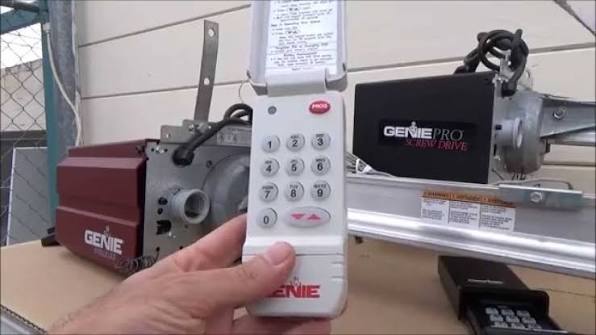
Have you ever stood in your driveway, rain pouring down, frantically pressing the button on your remote only to hear… silence? It is a frustrating scenario that many homeowners face when their garage door opener loses synchronization with its remote control. If you are wondering how to program clicker garage door opener for Genie, you are not alone, and fortunately, the solution is often simpler than you might think.
Genie garage door openers are renowned for their durability and smart technology, but like any electronic device, they occasionally require reprogramming. Whether you have purchased a new universal remote, replaced the batteries, or simply experienced a signal glitch, knowing the correct programming sequence is essential. This guide will walk you through the process with clarity and precision, ensuring you get your garage door working smoothly again without the need for an expensive service call.
Why Does My Genie Remote Stop Working?
Before diving into the programming steps, it is helpful to understand why disconnection happens. Understanding the root cause can prevent future issues and help you troubleshoot more effectively.
- Battery Depletion: The most common culprit is weak batteries. Even if the LED light on the remote blinks, the signal strength may be too low to reach the motor unit.
- Power Surges: A recent storm or power outage can reset the memory of the garage door opener’s main logic board, erasing all paired remotes.
- Interference: New LED light bulbs in the garage or nearby wireless devices can sometimes interfere with the radio frequency used by the opener.
- Accidental Reset: Pressing the “Learn” button on the motor unit for too long can wipe the memory, requiring you to reprogram all devices.
According to industry standards, most garage door openers operate on specific radio frequencies, typically 315 MHz or 390 MHz. Ensuring your remote matches the frequency of your Genie unit is the first step in successful programming. For more technical details on radio frequency allocations, you can refer to Wikipedia’s entry on Radio Spectrum.
Identifying Your Genie Model Type
Genie produces several series of garage door openers, including the Aladdin Connect, SilentMax, and PowerMax lines. While the core programming logic is similar, the location of the “Learn” button and the color of the indicator light can vary.
| Genie Series | Common Learn Button Color | Typical Location |
|---|---|---|
| Aladdin Connect | Purple or Red | Back panel, near antenna |
| SilentMax | Orange or Green | Side or back panel |
| PowerMax | Yellow or Purple | Back panel, under light cover |
| Older Models (Pre-2010) | Gray or Black | Near the hanging bracket |
Note: Always consult your specific user manual if available, as models change frequently.
Step-by-Step Guide: How to Program Clicker Garage Door Opener for Genie
This section details the standard procedure for programming a Genie remote. This method works for most modern Genie openers manufactured after 2010.
Step 1: Prepare the Garage Door Opener
Locate the motor unit mounted on your garage ceiling. You will need a sturdy ladder to reach it safely. Look for the “Learn” or “Program” button. It is usually located on the back panel of the unit, near the hanging bracket or the antenna wire.
- Safety Tip: Ensure the garage door area is clear of people and pets before starting.
Step 2: Clear the Memory (Optional but Recommended)
If you are having trouble pairing a new remote, or if old remotes are no longer working, it is best to clear the opener’s memory first.
- Press and hold the Learn button for approximately 10 seconds.
- Wait until the indicator LED turns off or blinks rapidly.
- Release the button. This erases all previously programmed remotes and keypads.
Step 3: Initiate Programming Mode
- Press and release the Learn button once.
- The indicator LED will illuminate or begin to blink. This signifies that the opener is now in “listening mode” and ready to accept a new code.
- You typically have 30 seconds to complete the next step.
Step 4: Program the Remote
- Pick up your Genie clicker remote.
- Press and hold the button you wish to program (e.g., Button 1).
- Keep holding the button until you see the lights on the motor unit flash or hear two distinct clicks.
- Release the remote button immediately.
Step 5: Test the Connection
Stand at a safe distance from the garage door and press the programmed button on your remote. The door should activate. If it does not, repeat Steps 3 and 4, ensuring you are within range and the batteries are fresh.
Troubleshooting Common Programming Issues
Even with careful following of instructions, things can go wrong. Here are solutions to the most frequent problems users encounter when trying to figure out how to program clicker garage door opener for Genie.
The Remote Won’t Pair
- Check Batteries: Replace the batteries with brand-new alkaline ones. Do not use rechargeable batteries as they may not provide the consistent voltage required.
- Distance: Stand closer to the motor unit during programming. Signal strength is crucial during the handshake process.
- Button Hold Time: Ensure you are holding the remote button long enough. Some older models require a 5-second hold, while newer ones respond instantly.
The Door Moves but Reverses Immediately
This is rarely a programming issue and more likely a safety sensor problem.
- Check the photo-eye sensors near the floor. Ensure they are aligned and free of dirt or spiderwebs.
- If the LED on the sensor is blinking, it indicates an obstruction or misalignment.
The Learn Button Light Does Not Turn On
- Check if the garage door opener is plugged in and receiving power.
- Inspect the circuit breaker in your home.
- If the unit has power but the light remains off, the logic board may be faulty, requiring professional repair.
Universal Remotes vs. OEM Genie Remotes
Many homeowners consider using universal remotes to save money. However, there are distinct differences in performance and ease of setup.
OEM Genie Remotes:
- Pros: Guaranteed compatibility, easier programming process, longer range, durable build quality.
- Cons: Higher price point, limited availability in some local stores.
Universal Remotes:
- Pros: Cost-effective, widely available, can often control multiple brands.
- Cons: Complex programming codes, shorter range, higher failure rate over time.
For the best experience, especially if you rely heavily on your garage access, investing in an original Genie remote is recommended. It eliminates the guesswork involved in finding the correct dip-switch settings or code sequences required by universal units.
Maintaining Your Genie Garage Door System
Programming is just one aspect of ownership. Regular maintenance ensures your system remains reliable.
- Lubricate Moving Parts: Use a silicone-based lubricant on the chain or screw drive every six months. Avoid WD-40 as it attracts dust.
- Inspect Cables and Springs: Look for fraying cables or gaps in the torsion springs. Warning: Never attempt to repair springs yourself; they are under high tension and dangerous.
- Update Smart Features: If you have an Aladdin Connect model, ensure your Wi-Fi module is connected and the app is updated to the latest version for seamless smartphone control.
FAQ Section
Q1: Can I program a Genie remote without accessing the motor unit?
A: No. For security reasons, you must physically press the “Learn” button on the motor unit to initiate the pairing process. This prevents unauthorized individuals from programming their own remotes to your door from outside.
Q2: How many remotes can I program to one Genie opener?
A: Most modern Genie openers can store up to 7 to 8 different devices. This includes wall consoles, remote controls, and keypad entries. If you exceed this limit, you may need to clear the memory and reprogram only the devices you currently use.
Q3: What do I do if I lost my only remote?
A: If you have no working remotes, you can still open the door using the wall-mounted console inside the garage. To program a new remote, you will need to access the motor unit. If you cannot reach the unit safely, consider contacting a professional technician.
Q4: Does reprogramming the remote erase the keypad code?
A: Yes, if you perform a full memory clear (holding the Learn button for 10 seconds), all devices, including wireless keypads, will be erased. You will need to reprogram the keypad as well. If you only press the Learn button briefly to add a new remote, existing devices usually remain intact.
Q5: Why does my remote work close to the door but not from the driveway?
A: This indicates weak batteries or signal interference. Try replacing the batteries first. If the issue persists, check for new LED bulbs in the garage opener light fixture, as these can emit electromagnetic interference that blocks the remote signal.
Q6: Is it possible to program a car’s built-in HomeLink system to a Genie opener?
A: Yes. Most Genie openers are compatible with HomeLink. The process involves putting the opener in Learn mode and then following the specific HomeLink programming sequence in your vehicle’s manual, which usually involves holding the car button and the remote button simultaneously.
Conclusion
Learning how to program clicker garage door opener for Genie is a valuable skill that saves time and money. By understanding your specific model, following the step-by-step pairing process, and troubleshooting common issues, you can ensure reliable access to your home. Remember to use fresh batteries, keep the safety sensors clean, and perform regular maintenance to extend the life of your system.
If you found this guide helpful, please share it with friends or family who might be struggling with their garage door remotes. A quick share on social media can help someone else avoid the frustration of being locked out in the rain!



Leave a Reply