Introduction
Struggling to sync your garage door with your luxury sedan? You’re not alone. Many Lexus ES 350 owners face confusion when trying to integrate their vehicle’s built-in system with their home garage. Knowing how to program garage door opener Lexus ES 350 is essential for seamless daily convenience, saving you from fumbling with separate remotes every time you arrive home. This guide simplifies the process, ensuring you get it right the first time.
Understanding the Lexus Homelink System
Before diving into the buttons, it is crucial to understand what you are working with. The Lexus ES 350 utilizes a technology called Homelink. This is a universal transceiver that allows your car to communicate with various radio-controlled devices, including garage door openers, gate operators, and even home lighting systems.
Unlike older cars that required bulky aftermarket visor clips, the ES 350 integrates these buttons directly into the rearview mirror or the overhead console, depending on the model year. This integration provides a sleek, factory-installed look while maintaining high security standards. According to Wikipedia, Homelink is one of the most widely used vehicle-to-home interface systems in North America, known for its rolling code security features that prevent unauthorized access.
Why Programming Can Be Tricky
Many users fail during the initial setup because they skip the “learning mode” on their actual garage door motor unit. It is not just about pressing buttons in the car; it is a two-way handshake between your vehicle and the garage receiver. If you miss a step, the system will not recognize the signal.
Preparation: What You Need Before Starting
To ensure a smooth programming session, gather the following items and conditions:
- Your Lexus ES 350: Ensure the battery is charged. A weak battery can interrupt the signal transmission.
- Original Garage Remote: You will need this to “teach” the car the specific frequency.
- A Helper: While not strictly mandatory, having someone inside the garage to watch the motor light is highly recommended.
- Clear Line of Sight: Park your car approximately 1–3 feet outside the garage door. Do not park inside yet, as you may need to exit quickly if the door closes unexpectedly.
Safety Tip: Always keep hands and objects clear of the garage door tracks during programming. Ensure the photo-eye sensors are clean and aligned.
Step-by-Step: How to Program Garage Door Opener Lexus ES 350
Follow these precise steps to sync your device. Note that procedures may vary slightly between model years (e.g., 2015 vs. 2022), but the core logic remains consistent.
Step 1: Clear Previous Settings (If Applicable)
If you are replacing an old remote or reprogramming a button that was previously used, you must clear the memory.
- Press and hold the two outer Homelink buttons simultaneously.
- Keep holding them for about 20 seconds.
- Watch the indicator light above the buttons. It will flash rapidly and then turn off.
- Release the buttons once the light extinguishes. This confirms the memory is wiped.
Step 2: Initiate Learning Mode in the Car
Now, you will teach the car the signal from your original handheld remote.
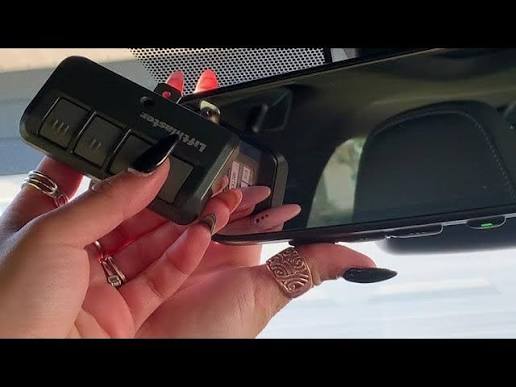
- Hold your original garage remote 1–3 inches away from the Homelink buttons in your Lexus.
- Press and hold the desired Homelink button in your car.
- While holding the car button, press and hold the button on your handheld remote.
- Continue holding both until the Homelink indicator light changes from a slow blink to a rapid flash.
- Release both buttons.
Note: For some newer models with “Smart” Homelink, you may need to select “Add New Device” via the touchscreen display instead of using physical buttons.
Step 3: Program the Garage Door Motor Unit
This is the step most people forget. Your garage door opener needs to accept the new signal from the car.
- Locate the “Learn” or “Smart” button on your garage door motor unit (usually hanging from the ceiling). It is often colored yellow, purple, or red.
- Press and release this button. The LED on the motor unit will usually light up or blink, indicating it is in pairing mode. You typically have 30 seconds to complete the next step.
- Return to your Lexus ES 350.
- Press and hold the programmed Homelink button for 2 seconds, release, and repeat this press-and-release cycle three times.
- Watch the garage door. It should move (open or close) to confirm the code has been accepted.
Step 4: Test and Finalize
Park your car outside the garage again. Press the Homelink button once. The door should operate smoothly. If it does not, repeat Step 3, ensuring you are within range and timing the presses correctly.
Troubleshooting Common Issues
Even with careful execution, things can go wrong. Here is a breakdown of common problems and solutions.
| Issue | Possible Cause | Solution |
|---|---|---|
| Light flashes but door doesn’t move | Motor unit not in learning mode | Re-press the “Learn” button on the garage motor and retry Step 3. |
| Car button does not respond | Weak car battery or dead remote | Check vehicle battery health; replace remote battery. |
| Door reverses immediately | Safety sensor obstruction | Clean the photo-eye sensors at the bottom of the garage tracks. |
| Rolling Code Error | Incompatible security protocol | Some older openers require a “compatibility kit.” Check your opener’s manual. |
Dealing with Rolling Codes
Modern garage doors use rolling codes for security, meaning the code changes every time you use it. If your door opens but only works once, you likely failed to complete the final synchronization in Step 3. The car sent the code, but the garage didn’t lock it in. Repeat the “press-and-release three times” method carefully.
Advanced Tips for Lexus ES 350 Owners
- Multiple Doors: You can program up to three different devices. Use the same process for each button, ensuring you clear the specific button if reprogramming.
- Gate Operators: The process is identical for gate openers. However, ensure your gate has a safety reverse mechanism, as cars lack the visual feedback of a garage door.
- Touchscreen Models: For newer ES 350 models with integrated infotainment Homelink, navigate to Settings > Vehicle > Homelink. Follow the on-screen prompts, which may ask you to select your garage door brand from a list for automated setup.
FAQ Section
1. Can I program my Lexus ES 350 without the original remote?
It is difficult but possible. You must access the garage door motor unit directly. Press the “Learn” button on the motor, then immediately go to your car and press the Homelink button repeatedly. However, having the original remote ensures the correct frequency is captured initially.
2. Why does my garage door only work when I am very close to the house?
This indicates a weak signal transmission. Check if your car’s battery is low, as voltage drops can affect radio frequency power. Also, ensure there are no large metal obstructions between your car and the garage receiver.
3. Is it safe to use Homelink for my garage door?
Yes. Homelink uses encrypted rolling codes, similar to your original remote. This makes it extremely difficult for hackers to intercept and replicate the signal, providing a high level of security for your home.
4. What if my garage door opener is very old (pre-1995)?
Older fixed-code openers may not be compatible with modern Homelink systems due to security regulations. You may need to install a universal receiver kit compatible with Homelink or consider upgrading your garage door opener unit.
5. Does programming Homelink void my Lexus warranty?
No. Using the factory-installed Homelink system is a standard feature and does not void your vehicle’s warranty. However, damage caused by improper installation of aftermarket garage components is not covered.
6. How do I delete a single button without clearing all three?
On most Lexus models, you cannot delete a single button individually without a specialized tool or dealer intervention. It is usually easier to clear all buttons (hold outer two for 20 seconds) and reprogram the ones you still need.
Conclusion
Mastering how to program garage door opener Lexus ES 350 transforms your daily routine, offering a blend of luxury and practicality. By following the steps above—clearing memory, syncing the remote, and finalizing with the motor unit—you ensure a secure and reliable connection. Remember, patience is key during the “learning mode” phase.
If you found this guide helpful, share it with fellow Lexus owners on social media who might be struggling with their setup. A seamless drive home starts with a garage door that opens just for you.



Leave a Reply