How To Program HomeLink With Chamberlain Garage Door Opener (H1)
Have you ever pulled into your driveway, fumbled for your garage remote, and wished there was an easier way? If your car has HomeLink and you own a Chamberlain garage door opener, you’re just minutes away from seamless, button-free access. In this guide, we’ll walk you through exactly how to program HomeLink with a Chamberlain garage door opener — step by step, with zero guesswork.
Whether you’ve just bought a new vehicle or recently installed a Chamberlain opener, pairing the two systems is simpler than most people think. Let’s get started.
What Is HomeLink and Why Should You Use It? (H2)
HomeLink is a wireless control system built directly into many modern vehicles. Manufactured by Gentex Corporation, it allows drivers to operate garage doors, security gates, home lighting, and other radio-frequency devices using buttons integrated into their car’s visor, mirror, or overhead console.
According to Gentex, over 90 million vehicles worldwide are equipped with HomeLink technology. That means chances are high your car already has it — you just need to know how to activate it.
Key Benefits of Using HomeLink
- No more lost remotes — your car is the remote
- Cleaner look — eliminates clutter on your sun visor
- Enhanced security — rolling code technology keeps signals safe
- Convenience — open your garage without digging through your bag or glove box
“HomeLink eliminates the frustration of carrying separate remotes by turning your vehicle into a universal controller.” — Gentex Corporation
Before You Start: What You Need (H2)
Before diving into the programming process, make sure you have the following ready:
| Item | Details |
|---|---|
| Vehicle with HomeLink | Check your owner’s manual or look for HomeLink buttons on your visor/mirror |
| Chamberlain garage door opener | Any model (belt-drive, chain-drive, or wall-mount) |
| Original Chamberlain remote | Needed for initial frequency learning |
| Ladder (optional) | Only if you need to access the “Learn” button on the motor unit |
| Clear line of sight | Park within 1–3 feet of the garage door during programming |
Important Note: Most Chamberlain openers manufactured after 1997 use Security+ rolling code technology. This means the programming process involves two stages: training HomeLink to learn the signal, then syncing with the opener’s receiver. We’ll cover both below.
For more background on how rolling code technology works to prevent signal theft, you can visit Wikipedia’s article on rolling codes.
Step-by-Step: How To Program HomeLink With Chamberlain Garage Door Opener (H2)
This is the core tutorial. Follow each step carefully, and you’ll have your system running in under 10 minutes.
Step 1: Clear Existing HomeLink Memory (If Needed)
If your HomeLink buttons were previously programmed (for example, if you bought a used car), it’s best to clear them first.
- Press and hold the two outer HomeLink buttons simultaneously.
- Hold for approximately 10–20 seconds until the indicator light begins to flash rapidly.
- Release both buttons. Your HomeLink is now reset.
Note: Some newer vehicles may require you to clear individual buttons instead. Refer to your vehicle’s owner’s manual for model-specific instructions.
Step 2: Train HomeLink to Learn Your Chamberlain Remote’s Signal
This step teaches your car’s HomeLink system the unique frequency of your Chamberlain remote.
- Sit in the driver’s seat with the ignition turned to the “ON” or “ACC” position (engine does not need to be running).
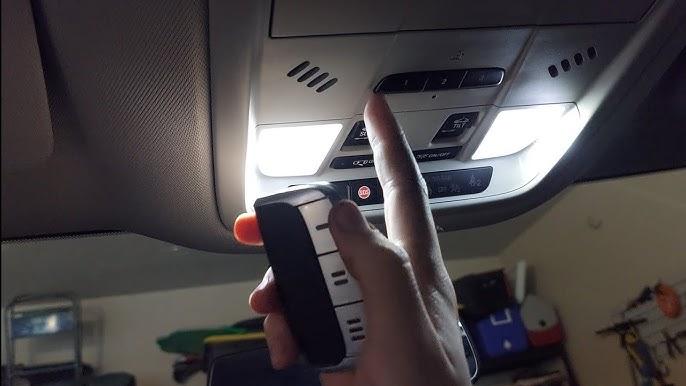
- Hold your original Chamberlain remote 1–3 inches away from the HomeLink buttons.
- Simultaneously press and hold:
- The button on your Chamberlain remote
- The HomeLink button you want to program
- Watch the HomeLink indicator light. It will start blinking slowly, then change to a rapid flash.
- Once the light flashes rapidly, release both buttons.
✅ Success indicator: The HomeLink LED stays solid or blinks rapidly, confirming the signal has been learned.
Step 3: Sync HomeLink With the Chamberlain Opener’s Receiver (Rolling Code Step)
Because Chamberlain uses Security+ rolling code technology, Step 2 alone won’t open your door. You must now introduce HomeLink to the opener’s motor unit.
- Locate the “Learn” button on your Chamberlain garage door opener motor unit. It’s typically found on the back or side panel and is colored yellow, red/orange, purple, or green depending on the model year.
- Press and release the Learn button. An LED near the button will illuminate, indicating the opener is in programming mode. You usually have about 30 seconds before it times out.
- Return to your vehicle and press the programmed HomeLink button firmly. Hold it for 2 seconds, then release.
- Repeat pressing the HomeLink button up to 3 times (press-hold-release, press-hold-release, press-hold-release).
- On one of these presses, the garage door should begin to move.
🎉 Congratulations! Your HomeLink is now fully programmed with your Chamberlain garage door opener.
Troubleshooting: Common Issues and Fixes (H2)
Even with clear instructions, things don’t always go perfectly on the first try. Here are the most common problems and how to solve them.
Problem 1: HomeLink Light Blinks but Door Doesn’t Open
Cause: The rolling code sync (Step 3) wasn’t completed properly.
Fix: Repeat Step 3. Make sure you press the Learn button and return to your vehicle quickly — you only have 30 seconds. Try holding the HomeLink button slightly longer (up to 5 seconds per press).
Problem 2: HomeLink Won’t Learn the Remote Signal
Cause: Dead battery in the original Chamberlain remote, or the remote is too far from the HomeLink buttons.
Fix: Replace the remote’s battery (typically a CR2032 coin cell). Hold the remote closer — within 1 inch of the HomeLink surface.
Problem 3: Door Opens Intermittently
Cause: Weak signal or interference from nearby electronics.
Fix: Reprogram HomeLink while parked as close to the garage door as possible. Remove any metal objects or electronic devices between the car and the opener during programming.
Problem 4: Learn Button Not Found
Cause: Different Chamberlain models place the Learn button in different locations.
Fix: Consult your Chamberlain opener’s manual. For MyQ-enabled models, the Learn button is often behind the light lens cover. For older models, check the rear panel near the antenna wire.
HomeLink Compatibility With Chamberlain Models (H2)
Not all Chamberlain openers behave identically. Here’s a quick compatibility overview:
| Chamberlain Model Series | Security+ Rolling Code? | HomeLink Compatible? | Notes |
|---|---|---|---|
| Belt Drive (B970, B1381) | Yes | ✅ Yes | Standard 3-step process |
| Chain Drive (C870, C450) | Yes | ✅ Yes | Standard 3-step process |
| Wall Mount (RJO20, RJO70) | Yes | ✅ Yes | Learn button inside cover |
| Smart Garage (MyQ series) | Yes | ✅ Yes | May also work via MyQ app |
| Pre-1997 Models | No (fixed code) | ⚠️ Partially | May skip Step 3; limited support |
Tip: If your Chamberlain opener has Wi-Fi and MyQ capability, you can also control it remotely through the MyQ smartphone app as a backup to HomeLink.
Pro Tips for a Smoother Experience (H2)
- Program all three HomeLink buttons — assign one for your garage, one for a gate, and one for outdoor lights.
- Test from different distances after programming to ensure reliable range (typical range is 30–50 feet).
- Reprogram after power outages — some Chamberlain units may lose their rolling code sync after extended power loss.
- Keep your original remote as a backup, even after successful HomeLink programming.
Frequently Asked Questions (FAQ) (H2)
Q1: Can I program HomeLink without the original Chamberlain remote?
In most cases, no. The original remote is required during Step 2 so that HomeLink can learn the correct frequency and code. However, if your Chamberlain opener supports the MyQ app, you may be able to set up smart controls as an alternative. Some newer vehicles with “direct connect” HomeLink can pair without a remote — check your vehicle’s manual.
Q2: How many HomeLink buttons can I program for my Chamberlain opener?
You can program one HomeLink button per device. Since most HomeLink systems have three buttons, you could theoretically program three different Chamberlain openers (e.g., main garage, detached garage, and a neighbor’s shared gate). Each button operates independently.
Q3: Will HomeLink work with Chamberlain openers that use MyQ?
Yes. HomeLink operates via radio frequency and works alongside MyQ’s Wi-Fi-based system. They do not interfere with each other. You can use HomeLink for in-car convenience and MyQ for remote monitoring and control from your phone.
Q4: Do I need to reprogram HomeLink if I replace my Chamberlain opener?
Yes. A new opener will have a different rolling code seed. You’ll need to repeat the full 3-step programming process with the new unit. Simply clearing and retraining HomeLink takes about 5 minutes.
Q5: Is HomeLink secure? Can someone copy my signal?
HomeLink uses rolling code encryption, meaning the access code changes every time you press the button. This makes it extremely difficult for thieves to intercept and replay your signal. It’s considered one of the most secure consumer RF systems available today.
Q6: Why does my HomeLink work sometimes but not always?
Intermittent operation is usually caused by one of three factors: (1) weak car battery affecting HomeLink transmitter power, (2) interference from LED bulbs installed in the garage door opener’s light fixture, or (3) the vehicle being parked at an angle that reduces signal strength. Try replacing your car battery, switching to incandescent bulbs in the opener, or reprogramming while parked directly facing the door.
Conclusion (H2)
Learning how to program HomeLink with a Chamberlain garage door opener is one of those small upgrades that makes a surprisingly big difference in daily life. No more hunting for remotes, no more bulky keychain clutter — just a simple press of a button built right into your car.
By following the three straightforward steps outlined in this guide — clearing memory, training the signal, and syncing the rolling code — you can have your system fully operational in under 10 minutes. And if you run into issues, our troubleshooting section has you covered.
Found this guide helpful? Share it with friends, family, or anyone who’s still fumbling for their garage remote! Post it on Facebook, Twitter/X, or Pinterest and help others enjoy the same effortless convenience. 🔗🚗🏠
Last updated: July 2026. Always refer to your specific vehicle and Chamberlain opener manuals for model-specific variations.



Leave a Reply