Introduction
Is there anything more frustrating than standing in your driveway, pressing the button on your car’s visor, and watching your garage door stay stubbornly closed? You are not alone. Many Hyundai Santa Fe owners struggle with integrating their vehicle’s built-in HomeLink system with their existing garage door openers. It can feel like a technical maze, but it doesn’t have to be.
If you are wondering how to program Hyundai Santa Fe garage door opener systems correctly, you have come to the right place. This guide cuts through the confusion. We will walk you through the exact steps, troubleshoot common issues, and ensure your smart car feature works seamlessly with your home security. Let’s get your garage door syncing with your Santa Fe today.
Understanding the HomeLink System in Your Santa Fe
Before we dive into the buttons, it is essential to understand what you are working with. Most modern Hyundai Santa Fe models (from 2013 onwards) come equipped with HomeLink. This is a universal transceiver that replaces up to three handheld remote controls for devices like garage doors, gate operators, and home lighting.
Why Does Programming Fail Initially?
Many users assume that pressing the button should just work. However, HomeLink uses radio frequencies that must “learn” the specific code of your garage door opener. If the frequencies do not match or if the “learning mode” on your garage motor isn’t activated, the connection will fail.
According to industry standards, most garage door openers operate on frequencies between 300 MHz and 400 MHz. HomeLink is designed to mimic these signals, but it requires a precise handshake protocol to establish trust between the car and the garage motor.
Step-by-Step: How To Program Hyundai Santa Fe Garage Door Opener
This process generally takes about 5–10 minutes. Ensure your vehicle is parked outside the garage with the engine running or in accessory mode to prevent battery drain.
Step 1: Clear Existing Memory (If Necessary)
If you are reprogramming a button that was previously used, or if the system is acting erratically, start with a clean slate.
- Press and hold the two outer HomeLink buttons simultaneously.
- Hold them for about 20 seconds.
- Release when the indicator light begins to flash rapidly. This confirms the memory is cleared.
Step 2: Initiate the Learning Mode
- Choose the HomeLink button you wish to program.
- Press and hold this button. Do not release it yet.
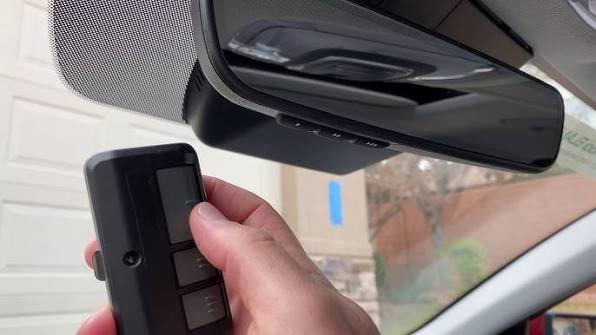
- While holding the HomeLink button, bring your original handheld garage remote within 1–3 inches of the HomeLink mirror/visor area.
- Press and hold the button on your handheld remote.
- Keep both buttons held down. The HomeLink indicator light will slowly change from a slow blink to a rapid flash.
- Once the light flashes rapidly, release both buttons.
Pro Tip: If the light does not flash rapidly after 30 seconds, try moving the handheld remote slightly closer or further away. Interference can sometimes block the signal transfer.
Step 3: Test the Connection
Press the programmed HomeLink button in your Santa Fe. Your garage door should activate. If it does, congratulations! You are done. If the door moves but stops immediately, or doesn’t move at all, proceed to the next section regarding rolling codes.
Dealing with Rolling Code Technology
Most garage door openers manufactured after 1996 use rolling code technology for security. This means the code changes every time you press the button, preventing hackers from intercepting and replaying the signal. HomeLink must be paired specifically to handle this encryption.
If your initial programming attempt failed, or if the door only works once and then stops, you likely have a rolling code system. Here is how to fix it:
The “Smart Button” Method
- Locate the “Learn” or “Smart” button on your garage door opener motor unit (usually hanging from the ceiling). It is often colored yellow, purple, or red.
- Press and release the “Learn” button. The indicator light on the motor will usually turn on or blink.
- You have approximately 30 seconds to return to your vehicle.
- Press and hold the programmed HomeLink button in your Santa Fe for 2 seconds, then release.
- Repeat this press-and-release cycle up to three times.
- The garage door should activate, confirming the rolling code has been synced.
For more detailed technical specifications on universal transmitter protocols, you can refer to the general overview of Radio Frequency Identification technologies, which underpin many modern smart home integrations.
Troubleshooting Common Issues
Even with careful following of instructions, things can go wrong. Here is a breakdown of common problems and their solutions.
| Issue | Possible Cause | Solution |
|---|---|---|
| Light doesn’t flash | Weak battery in handheld remote | Replace the battery in your original garage remote. |
| Door moves then stops | Rolling code not synced | Perform the “Smart Button” method described above. |
| No response at all | Wrong frequency | Check if your garage opener is compatible (most are). Try repositioning the remote closer to the visor. |
| Intermittent operation | Signal interference | LED bulbs in garage openers can cause interference. Try turning off nearby LED lights during programming. |
Expert Insight on Interference
Recent studies in home automation suggest that LED light bulbs installed in garage door opener units can emit radio frequency noise that interferes with HomeLink signals. If you are struggling to program the device, try temporarily unscrewing the LED bulb in the garage motor unit, programming the car, and then reinstalling the bulb.
Alternative Methods: Using a Compatible Remote
If you no longer have the original handheld remote, you cannot use the standard cloning method. In this case, you have two options:
- Purchase a Universal Compatible Remote: Buy a cheap universal remote compatible with your garage brand (e.g., Chamberlain, LiftMaster, Genie). Use this new remote to clone the signal to your Santa Fe using the steps in Section 2.
- Contact a Professional Dealer: Some newer Hyundai models allow dealerships to program the HomeLink system directly using diagnostic tools. This is often a paid service but guarantees compatibility.
FAQ Section
Q1: Can I program more than one garage door to my Hyundai Santa Fe?
A: Yes. The HomeLink system in the Santa Fe typically supports up to three different devices. You can repeat the programming steps for each button, assigning one to your main garage, one to a gate, and one to a secondary garage or light system.
Q2: Why does my garage door only work when I am very close to the house?
A: This usually indicates a weak signal transmission or interference. Ensure your car battery is healthy. Also, check if there are large metal structures or high-voltage lines between your parking spot and the garage receiver. Reprogramming the rolling code (Step 3) often improves range.
Q3: Is it safe to use HomeLink instead of my physical remote?
A: Absolutely. HomeLink uses the same encrypted rolling code technology as modern handheld remotes. In some cases, it is safer because you are less likely to lose your car than a small plastic remote. Always ensure your garage door has functioning safety sensors that stop the door if an object is detected.
Q4: What if my Santa Fe doesn’t have HomeLink buttons on the visor?
A: Some base models or older trims may not include HomeLink. Check your owner’s manual. If it is not installed, you can purchase an aftermarket universal garage door opener that plugs into your car’s 12V outlet or attaches to the sun visor with adhesive.
Q5: Does programming HomeLink void my car warranty?
A: No. Programming HomeLink is a user-enabled feature supported by Hyundai. It does not involve modifying the vehicle’s electrical system or software, so it has no impact on your warranty coverage.
Q6: Can I program a MyQ or Wi-Fi enabled garage door opener?
A: Yes, but with a caveat. HomeLink communicates via radio frequency (RF), not Wi-Fi. As long as your Wi-Fi-enabled opener (like Chamberlain MyQ) also has a standard RF receiver and a “Learn” button, it will work with HomeLink. You are essentially pairing with the local receiver, not the cloud app.
Conclusion
Learning how to program Hyundai Santa Fe garage door opener systems is a straightforward process once you understand the interaction between your car’s HomeLink module and your garage’s receiver. By following the steps outlined above—clearing memory, cloning the signal, and syncing rolling codes—you can enjoy the convenience of hands-free garage access.
Remember, patience is key. If the first attempt fails, check your batteries and eliminate potential LED interference. With your Santa Fe now synced to your home, you gain not just convenience, but a seamless integration of your daily commute and home life.
Did this guide help you get your garage door working? Share this article with fellow Hyundai owners on Facebook or Twitter who might be struggling with their HomeLink setup. Drive safe and stay connected!



Leave a Reply