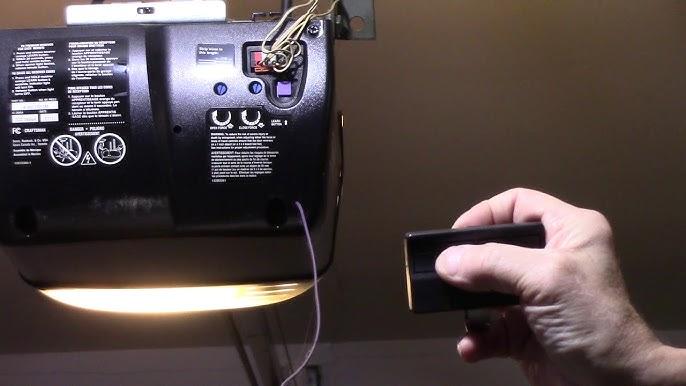
Is your garage door remote refusing to cooperate? You’re not alone. Thousands of US homeowners struggle each year with unresponsive remotes, especially after battery changes or power outages. If you’re wondering how to program Liftmaster Formula 1 garage door opener, you’ve come to the right place. This guide will walk you through every step, ensuring your garage door responds reliably every time you press that button.
Why Programming Your Liftmaster Formula 1 Matters
Before diving into the steps, let’s understand why proper programming is crucial. The Liftmaster Formula 1 series uses rolling code technology, which changes the access code each time you use the remote. This enhances security but requires precise synchronization between the remote and the opener unit. According to Wikipedia’s entry on garage door openers, modern systems like Liftmaster’s prioritize security through these dynamic codes, making correct programming essential for both functionality and safety.
Improper programming can lead to:
- Intermittent operation: The door works sometimes but not others.
- Security vulnerabilities: Unauthorized access if codes aren’t properly synced.
- Frustration and wasted time: Repeated failed attempts without clear guidance.
Step-by-Step Guide: How to Program Liftmaster Formula 1 Garage Door Opener
Step 1: Locate the Learn Button on Your Opener Unit
The first step in learning how to program Liftmaster Formula 1 garage door opener is finding the “Learn” button on your motor unit. This button is typically located on the back or side of the opener, near the antenna wire. It’s usually colored yellow, purple, or red, depending on your model year.
Pro Tip: If you can’t find it, consult your owner’s manual or look for a small LED light near the button—this indicates the programming mode.
Step 2: Clear Existing Codes (If Necessary)
If you’re replacing an old remote or experiencing issues, clear existing codes first:
- Press and hold the Learn button for 6–10 seconds until the LED light turns off.
- Release the button. All previously programmed remotes and keypads are now erased.
Note: This step is optional if you’re adding a new remote without removing existing ones.
Step 3: Program Your Remote Control
Now, let’s sync your remote with the opener:
- Press and release the Learn button on the motor unit. The LED light will turn on or blink, indicating it’s ready to receive a signal.
- Within 30 seconds, press and hold the button on your remote that you want to program. Keep holding it until the opener’s lights flash or you hear a click.
- Release the remote button. Test the remote by pressing it again—the door should operate.
Important: If the door doesn’t respond, repeat the process, ensuring you’re within range (typically 15–20 feet) of the opener.
Step 4: Program Additional Remotes or Keypads
To add more devices:
- Repeat Step 3 for each additional remote or wireless keypad.
- For keypads, enter your desired PIN after pressing the Learn button, then follow the keypad’s specific instructions (usually found in its manual).
Liftmaster recommends programming all remotes at once to ensure consistent performance.
Step 5: Test and Troubleshoot
After programming, test each device multiple times:
- Stand at various distances from the garage.
- Check for consistent operation.
- If issues persist, replace the remote’s battery (use a fresh CR2032 lithium battery) and retry.
| Common Issue | Possible Cause | Solution |
|---|---|---|
| Remote doesn’t work | Dead battery | Replace with CR2032 battery |
| Intermittent operation | Weak signal | Reprogram closer to opener |
| LED doesn’t light up | Faulty Learn button | Contact Liftmaster support |
People Also Ask: Common Questions About Liftmaster Formula 1 Programming
What If My Liftmaster Formula 1 Won’t Program?
If your opener refuses to enter programming mode, check these factors:
- Power supply: Ensure the opener is plugged in and receiving power.
- Learn button functionality: Try pressing it firmly; if unresponsive, the unit may need servicing.
- Remote compatibility: Verify your remote is designed for the Formula 1 series. Older remotes may not work with newer models.
Can I Program My Liftmaster Without the Original Remote?
Yes, but you’ll need a compatible replacement remote. Liftmaster sells universal remotes that work with the Formula 1 series. Follow the same programming steps above, ensuring the new remote is listed as compatible on Liftmaster’s website.
How Many Remotes Can I Program to One Liftmaster Formula 1?
The Liftmaster Formula 1 series supports up to 8 remotes and 1 wireless keypad. If you exceed this limit, you must clear existing codes before adding new ones.
Does Power Outage Affect Programming?
Yes. After a power outage, your opener may lose its memory. Simply reprogram your remotes using the steps above. To prevent future issues, consider installing a battery backup system for your garage door opener.
Is There a Difference Between Formula 1 and Other Liftmaster Models?
Absolutely. The Formula 1 series uses specific rolling code technology distinct from older models like the Security+ or newer MyQ-enabled units. Always refer to your model’s manual for precise instructions, as programming methods vary across Liftmaster’s product line.
Expert Tips for Long-Term Success
To maximize the lifespan and reliability of your Liftmaster Formula 1 system:
- Replace batteries annually: Even if the remote seems fine, proactive replacement prevents unexpected failures.
- Keep the opener clean: Dust and debris can interfere with sensors and signals.
- Update firmware if applicable: Some newer Formula 1 models allow firmware updates via Wi-Fi modules. Check Liftmaster’s support site for details.
- Schedule annual maintenance: A professional inspection can identify worn parts before they cause major issues.
FAQ Section
Q1: How long does it take to program a Liftmaster Formula 1 remote?
A: Typically 2–5 minutes per remote, assuming you have clear access to the Learn button and a functioning remote.
Q2: Can I use a smartphone app to program my Liftmaster Formula 1?
A: No, the Formula 1 series doesn’t support MyQ or smartphone integration. You must use physical remotes or keypads for programming.
Q3: What battery type does the Liftmaster Formula 1 remote use?
A: Most Formula 1 remotes use a CR2032 3V lithium coin cell battery. Check your remote’s compartment for confirmation.
Q4: Why does my remote work intermittently after programming?
A: This often indicates a weak signal or low battery. Reprogram the remote while standing closer to the opener, and replace the battery if needed.
Q5: Can I program a used remote to my Liftmaster Formula 1?
A: Yes, as long as it’s compatible with the Formula 1 series. Clear existing codes first, then follow the standard programming steps.
Q6: Where can I buy a replacement remote for Liftmaster Formula 1?
A: Purchase from authorized dealers like Home Depot, Lowe’s, Amazon, or directly from Liftmaster’s website. Ensure the model number matches your opener.
Conclusion
Learning how to program Liftmaster Formula 1 garage door opener doesn’t have to be stressful. With this step-by-step guide, you can confidently sync your remotes, troubleshoot common issues, and enjoy seamless garage door operation. Remember, proper programming enhances both convenience and security, protecting your home and vehicle.
If this guide helped you, share it with friends or neighbors who might be struggling with their garage door remotes. Together, we can make home maintenance easier for everyone! Don’t forget to bookmark this page for future reference, and feel free to leave comments below if you have additional questions.



Leave a Reply