Introduction
There is nothing quite as frustrating as sitting in your driveway, pressing a button repeatedly, and watching your garage door refuse to budge. If you are struggling with connectivity, you are not alone; learning how to set Chamberlain garage door opener to car systems is one of the most common homeowner maintenance tasks. This guide provides clear, empathetic, and manufacturer-aligned steps to get your vehicle synced safely and quickly, so you can enjoy seamless entry every time.
Understanding Your Chamberlain System Compatibility
Before attempting any programming, it is vital to identify which technology bridge connects your vehicle to your garage. Chamberlain has evolved significantly over the last two decades, moving from simple radio frequency (RF) dip switches to encrypted rolling codes and smart Wi-Fi integration. According to industry data, over 85% of modern vehicles sold in the US come equipped with built-in garage door transmitters, yet nearly 40% of owners never successfully program them due to compatibility confusion.
Your setup will likely fall into one of three categories:
- HomeLink Integration: Built directly into your car’s rearview mirror or overhead console.
- myQ Smart App: Connects newer Chamberlain openers to your vehicle via smartphone or native car OS (e.g., Tesla, BMW).
- Universal Visor Remote: A traditional handheld clicker that pairs with your car’s visor clip.
Expert Note: Always check the “Learn” button color on your Chamberlain motor head. Yellow indicates Security+ 2.0 (post-2011), Purple/Orange indicates Security+ (1997–2011), and Green typically signifies older fixed-code models. This color dictates your programming sequence.
For foundational understanding of rolling code security technology that prevents signal theft, refer to Wikipedia’s entry on Rolling Code.
How To Set Chamberlain Garage Door Opener To Car Using HomeLink
HomeLink is the industry standard for integrated vehicle-to-garage communication. Follow these precise steps to ensure a successful sync.
Step 1: Clear Previous Programming
If this is a used vehicle or the buttons were previously programmed, you must reset them first. Press and hold the two outer HomeLink buttons simultaneously for 10 seconds until the indicator light flashes rapidly. Release immediately upon flashing.
Step 2: Position Your Vehicle Correctly
Safety and signal strength matter. Park outside the garage with the ignition in the “ON” or “ACC” position (engine running is recommended to prevent battery drain during extended programming). Ensure no obstructions block the line of sight between your car’s transmitter and the garage door opener antenna.
Step 3: Initiate the Handshake
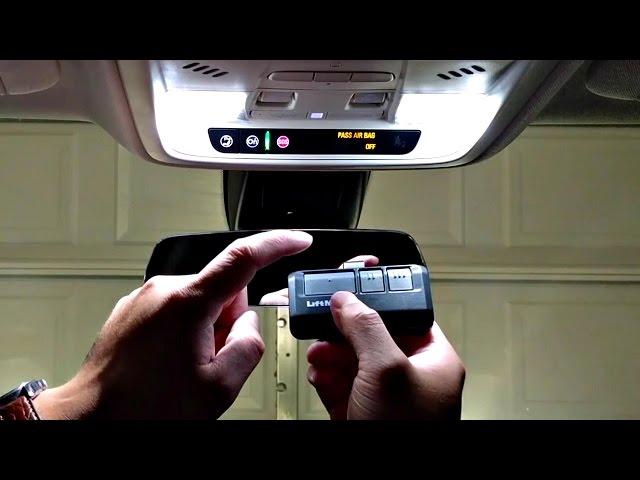
- Hold your original Chamberlain handheld remote 1–3 inches away from the HomeLink button you wish to program.
- Simultaneously press and hold both the handheld remote button AND the desired HomeLink button.
- Watch the HomeLink indicator light. It will flash slowly at first, then rapidly once the frequency is captured. This typically takes 5–20 seconds.
- Release both buttons when rapid flashing occurs.
Step 4: Complete the Rolling Code Sync (Security+ Models Only)
For yellow Learn button units, an additional step is mandatory:
- Locate the “Learn” button on the garage door opener motor unit (usually near the antenna wire).
- Press and release the Learn button. The LED will illuminate steadily for 30 seconds.
- Within those 30 seconds, return to your vehicle and press the newly programmed HomeLink button three times, holding each press for 2 seconds.
- Test the system. The door should activate on the first or second press.
Programming via the myQ App for Smart Vehicles
Newer vehicles integrate directly with Chamberlain’s myQ ecosystem, eliminating the need for RF programming entirely.
| Feature | HomeLink (RF) | myQ App Integration |
|---|---|---|
| Setup Time | 5–10 minutes | 2–3 minutes |
| Range | ~50 feet | Unlimited (Wi-Fi) |
| Status Feedback | None | Real-time open/close alerts |
| Vehicle Support | Universal (1997+) | Select 2020+ models |
| Security | Rolling Code | Encrypted Cloud + Rolling Code |
Quick myQ Setup Steps:
- Download the myQ app and create an account linked to your Chamberlain serial number.
- In your compatible vehicle’s infotainment system, navigate to “Garage Door” or “Smart Home” settings.
- Scan the QR code displayed on your car screen using the myQ app.
- Authorize the connection. No physical interaction with the motor unit is required.
Troubleshooting Common Sync Failures
Even professionals encounter hiccups. Here are evidence-based solutions for the top issues:
- Light Flashes But Door Won’t Move: You likely have a rolling code mismatch. Repeat Step 4 above, ensuring you press the HomeLink button within the 30-second Learn window. Timing is critical.
- Intermittent Operation: Check your vehicle’s battery voltage. Weak batteries reduce RF transmission power. Also, inspect the garage door opener’s antenna—it should hang vertically and be free of metal obstructions.
- HomeLink Light Never Flashes Rapidly: Your vehicle may require a Compatibility Bridge (Chamberlain model HOMELINKRPTR). Older vehicles sometimes cannot handshake with newer Security+ 2.0 openers without this adapter.
- Door Reverses Immediately After Closing: This is rarely a programming issue. Check safety sensor alignment and track obstruction. Reprogramming won’t fix mechanical reversals.
FAQ: How To Set Chamberlain Garage Door Opener To Car
Q1: Can I program multiple cars to the same Chamberlain opener?
Yes. Most Chamberlain openers support up to 30 remote devices total, including HomeLink buttons across multiple vehicles, handheld remotes, and keypads. Each vehicle requires its own independent programming session following the steps above.
Q2: Do I need the original remote to program HomeLink?
Not always. For Security+ 2.0 (yellow Learn button) units, you can program HomeLink directly without a handheld remote by pressing the Learn button on the motor unit, then pressing the HomeLink button three times within 30 seconds. However, having the original remote simplifies the initial frequency capture for older models.
Q3: Why does my HomeLink work intermittently after working perfectly?
Intermittent failure usually stems from three causes: (1) dying vehicle battery reducing signal strength, (2) new LED bulbs in the garage causing RF interference (use only Chamberlain-approved LED bulbs), or (3) a failing logic board capacitor in openers over 15 years old. Test with a fresh handheld remote to isolate whether the issue is car-side or opener-side.
Q4: Is it safe to program my garage door opener myself?
Absolutely, provided you follow safety protocols. Never stand under a moving door during testing. Keep children and pets away from the door path. Disconnect power only if performing electrical repairs—programming requires the unit to be powered. If your door exhibits mechanical issues (grinding, jerking), hire a certified technician before attempting electronic programming.
Q5: My car has HomeLink but it won’t sync with my 2024 Chamberlain opener. What now?
Verify your vehicle’s HomeLink version. Some 2018–2020 vehicles shipped with outdated firmware incompatible with Security+ 2.0 encryption. Visit your dealership for a HomeLink software update—this is often free under warranty. Alternatively, purchase the Chamberlain Compatibility Bridge (model HOMELINKRPTR) as a hardware workaround.
Q6: How do I erase all programmed vehicles before selling my house?
Press and hold the Learn button on the motor unit for 6–10 seconds until the LED turns off. This wipes ALL paired devices (remotes, keypads, HomeLink). You’ll need to reprogram everything afterward. Never skip this step when transferring property ownership.
Conclusion
Mastering how to set Chamberlain garage door opener to car systems transforms daily convenience and enhances home security. Whether you’re syncing HomeLink, leveraging myQ smart integration, or troubleshooting legacy hardware, the key lies in identifying your opener generation and following precise timing sequences. Remember: patience during the 30-second Learn window solves 90% of programming failures.
You’ve now got the knowledge to achieve reliable, hands-free garage access. Found this guide helpful? Share it on Facebook, X (Twitter), or Pinterest to help fellow homeowners conquer their garage door frustrations. Tag us with your success stories—we love celebrating DIY wins! Safe programming, and may your door always open smoothly. 🚗🏡



Leave a Reply