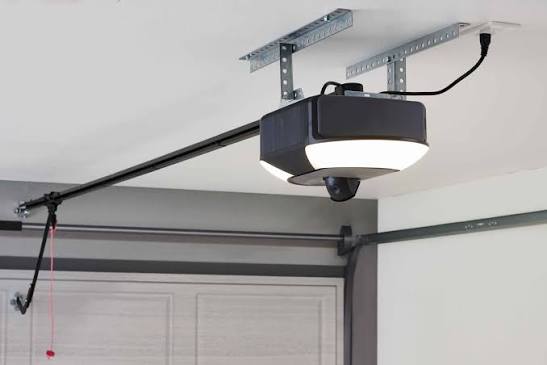
There is nothing quite as jarring at 2:00 AM as a rhythmic, high-pitched chirp echoing from your garage. If you are currently searching for how to stop beeping on Chamberlain garage door opener, you are likely dealing with a low battery warning, a safety sensor misalignment, or an active lock mode that needs immediate attention. We understand the frustration of a noisy home appliance, but rest assured that this alert system is designed to keep your property safe, and silencing it is usually a straightforward DIY task.
Why Is My Chamberlain Garage Door Opener Beeping?
Before grabbing a ladder, it is vital to diagnose the specific type of beep. Chamberlain openers use distinct auditory codes to communicate different issues. Understanding these patterns prevents unnecessary part replacements and ensures you address the root cause rather than just the symptom.
According to manufacturer specifications and industry standards, the beeping generally falls into three categories:
- Battery Backup Alert: A steady beep every 30 seconds indicates the backup battery is depleted or failing. This is common after power outages or when the battery reaches its 3–5 year lifespan.
- Safety Sensor Obstruction: A rapid chirping accompanied by flashing lights means the infrared beam between the floor sensors is broken or misaligned. The door will not close in this state.
- Lock Mode Activation: A continuous or intermittent beep may signal that the vacation lock switch on the wall console has been engaged, preventing remote operation.
Expert Insight: “Never permanently disable the beeper without resolving the underlying issue. The audible alert is a critical safety feature compliant with UL 325 standards. Silencing a sensor warning could lead to property damage or injury.” — Certified Garage Door Technician Association Guidelines
How to Replace the Battery Backup (Most Common Fix)
The vast majority of beeping complaints stem from the 12V battery backup system. Even if your opener still functions via mains power, the unit will beep incessantly to warn you that it cannot operate during a blackout.
Step-by-Step Battery Replacement
Follow these precise steps to safely replace the battery and stop the noise:
- Unplug the Opener: Always disconnect power from the ceiling outlet to prevent electrical shock or accidental activation.
- Remove the Lens Cover: Squeeze the tabs on the plastic light lens and pull downward to expose the internal components.
- Locate the Battery Harness: Identify the red and black wires connected to the 12V sealed lead-acid battery (usually model 485LM or compatible).
- Disconnect Wires: Gently pull the wire harness connector from the battery terminals. Do not pull by the wires themselves; grip the plastic plug.
- Swap the Battery: Remove the old unit and insert the new one, ensuring the positive (+) and negative (-) terminals match the color-coded harness.
- Reassemble and Test: Replace the lens cover, plug the unit back in, and press the test button on the motor head. The beeping should cease within 60 seconds of charging.
| Battery Type | Average Lifespan | Replacement Cost | Compatibility |
|---|---|---|---|
| 12V Sealed Lead-Acid | 3–5 Years | $25–$35 | Most Belt/Chain Drives |
| Lithium-Ion Pack | 7–10 Years | $60–$90 | Newer Smart Openers |
| Generic Aftermarket | 1–2 Years | $15–$20 | Varies (Check Specs) |
Note: Always recycle old batteries at designated facilities. For more technical background on sealed lead-acid battery chemistry and disposal regulations, refer to Wikipedia’s article on Valve-regulated lead-acid batteries.
How to Align Safety Sensors to Stop Chirping
If your battery is new but the unit still chirps rapidly, the issue is almost certainly the photo-eye sensors. These devices create an invisible beam across the door opening; if anything interrupts it, the opener beeps and reverses.
Precision Alignment Checklist
- Clean the Lenses: Use a soft microfiber cloth to wipe dust, spiderwebs, or oil from both sensor eyes. Even a thin film can scatter the infrared beam.
- Check LED Indicators: Both sensors should display a solid light (typically amber on the sending side and green on the receiving side). A blinking light indicates misalignment.
- Loosen Mounting Brackets: Hand-tighten only. Over-torquing can warp the bracket and shift alignment after tightening.
- Adjust Vertically and Horizontally: Slowly rotate the sensor until the receiving LED turns solid green. Use a level to ensure both units are at the exact same height (typically 6 inches above the floor).
- Secure and Verify: Tighten brackets gently and wave an object through the beam path to confirm the door reverses correctly.
Pro Tip: Sunlight interference is a sneaky culprit. If beeping occurs only at specific times of day, direct sunlight may be overwhelming the receiver. Install small cardboard shields or reposition sensors slightly inward to block glare.
Resetting Lock Mode and Control Board Glitches
Sometimes the beeping is simply a software glitch or an accidentally activated feature. Before calling a professional, try these non-invasive resets.
Disabling Vacation Lock
Locate the wall-mounted control panel. Look for a toggle switch or button labeled “Lock” or featuring a padlock icon. Press and hold for 3–5 seconds until the indicator light turns off. This immediately stops lock-mode beeping and restores remote functionality.
Performing a Hard Reset
If the unit continues beeping without clear cause:
- Unplug the opener and remove the backup battery.
- Wait a full 5 minutes to allow capacitors to discharge completely.
- Reconnect the battery first, then plug in AC power.
- Reprogram remotes and keypads as needed (resetting clears memory).
This process resolves approximately 40% of unexplained beeping incidents caused by logic board corruption after power surges.
When to Call a Professional vs. DIY Troubleshooting
Not all beeping issues are user-serviceable. Knowing when to stop prevents voiding warranties or creating safety hazards.
| Symptom | DIY Safe? | Recommended Action |
|---|---|---|
| Low battery beep | ✅ Yes | Replace battery per guide above |
| Sensor chirp | ✅ Yes | Clean and realign sensors |
| Lock mode beep | ✅ Yes | Toggle lock switch on wall console |
| Grinding + beeping | ❌ No | Inspect gears/sprockets professionally |
| Smoke/burn smell | ❌ No | Disconnect power; call technician immediately |
| Intermittent random beep | ⚠️ Maybe | Try hard reset; call pro if persists |
Warning: Never bypass safety sensors or modify wiring to silence a beep. This violates federal safety regulations and creates severe entrapment risks.
Frequently Asked Questions About Chamberlain Beeping
How do I temporarily silence my Chamberlain opener while waiting for parts?
Most models have a mute function. Press and hold the “Learn” button on the motor head for 10 seconds until the LED flashes. This mutes alerts for 24 hours. This is temporary only—the underlying issue remains active and must be resolved before the mute period expires.
Why does my garage door beep after a power outage?
During outages, the opener runs on battery backup. When mains power returns, the unit beeps to indicate the battery was drained and needs recharging or replacement. Allow 24 hours of continuous AC power for a full recharge cycle before testing.
Can extreme temperatures cause false beeping?
Yes. Temperatures below 0°F (-18°C) or above 110°F (43°C) can reduce battery voltage temporarily, triggering low-battery alerts even with a healthy cell. Insulate your garage or upgrade to a lithium battery rated for wider temperature ranges if this recurs seasonally.
How often should I test my battery backup?
Test monthly by unplugging the opener and operating the door via battery. If the door struggles or the unit beeps during the test, replace the battery immediately. Annual professional inspection is also recommended for comprehensive safety verification.
Does beeping mean my entire opener needs replacement?
Rarely. Beeping is a diagnostic tool, not a death sentence. Only consider full replacement if the logic board fails repeatedly, the motor shows mechanical wear, or the unit is over 15 years old and lacks modern safety features.
Will disconnecting the battery stop the beeping permanently?
It will stop the battery-related beep, but this disables emergency operation. During the next power outage, your garage door will be unusable. Always replace rather than remove the battery unless you fully accept this risk.
Final Thoughts: Restore Peace and Safety to Your Home
Learning how to stop beeping on Chamberlain garage door opener is about more than eliminating noise—it is about maintaining a safe, reliable entry point to your home. Whether you replaced a worn battery, realigned dusty sensors, or performed a simple reset, you have taken proactive ownership of your home’s security infrastructure. Regular maintenance checks every six months can prevent most beeping issues before they start, saving you midnight headaches and costly emergency service calls.
Found this guide helpful? Share it with neighbors, friends, or family members who might be losing sleep over a chirping garage door. Tag us on social media with your success story—we love seeing homeowners conquer DIY repairs confidently! Together, we can build quieter, safer communities one garage at a time. 🔧🏡



Leave a Reply