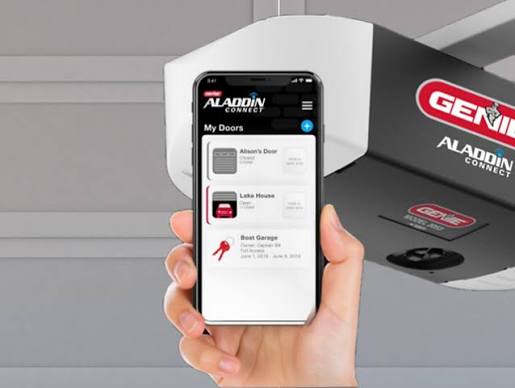
Have you ever pulled into your driveway only to realize you left your garage door remote on the kitchen counter? It is a frustrating scenario that many homeowners face daily. If you are looking to modernize your home security and convenience, you might be asking, is there an app for Genie garage door opener? The short answer is yes, but it depends heavily on which model you own and whether you have the right connectivity hardware installed.
In this comprehensive guide, we will break down exactly how to connect your Genie opener to your smartphone, explore the official Aladdin Connect system, and discuss third-party alternatives if your current model isn’t natively supported. Let’s dive in.
Understanding Genie’s Smart Connectivity: Aladdin Connect
To answer the core question directly: Genie does not have a single universal app for all its openers. Instead, they rely on a specific ecosystem called Aladdin Connect. This is a smart home integration platform that allows you to control your garage door via a dedicated mobile application.
How Does It Work?
The Aladdin Connect system works by adding a “brain” to your existing garage door opener. If your Genie opener was manufactured after 2014, it likely has built-in compatibility. For older models, you need to install a separate Door Control Module (DCM).
Once connected, the system communicates with your home Wi-Fi network, allowing you to send commands from anywhere in the world. You can check the status of your door, open or close it, and even set schedules for automatic operation.
Expert Insight: According to smart home security standards, integrating your garage door with a verified app like Aladdin Connect adds a layer of encryption that traditional radio-frequency remotes lack. This significantly reduces the risk of code grabbing by thieves.
For more technical details on how smart garage protocols work, you can refer to the general overview of Internet of Things (IoT) security on Wikipedia.
Step-by-Step Guide: Setting Up the Genie App
If you have confirmed that your Genie opener is compatible with Aladdin Connect, follow these precise steps to get up and running. Proper installation is crucial for both functionality and safety.
Prerequisites
- A Genie garage door opener with Aladdin Connect capability (or a DCM kit).
- A stable 2.4 GHz Wi-Fi network (most smart home devices do not support 5 GHz).
- A smartphone (iOS or Android).
Installation Steps
- Download the App: Search for “Aladdin Connect” in the Apple App Store or Google Play Store. Do not confuse this with generic garage door apps; ensure it is the official Genie-branded version.
- Create an Account: Open the app and sign up using your email address. Verify your account through the confirmation link sent to your inbox.
- Power Cycle the Opener: Unplug your Genie garage door opener from the power outlet for 10 seconds, then plug it back in. This resets the internal receiver and prepares it for pairing.
- Initiate Pairing Mode: Locate the “Learn” button on your garage door opener motor unit. It is usually located near the antenna wire. Press and hold this button until the LED indicator begins to flash rapidly.
- Connect via App: In the Aladdin Connect app, select “Add Device.” Follow the on-screen prompts to connect the app to your Wi-Fi network. The app will search for the flashing signal from your opener.
- Finalize Setup: Once connected, name your device (e.g., “Main Garage”) and test the open/close function. Ensure the door moves smoothly and stops at the correct limits.
Note: If the pairing fails, ensure you are within 10 feet of the motor unit during the process. Interference from other electronic devices can sometimes disrupt the initial handshake.
Compatibility Check: Which Genie Models Support the App?
Not every Genie opener is created equal. Before purchasing additional hardware, it is essential to verify if your current model supports smart connectivity. Below is a comparison of common Genie series and their app compatibility.
| Genie Series | Model Examples | Native App Support | Requires Add-On? |
|---|---|---|---|
| Genie SilentMax | 1035, 1235 | Yes (Built-in) | No |
| Genie ChainLift | 2028, 2033 | No | Yes (DCM Kit) |
| Genie Screw Drive | 2096, 2196 | No | Yes (DCM Kit) |
| Genie Wall Mount | B6174 | Yes (Built-in) | No |
| Older Models | Pre-2014 | No | Yes (DCM Kit) |
What is the DCM Kit?
If your model requires an add-on, you will need the Aladdin Connect Door Control Module. This small device wires into your existing opener’s terminal block. It acts as a bridge between the mechanical opener and your Wi-Fi network. Installation typically takes about 15–20 minutes and requires basic tools like a screwdriver and wire strippers.
Third-Party Alternatives: When Genie’s App Isn’t Enough
While Aladdin Connect is the official solution, some users prefer integrating their garage door into broader smart home ecosystems like Amazon Alexa, Google Home, or Apple HomeKit. If your Genie opener is older or you want more automation features, consider these alternatives.
1. MyQ by Chamberlain
Although MyQ is primarily designed for LiftMaster and Chamberlain openers, many users successfully integrate it with Genie openers using a universal smart garage controller. This allows you to use the MyQ app alongside your Genie hardware.
2. Tailwind GDS1
The Tailwind GDS1 is a popular third-party smart garage controller. It is known for its sleek design and robust app interface. It works by attaching to the wall near your opener and using a sensor to detect the door’s position. It is compatible with almost any brand, including Genie.
3. Meross Smart Garage Door Opener
Meross offers a budget-friendly alternative that integrates well with Alexa and Google Assistant. It requires a neutral wire for power, so check your garage’s electrical setup before purchasing.
Pros and Cons of Third-Party Apps:
- Pros: Often cheaper than official kits, better integration with non-Genie smart devices, frequent software updates.
- Cons: May void manufacturer warranty, installation can be more complex, reliance on third-party servers for connectivity.
Troubleshooting Common Connectivity Issues
Even with the best setup, you may encounter glitches. Here are solutions to the most common problems users face when asking, “Is there an app for Genie garage door opener?”
Issue: App Says “Device Offline”
- Solution: Check your Wi-Fi router. Ensure the 2.4 GHz band is active. Restart your router and the garage door opener. If the issue persists, move your router closer to the garage or install a Wi-Fi extender.
Issue: Door Opens but Doesn’t Close
- Solution: This is often a safety sensor issue, not an app issue. Check the photo-eye sensors at the bottom of the door tracks. Ensure they are aligned and free of dirt or spider webs. The LED lights on the sensors should be solid, not blinking.
Issue: Delayed Response Time
- Solution: Smart garage doors rely on internet speed. If your garage has poor signal strength, consider installing a mesh Wi-Fi node in the garage. A delay of 2–5 seconds is normal, but anything longer indicates a network bottleneck.
FAQ Section
1. Is the Aladdin Connect app free to use?
Yes, the Aladdin Connect app is free to download and use. There are no monthly subscription fees for basic remote access and status monitoring. However, some advanced features or integrations with premium smart home platforms may require additional setups.
2. Can I use voice commands with my Genie garage door?
Absolutely. Once you have set up Aladdin Connect, you can link it to Amazon Alexa or Google Assistant. This allows you to say commands like, “Alexa, open the garage door,” provided you have enabled the skill in your respective voice assistant app.
3. What happens if my Wi-Fi goes down?
If your Wi-Fi goes down, you will lose remote access via the app. However, your physical remote controls and wall-mounted buttons will continue to work normally. The garage door opener operates independently of the internet for local control.
4. Is it safe to leave my garage door connected to an app?
Yes, provided you follow best security practices. Use a strong, unique password for your Aladdin Connect account. Enable two-factor authentication (2FA) if available. Regularly update the app to ensure you have the latest security patches.
5. Can multiple family members use the app?
Yes, the Aladdin Connect app allows you to invite multiple users. You can grant different levels of access, such as full control or view-only status, to family members or trusted neighbors. This is managed through the “User Management” section in the app settings.
Conclusion
So, is there an app for Genie garage door opener? Yes, the Aladdin Connect app is the primary solution for controlling Genie openers remotely. Whether you have a newer model with built-in Wi-Fi or an older unit requiring a Door Control Module, you can enjoy the convenience of smartphone control.
By following the setup steps outlined above, you can transform your traditional garage into a smart entry point for your home. Remember to prioritize security by keeping your software updated and your Wi-Fi network secure.
If you found this guide helpful, please share it with friends who are still struggling with lost remotes. Smartening up your garage is just one click away!



Leave a Reply