Are you experiencing issues with your overhead garage door opener and need to perform a reset? This comprehensive guide will walk you through the process of resetting your overhead garage door opener, troubleshooting common issues, and ensuring smooth operation.
Understanding the Need for Resetting Overhead Garage Door Opener
Why Resetting is Necessary
Over time, various factors can cause your overhead garage door opener to malfunction or become unresponsive. These factors may include power surges, electrical issues, programming errors, or mechanical failures. Performing a reset can help restore your garage door opener to its default settings, resolving many common problems.
Steps for Resetting Overhead Garage Door Opener
1. Disconnect Power
Begin by unplugging the power cord of your overhead garage door opener from the electrical outlet. Alternatively, you can switch off the circuit breaker that supplies power to the opener to ensure safety during the reset process.
Read too: No Power to Genie Garage Door Opener – Resolving the Issue with Ease: Troubleshooting Guide
2. Locate Reset Button
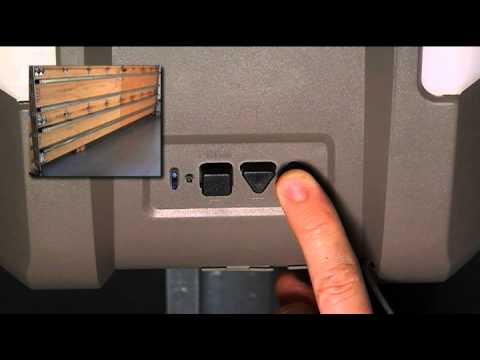
Most overhead garage door openers are equipped with a reset button, typically located on the back or side of the motor unit. Consult your opener’s user manual or manufacturer’s instructions to locate the reset button specific to your model.
3. Press and Hold Reset Button
Once you’ve located the reset button, press and hold it down for approximately 30 seconds. This action will reset the opener’s internal settings and clear any stored programming or error codes.
4. Restore Power
After holding down the reset button for the specified duration, restore power to the overhead garage door opener by plugging in the power cord or turning on the circuit breaker. Wait a few moments for the opener to initialize and reset completely.
5. Test Operation
Once power is restored, test the operation of your overhead garage door opener by pressing the remote control or wall-mounted button. Observe the door’s movement to ensure it opens and closes smoothly without any issues.
Troubleshooting Common Issues
1. Remote Control Malfunction
If your overhead garage door opener still doesn’t respond after resetting, the issue may lie with the remote control. Replace the batteries in the remote control and reprogram it according to the manufacturer’s instructions.
2. Sensor Misalignment
Another common issue that can affect the operation of your garage door opener is sensor misalignment. Check the alignment of the safety sensors located near the bottom of the garage door tracks and adjust them if necessary.
3. Mechanical Obstructions
Inspect the garage door tracks for any obstructions or debris that may be preventing the door from opening or closing smoothly. Clear away any debris and lubricate the tracks and rollers to ensure proper operation.
Conclusion
Resetting your overhead garage door opener can often resolve common issues and restore smooth operation. By following the steps outlined in this guide and troubleshooting any additional problems, you can ensure that your garage door opener functions reliably for years to come.



Leave a Reply