The Learn Button is a critical feature of modern garage door openers, enabling users to program remotes, keypads, and other accessories seamlessly. If you’re a Craftsman garage door opener owner, you might wonder, where is the Learn Button on Craftsman garage door opener, and how can you use it effectively? This guide will provide detailed insights into locating and utilizing the Learn Button to enhance your garage door opener’s functionality and security.
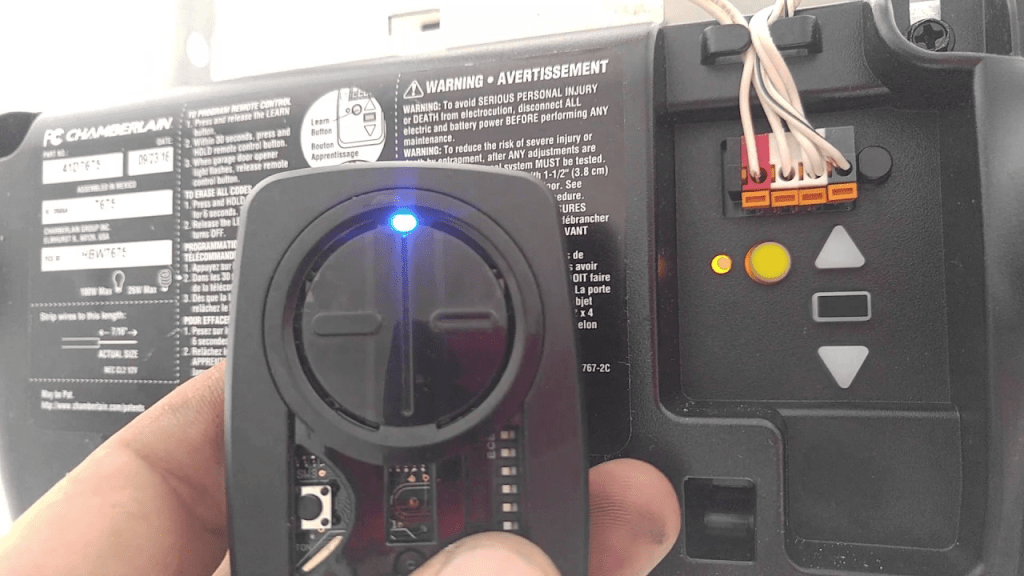
What Is the Learn Button on a Craftsman Garage Door Opener?
The Learn Button is a small yet powerful feature that allows your Craftsman garage door opener to connect with remotes, wireless keypads, and other devices. Its purpose is to “learn” and store the unique codes of these accessories, ensuring that only authorized devices can operate your garage door.
Where Is the Learn Button on Craftsman Garage Door Opener?
Locating the Learn Button on your Craftsman garage door opener is straightforward once you know where to look. Typically, it is found on the motor housing of the opener. However, the exact placement and appearance can vary depending on the model and manufacturing year.
Read too: The Complete Guide to Tighten Chain On Garage Door Opener for Smooth Operation
Common Locations of the Learn Button
- Back of the Motor Unit
- The Learn Button is often positioned on the back panel, near the antenna wire or the light bulb compartment.
- Under a Cover Panel
- Some Craftsman models hide the Learn Button beneath a protective cover. Slide or lift the cover to access it.
What Does the Learn Button Look Like?
- The Learn Button is usually small and circular.
- It is color-coded for easy identification. Common colors include:
- Yellow
- Purple
- Green
- Red/Orange
How to Use the Learn Button on a Craftsman Garage Door Opener
Programming a New Remote
Adding a new remote to your Craftsman garage door opener is simple:
- Locate the Learn Button on the motor unit.
- Press and release the Learn Button. The indicator light will begin blinking.
- Within 30 seconds, press the button on your remote that you want to program.
- The garage door opener will confirm the connection with a click or flashing light.
Programming a Wireless Keypad
To connect a wireless keypad:
- Press and release the Learn Button.
- Enter your desired PIN on the keypad and press Enter.
- Wait for a confirmation signal, such as a flashing light or a sound.
Erasing All Stored Codes
To reset the system and remove all paired devices:
- Press and hold the Learn Button for about 6-10 seconds until the indicator light stops blinking.
- This action clears all stored codes, enhancing security if a remote is lost or stolen.
Troubleshooting the Learn Button on Craftsman Garage Door Openers
1. Learn Button Not Responding
- Power Supply Check: Ensure the garage door opener is connected to a functioning power source.
- Inspect the Button: Dirt or wear may prevent the button from working. Clean it gently.
- Reset the System: Unplug the unit, wait a few minutes, and reconnect it.
2. Remote Fails to Program
- Battery Issues: Check and replace the remote’s battery if necessary.
- Remote Compatibility: Ensure the remote matches your Craftsman model’s frequency and technology (e.g., Security+ or Security+ 2.0).
3. Accidental Code Reset
If you accidentally erase all codes, reprogram each remote and keypad using the Learn Button.
Security Features of the Learn Button
The Learn Button plays a vital role in securing your Craftsman garage door opener:
- Unique Code Pairing: Each remote or keypad is assigned a unique code, preventing unauthorized access.
- Rolling Code Technology: Craftsman openers often use rolling codes, which change each time the opener is used, adding an extra layer of security.
- Reset Functionality: The ability to erase all codes ensures you can remove access from lost or stolen devices.
Common Craftsman Models and Learn Button Details
1. Craftsman ½ HP Chain Drive
- Learn Button Location: On the back panel near the antenna wire.
- Typical Color: Red/Orange.
2. Craftsman Belt Drive Models
- Learn Button Location: Beneath the light bulb compartment or cover panel.
- Typical Color: Purple or Yellow.
3. Craftsman Smart Garage Openers
- Learn Button Location: Integrated with the control panel or motor housing.
- Supports advanced features like Wi-Fi connectivity and mobile app integration.
Maintaining Your Craftsman Garage Door Opener
- Clean the Unit Regularly: Dust and debris can accumulate around the Learn Button and motor housing.
- Test Remotes and Keypads: Periodically check the functionality of all paired devices.
- Replace Batteries Promptly: Weak batteries in remotes or keypads can cause pairing issues.
- Upgrade Accessories: Consider upgrading to newer remotes or keypads for improved security and convenience.
Frequently Asked Questions
1. Can I program multiple remotes using the Learn Button?
Yes, most Craftsman garage door openers support multiple remotes and keypads.
2. What happens if I hold the Learn Button too long?
Holding the Learn Button for an extended period erases all stored codes, resetting the system.
3. Is the Learn Button unique to Craftsman openers?
No, other brands like LiftMaster and Chamberlain also use Learn Buttons, but their placement and color may vary.
4. Can I program a universal remote with the Learn Button?
Yes, as long as the universal remote is compatible with your Craftsman model.
Why Understanding the Learn Button Is Important
The Learn Button is more than just a programming tool—it’s a cornerstone of your garage door opener’s security and functionality. Whether you’re adding new accessories, troubleshooting issues, or enhancing your home’s safety, knowing how to locate and use the Learn Button is invaluable.



Leave a Reply