If you’re searching How To Factory Reset A LiftMaster Garage Door Opener, you may be troubleshooting door movement issues, clearing old programming, or trying to restore your opener after a malfunction. A full factory reset wipes out all settings—including limits, travel distance, force calibration, and remote memory—giving you a clean slate to reprogram everything from scratch. This guide walks you through the entire process safely, simply, and in detail.
What Does a Factory Reset Do on a LiftMaster Opener?
A factory reset on a LiftMaster opener clears:
- All remote controls
- Wireless keypads
- HomeLink buttons (car remotes)
- MyQ accessories
- Travel limits (open/close distance)
- Force settings
- Motor calibration
- Light timing presets
A factory reset is NOT the same as simply clearing memory.
It erases all operational data and returns the unit to default.
Read too: Door and Garage Door Companies: Choosing the Right Partner for Your Needs
How To Factory Reset A LiftMaster Garage Door Opener (Full Instructions)
Different models follow the same logic but slightly different button sequences. Below are universal reset methods covering most LiftMaster openers, including Security+ 1.0, Security+ 2.0, Chamberlain-built LiftMaster, and MyQ units.
Method 1: Universal Factory Reset for Most LiftMaster Models
Step 1: Erase Remote & Keypad Memory
This clears all paired accessories.
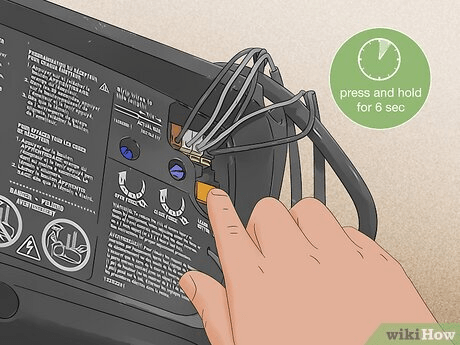
- Locate the Learn button.
- Yellow, Purple, Red/Orange, Green
- Usually behind the light lens or side panel
- Press and hold the Learn button for 6–10 seconds.
- LED turns off → memory wiped.
Step 2: Clear Door Travel Limits (Factory Limit Reset)
This resets the open/close positions.
- Press and hold the Up and Down arrow buttons together.
- Hold for 10 seconds.
- LED blinks → limits reset to default.
Step 3: Reset Motor Force Calibration
Force settings determine how much pressure the motor uses.
- Press and hold the Adjustment button (middle button) until LED turns off.
- Release → opener enters factory force mode.
Step 4: Power Cycle the Opener
To finalize the reset:
- Unplug LiftMaster opener from power.
- Wait 30 seconds.
- Plug it back in.
Your opener is now fully reset.
Method 2: Factory Reset for Newer MyQ LiftMaster Openers
Newer models include Wi-Fi and MyQ connectivity.
Step 1: Erase MyQ/Wi-Fi Settings
- Press and hold the Settings button (gear icon).
- After 6 seconds, yellow LED blinks → Wi-Fi cleared.
- Hold another 6 seconds → factory defaults restored.
This resets:
- Wi-Fi
- MyQ hub pairing
- Smart accessories
Step 2: Reset Remote Memory
Same as earlier:
- Hold Learn for 6–10 seconds.
Step 3: Reset Travel Limits
- Hold Up/Down arrows for 10 seconds.
How To Reprogram the LiftMaster After Factory Reset
Once reset, the opener must be rebuilt from scratch.
Step 1: Set the Open Position
- Press and hold Up arrow until door opens fully.
- Press Learn once to save.
Step 2: Set the Close Position
- Press and hold Down arrow until door closes fully.
- Press Learn once to save.
Step 3: Set Force/Calibration Automatically
LiftMaster calibrates force automatically after limits are set.
Run the door 1 full open–close cycle to complete.
Step 4: Reprogram Your Remotes
- Press Learn once (don’t hold).
- Press remote button for 2–3 seconds.
- Light flashes → paired.
Why You May Need a Factory Reset
Factory resets are ideal for:
1. Opener Not Opening/Closing Fully
Limits are corrupted.
2. Motor Reverses Midway
Force settings miscalibrated.
3. Door Only Moves a Few Inches
Sensor or logic board glitch.
4. After Power Surge or Lightning Strike
Internal memory corruption is common.
5. When Installing a New Door
New door weight requires recalibration.
6. When Moving Into a New Home
You should erase all old devices for safety.
Comparison Table: Memory Erase vs Factory Reset
| Feature | Memory Erase | Factory Reset |
|---|---|---|
| Clears remotes/keypads | ✔ | ✔ |
| Clears HomeLink | ✔ | ✔ |
| Resets limits | ✘ | ✔ |
| Resets force settings | ✘ | ✔ |
| Resets MyQ settings | ✘ | ✔ |
| Fixes major door travel issues | ✘ | ✔ |
| Best for troubleshooting | Some issues | All major issues |
Troubleshooting: Factory Reset Not Working
1. Learn Button Doesn’t Respond
Possible causes:
- No power
- Faulty logic board
- Broken Learn button
2. Travel Limits Won’t Reset
Try:
- Holding Up/Down buttons longer
- Checking door binding
- Checking rail obstruction
3. Sensors Keep Blinking After Reset
This is unrelated to the factory reset—sensors must be:
- Clean
- Aligned
- Lit solid
4. MyQ Won’t Reconnect
Make sure you fully erased Wi-Fi settings:
- Hold Settings for 12 seconds total.
Safety Tips Before Resetting
- Disconnect power before touching wiring
- Use a stable ladder
- Keep children and pets away
- Never reset while door is moving
- Do not force the door manually during reset
People Also Ask (FAQ Section)
1. Does factory resetting erase all remotes?
Yes. You must reprogram every remote and keypad.
2. Will factory reset fix a garage door that won’t close?
Yes—if the issue is due to corrupted limits.
No—if the sensors are blocked or misaligned.
3. Do LiftMaster openers have a reset button?
Yes—Learn button + adjustment buttons control resets.
4. Will I lose MyQ settings?
Yes—if you hold Settings for a full 12 seconds.
5. Does factory resetting damage the opener?
No—it is safe and recommended by manufacturers for troubleshooting.
6. How long does the reset take?
Typically 2–4 minutes.
Conclusion
Learning How To Factory Reset A LiftMaster Garage Door Opener gives you complete control over your system, restores proper operation, and enhances security. Whether you’re troubleshooting travel issues, removing old remotes, or starting fresh after moving into a new home, a factory reset is an effective, reliable solution.



Leave a Reply