Struggling to pair your remote or replace a dead battery can be frustrating—especially when you’re in a hurry. This LiftMaster 893LM 3-Button Garage Door Opener Remote Control Manual walks you through everything step by step, in plain English. Whether you’re setting up a brand-new remote or reprogramming after a power outage, you’ll find clear, reliable instructions here.
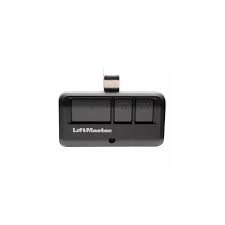
What Is the LiftMaster 893LM Remote and What Does It Do?
The LiftMaster 893LM is a compact, three-button visor/keychain remote that can control up to three garage doors or gate operators. It uses rolling-code encryption (Security+ / Security+ 2.0) to prevent code grabbing and unauthorized access.
Read too: Door and Garage Door Companies: Choosing the Right Partner for Your Needs
Key Capabilities
- Controls 3 devices independently
- Works with most LiftMaster openers made since 1993
- Uses CR2032 coin battery
- Typical range: 100–150 ft (30–45 m) depending on interference
- Durable buttons designed for daily use
Why it matters: Industry service data shows that battery failure and lost programming account for a large share of garage remote issues. Knowing the correct sequence saves time and avoids unnecessary replacements.
LiftMaster 893LM 3-Button Garage Door Opener Remote Control Manual — Programming Steps
This is the exact process most homeowners need. Read once, then follow along near your opener.
Step 1 — Prepare the Area
- Make sure the garage door is fully closed
- Stand within 3–6 ft (1–2 m) of the motor unit
- Confirm the remote battery is working (LED lights when pressed)
Step 2 — Find the Learn Button on the Opener
Look on the back or side of the motor head. It may be under the light lens, near the antenna wire.
| Learn Button Color | System Type | 893LM Support |
|---|---|---|
| Yellow | Security+ 2.0 | Yes |
| Purple | Security+ | Yes |
| Red/Orange | Security+ | Yes |
| Green | Billion Code | Yes |
Step 3 — Put the Opener in Learn Mode
- Press and release the Learn button once
- An LED will glow for ~30 seconds (programming window)
Step 4 — Program a Remote Button
- Press and hold the chosen button on the 893LM for 2–3 seconds
- Release when the opener light blinks or you hear a click
Step 5 — Test
Press the programmed button. The door should move immediately.
If nothing happens, repeat the steps and ensure you complete them within the 30-second window.
How Do You Program All Three Buttons for Different Doors?
You can assign each button to a different opener.
- Button 1: Main garage
- Button 2: Second garage / workshop
- Button 3: Gate operator
Repeat the same Learn-button process for each opener, one at a time.
How to Erase All Remotes from the Opener (Security Reset)
If a remote is lost, clear the opener memory:
- Press and hold the Learn button for 6–10 seconds
- The LED turns off → memory cleared
- Reprogram only the remotes you still have
This prevents old remotes from operating your door.
Battery Replacement (CR2032) — Exact Steps


4
A weak battery is the #1 reason remotes appear “dead.”
- Insert a small flat screwdriver into the seam
- Gently twist to open the case
- Remove old CR2032 battery
- Insert new battery positive (+) side up
- Snap the case closed
Battery life: typically 12–24 months at normal temperatures (ideal 22–28°C / 72–82°F).
Troubleshooting Guide (Most Searched Problems)
Remote LED Lights But Door Doesn’t Move
Cause: Lost programming
Fix: Reprogram using Learn button steps
Very Short Range
Cause: LED bulbs or RF interference
Fixes:
- Replace bulbs with garage-rated LEDs
- Extend/reposition antenna wire downward
Door Moves Intermittently
Cause: Weak battery or signal reflection
Fix: Replace battery and test from different spots
Remote Works for One Door but Not Another
Cause: That button not programmed yet
Fix: Repeat programming for that specific opener
Compatibility Snapshot
| Opener Brand | Year | Works with 893LM |
|---|---|---|
| LiftMaster | 1993–present | Yes |
| Chamberlain | 1993–present | Yes |
| Craftsman | 1993–present | Yes |
| Pre-1993 models | Older dip switch | No (needs receiver) |
Security Explained in Simple Terms
Rolling codes change every time you press the remote. This prevents code theft devices from copying your signal. For a technical overview of how garage opener signaling evolved, see Wikipedia’s garage door opener page for background context:
https://en.wikipedia.org/wiki/Garage_door_opener
Advantages vs Limitations
Advantages
- Controls three devices
- Strong encryption
- Small, durable, portable
- Broad compatibility
Limitations
- Not for very old dip-switch systems
- Small size can be misplaced
- Requires precise Learn timing
Pro Tips from Field Technicians
- Program remotes before mounting a new opener to the ceiling (easier access)
- Keep a spare CR2032 in the house
- Label buttons with a tiny marker for multi-door homes
- After power outages, test remotes before assuming failure
FAQ — LiftMaster 893LM 3-Button Garage Door Opener Remote Control Manual
Q1: Can I program the 893LM without climbing a ladder?
Only if your opener’s Learn button is reachable. Otherwise, safe ladder access is required.
Q2: How many doors can this remote control?
Up to three doors or gates.
Q3: What if my opener has no Learn button?
You likely have a pre-1993 model and need a compatible receiver.
Q4: Does temperature affect performance?
Yes. Extreme cold or heat reduces battery performance and range.
Q5: How do I know the battery is low?
LED becomes dim, range shortens, or door responds inconsistently.
Q6: Will this work with gate operators?
Yes, if the gate system supports LiftMaster Security+ signaling.
Conclusion
This LiftMaster 893LM 3-Button Garage Door Opener Remote Control Manual gives you the exact steps to program, troubleshoot, and maintain your remote with confidence. With proper setup and a fresh battery, the 893LM delivers years of reliable, secure access to your garage or gate.
If this guide helped you get your remote working again, consider sharing it on social media—someone else may be stuck outside their garage right now.



Leave a Reply